
Compatibility
Minecraft: Java Edition


Links
Tags
Creators
Details

Website Page: Oratot's PVP | oratot.com
GitHub Repo: https://github.com/ItzOratotITA/OratotPVP/
Now with cool stuff!
This resource pack improves your PvP experience by increasing visibility, along with some little funny textures, some recolors and also more useful cool stuff from Vanilla Tweaks. A lot of vanilla tweaks. This texture pack is a mix of different texture packs made by other people and some features I made myself. This resource pack works with:
- VulkanMod (Glowier Glow won't work according to VT, but I haven't tested that)
- Vulkan Renderer Mode (Official 26.2+) (everything works properly)
- Respackopts (from version 2.1 and above)
DISCLAIMER: Use of NoTextureRotations is recommended because of the use of variated blocks. That will still not solve non-rotation texture variations, which are locational, but after v2.5 there is an option to remove them.
Features
- Side Shields (From: SideShieldTexturePack)
- Small Shield Blocking (From: Vanilla+)
- Lower Fire (From: Vanilla Tweaks)
- Ore Outlines (From: Vanilla Tweaks)
- Short Swords
- Small Totems including Pop Animation
- Smaller Utilities (From: Vanilla Tweaks)
- Bow Charge Indicator
- Recolored Totems, Crystals and Respawn Anchors
- High Resolution Font (From: Faithful 32x)
- Dark GUI (From: Vanilla Tweaks)
- Visible Wither Hearts (From: Vanilla Tweaks)
- More cool stuff! (From: Vanilla Tweaks, Ice Cream)
Installation Guide
After downloading the texture pack, go in Minecraft > Options > Resource Packs > Open Pack Folder. An instance of File Explorer should pop up on the screen, opened on your Minecraft folder.
Then go back to your browser, click the download icon (usually on the top-right corner of the screen) and click the folder icon next to Oratot's PVP.zip (or whatever the file name is, depending on the version you downloaded).
Another instance of File Explorer should pop up.
Drag Oratot's PVP.zip from the instance of File Explorer opened in your downloads folder to the center of the one opened on your Minecraft folder. Go back to Minecraft, and the texture pack should show up.
Credits
- Marlow - Vanilla+ (literally a single file, small shield)
- ArshuGamingHY - SideShieldTexturePack - © ArshuGamingHY
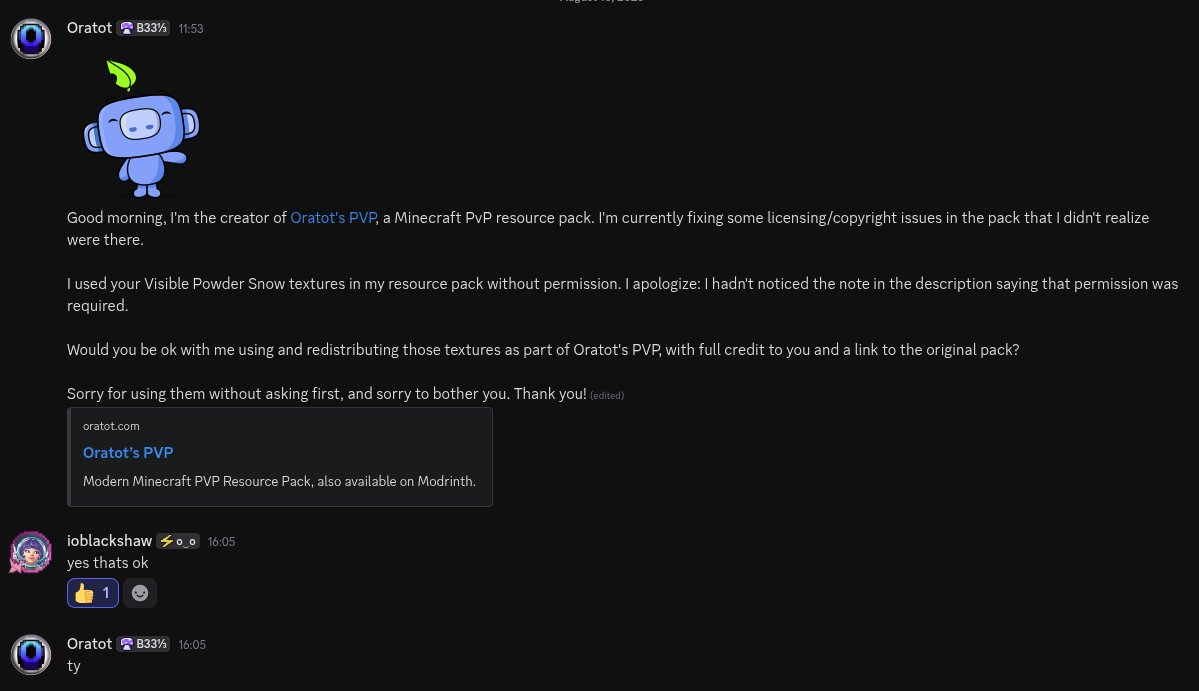
- ioblackshaw (a.k.a Enchanted Games) - Visible Powder Snow
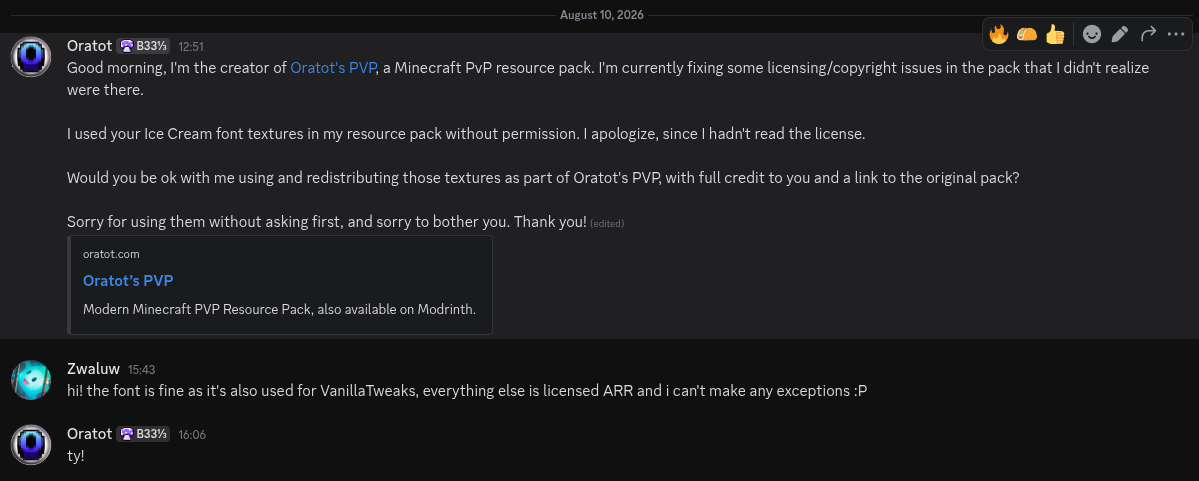
- Zwaluw - Ice Cream (font)
- Faithful Resource Pack Team - Faithful 32x (font) - https://faithfulpack.net/
Permission
All Vanilla Tweaks Credits
Vanilla Tweaks: https://vanillatweaks.net
All packs utilizing vanilla shaders by ShockMicro, Ancientkingg & ioblackshaw
Unique Dyes by MMStinks
Allay Elytra by Ninni
Vex Elytra by The_Khuzdul1
Bushy Leaves by Pollie
Variated Connected Bookshelves by Charlie Nichols
Spinning Skull on Fire Painting by Kristoffer Zetterstrand
Xisuma Turtle by LordCloud147
Wandering Xisuma by Rashaexe
Beeralis by RubikOwl
Smoother Font from Faithful Resource Pack Project
Anti-Alias Font by Zwaluw
MS Painted Font by Stridey
Blocky Font by Ewan Howell
Classic Panorama by sameythehedgie
Smash Enderman (OptiFine model) by Bold Muddy
Most 'Updated Texture' Fix packs by (or based on textures by) Jasper 'JAPPA' Boerstra
Pixel Consistent Ghast from Faithful Resource Pack Project
Pixel Consistent Sonic Boom from Faithful Resource Pack Project
Phantom Rain by ItsChawk
Pumpkin Carving Competition 2025 winners (credits):
- "Long Boy" (carved_pumpkin_long_boy.png) by Miffen Kops
- "Hysterical" (carved_pumpkin_hysterical.png) by Samusquinha
- "Pumpkin #1" (carved_pumpkin_green_guy1.png) by Green Guy
- "Evil pumpkin guy" (carved_pumpkin_evil.png) by HeyIgna
- "Mr. Jive" (carved_pumpkin_mr_jive.png) by Shark_cool
- "Jackenstein" (carved_pumpkin_jackenstein.png) by Squid Eevee
- "Creeper Pumpkin" (carved_pumpkin_creeper.png) by Spruce Studios
- "Pumpkin #2" (carved_pumpkin_green_guy2.png) by Green Guy
- "YOUR TAKING TOO LONG" (carved_pumpkin_taking_too_long.png) by Crackers0106
- "Orange Cat Activities" (carved_pumpkin_orange_cat_activities.png) by HiperDoble
- "Happy Ghast" by (carved_pumpkin_happy_ghast.png) Miffen Kops
- "Unease" (carved_pumpkin_unease.png) by Anirak0
- "cross eyed" (carved_pumpkin_cross_eyed.png) by Sergkx
- "Little Angry Guy" (carved_pumpkin_little_angry_guy.png) by Scutoel
- "Agonizing Guy" (carved_pumpkin_agonizing_guy.png) by HeyIgna
- "arthropod" (carved_pumpkin_arthropod.png) by Crabbarition
- "Mischievous smile pumpkin" (carved_pumpkin_mischievous.png) by Uanderson_test3
- "Goofy Pumpkin" (carved_pumpkin_goofy.png) by Spruce Studios
- "Fake Angry Pumpkin" (carved_pumpkin_fake_angry.png) by Uanderson_test3
- "Eeyees" (carved_pumpkin_eeyees.png) by Lilly
- "Loopy Ghost" (carved_pumpkin_loopy_ghost.png) by anderium
- "Melting" (carved_pumpkin_melting.png) by Lilly
- "2" (carved_pumpkin_ioblackshaw2.png) by ioblackshaw
- "Guardian" (carved_pumpkin_guardian.png) by BetterDonutGalaxy
- "Surveyor" (carved_pumpkin_surveyor.png) by Lapiz101
License
Oratot's PVP is created and maintained by Oratot.
Do not misrepresent this resource pack or its original contributions as your own work.
Minecraft and Minecraft-derived assets are owned by Mojang Studios / Microsoft and are subject to their applicable terms.
Original files independently authored by Oratot, including Respackopts configuration, are available under the MIT License.
This does not apply to Minecraft-derived assets, Vanilla Tweaks material, or other third-party material [^1].
See credits.txt
[^1]: Vanilla Tweaks and other third-party material remain subject to their respective licenses and permissions.
MIT License
© 2026 ItzOratotITA
Permission is hereby granted, free of charge, to any person obtaining a copy of this software and associated documentation files (the “Software”), to deal in the Software without restriction, including without limitation the rights to use, copy, modify, merge, publish, distribute, sublicense, and/or sell copies of the Software, and to permit persons to whom the Software is furnished to do so, subject to the following conditions:
The above copyright notice and this permission notice shall be included in all copies or substantial portions of the Software.
THE SOFTWARE IS PROVIDED “AS IS”, WITHOUT WARRANTY OF ANY KIND, EXPRESS OR IMPLIED, INCLUDING BUT NOT LIMITED TO THE WARRANTIES OF MERCHANTABILITY, FITNESS FOR A PARTICULAR PURPOSE AND NONINFRINGEMENT. IN NO EVENT SHALL THE AUTHORS OR COPYRIGHT HOLDERS BE LIABLE FOR ANY CLAIM, DAMAGES OR OTHER LIABILITY, WHETHER IN AN ACTION OF CONTRACT, TORT OR OTHERWISE, ARISING FROM, OUT OF OR IN CONNECTION WITH THE SOFTWARE OR THE USE OR OTHER DEALINGS IN THE SOFTWARE.