
Compatibility
Minecraft: Java Edition
Platforms
Supported environments


Links
Tags
Creators
Details
🧪 Potion Bar
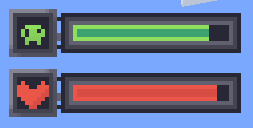
Potion Bar adds clean and simple progress bars for active potion effects.
No more guessing — see exactly how much time is left for each effect, with a bar and an icon on the side.

✅ Features:
- Displays potion duration as a progress bar
- Colored bars depending on the potion type
- Fully client-side — no need to install on servers
⚙️ Commands:
Position Hud:
- /potionbar position center (default)
- /potionbar position left
- /potionbar position right
- /potionbar position custom — opens HUD editor (drag & drop)
Show Vanilla effects:
- /potionbar vanilaEffects show
- /potionbar vanilaEffects hide (default)
Timer system:
- /potionbar timer on — enable potion effect timer
- /potionbar timer off — disable potion effect timer
- /potionbar timer left — show timer on the left
- /potionbar timer right — show timer on the right (default)
- /potionbar timer above — show timer above the icon
- /potionbar timer below — show timer below the icon
Custom icons:
- /potionbar CustomIcons on — enable custom textures (default)
- /potionbar CustomIcons off — disable (vanilla textures)
Level:
- /potionbar level on — enable level effects (default)
- /potionbar level off — disable level effects
📸 Screenshots:

🧪 Stay informed. Stay alive. Use Potion Bar.