
Compatibility
Minecraft: Java Edition
Platforms
Supported environments


Tags
Creators
Details
Item Filter
Item Filter is a Minecraft Fabric mod that adds a configurable, high-speed item filter block.
It works like a hopper, but with filter slots, a toggleable filter mode, and adjustable transfer speeds of up to 640×. Choose which items are allowed to pass through, or disable filtering to transfer any item.
Showcase
Features
| Feature | Description |
|---|---|
| 🧰 Item Filter Block | Adds a custom hopper-like block focused on item filtering. |
| ⚡ High-Speed Transfers | Transfers full stacks without the vanilla hopper cooldown. |
| 🚀 Adjustable Speed | Configure transfer speeds from 1× to 640×. |
| ⚙️ Mod Menu Integration | Adjust transfer speed through the Mod Menu configuration screen. |
| 🌐 Multiplayer Support | Server-controlled transfer speed for consistent multiplayer behavior. |
| 🔍 Configurable Filter | Choose which items are allowed to pass through. |
| 🔘 Toggleable Mode | Switch between filtered mode and unrestricted item transfers. |
| ⬇️ Pulls From Above | Extracts items from chests, barrels, furnaces, smokers, and other inventories. |
| 📦 Double Chest Support | Supports large chests and trapped large chests. |
| 🧲 Dropped Item Pickup | Collects dropped items from above. |
| ↪️ Directional Output | Outputs items in the direction the block is facing. |
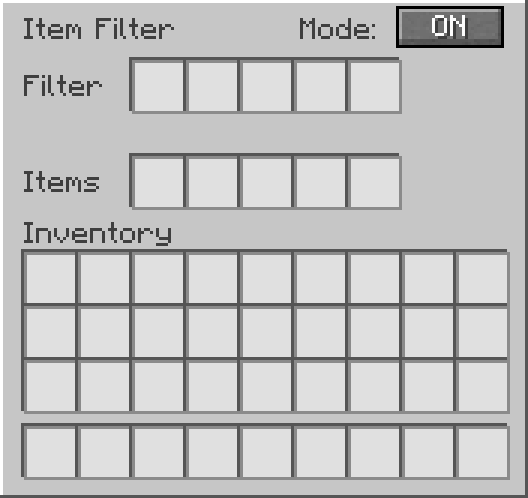
| 🖥️ Custom GUI | Includes filter slots, internal item slots, and an ON/OFF button. |
How It Works
Place the Item Filter like a vanilla hopper.
Items can enter from the top through hoppers, be pulled directly from inventories above, or be collected as dropped items.
Items leave through the direction the block is facing.
Whenever possible, items transfer directly between inventories without passing through the internal storage slots.
Inside the GUI:
- Filter slots define which items are allowed to pass.
- Items slots work as the internal inventory.
- Mode ON allows only filtered items.
- Mode OFF allows any item to pass through.
When filter mode is ON, only items matching the filter slots can enter the Item Filter.
When filter mode is OFF, the Item Filter allows any item to pass through.
Transfer Speed
Starting with version 1.2.0, Item Filter features high-speed transfers with adjustable throughput.
Transfer speed ranges from 1× to 640×, with 640× enabled by default.
Transfer Speed Reference
| Setting | Maximum Transfer Rate |
|---|---|
| 1× | 10 items/s |
| 32× | 320 items/s |
| 64× | 640 items/s |
| 128× | 1,280 items/s |
| 256× | 2,560 items/s |
| 320× | 3,200 items/s |
| 640× | 6,400 items/s |
Transfer rates are theoretical maximums at 20 TPS. Actual performance depends on available items, destination capacity, inventory restrictions, and server performance.
Configuration
With Mod Menu installed, navigate to:
Mods → Item Filter → Configure → Transfer Speed
Choose your preferred speed and save the configuration.
In single-player, transfer speed can be configured locally. On dedicated servers, the server administrator controls the transfer speed for all players.
Mod Menu is optional and is not required on dedicated servers.
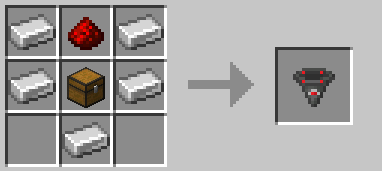
Recipe
GUI Preview
Support
Need help, found a bug, or want to suggest something?
Join the Discord support forum:
License
This project is licensed under the MIT License.