
Compatibility
Minecraft: Java Edition
Platforms
Supported environments


Tags
Creators
Details






What it does
A Fabric mod that lets you stop time whenever you want, and turn it back, using the Paradox.
- Adds the Paradox, a clock with two faces: one stops time, the other rewinds it.
- Freezes almost everything: mobs, music, projectiles, particles, weather, animated textures, redstone and more.
- Rewind: while time is stopped, go back through the last seconds and change what happened.
- Death rewind: if you die carrying your Paradox, you get one chance to go back before it happened.
- Foresight: hold a Netherite Paradox to see the future, then return to your body knowing what comes next.
- Redirect projectiles: hit a frozen projectile to send it where you are looking, with a preview of where it will land.
- Share Mode for multiplayer: your friends can keep moving while the rest of the world stays frozen.
- 3 tiers: Golden, Diamond and Netherite.
- A Control Panel to set the lapse, add charges and switch between stasis and rewind.
- In-game config screen (with Mod Menu) and a safety command: /stasis break

While time is stopped you can do almost anything! fight, build, break blocks, shoot and use redstone. Everything you do takes effect when time resumes, and redstone actions run in the order you made them. The blocks you use, like chests, doors and jukeboxes, come back to life in color for a few seconds, so they still work in a frozen world. Fall damage and burns still count, but you only take them when time resumes.
Controls
The Paradox
- Right-click: stops time with the selected lapse.
- Right-click while time is stopped: resumes it early.
- Sneak + right-click: opens the Control Panel.
- Hold right-click (Netherite): Foresight. Right-click again to return to your body.
While time is stopped
- Hold R (Diamond and Netherite): rewind.
- Hold G: fast-forward back to where you were.
- Tap R: rewind mode. The mouse wheel moves through time (down goes back, up goes forward). Tap R again to leave.
- Left-click a frozen projectile: redirect it where you are looking.
Control Panel
- Click or scroll the dial: choose 10s, 20s, 30s or Custom.
- Top button (Diamond and Netherite): flips between the stasis face and the rewind face.
- Crown (Netherite): sets the custom lapse.
- Left button: turns Share Mode on and off.
- Apply: saves your changes, or Reforge when the 4 Resonators are in place.
Inventory
- Right-click a Rewind Charge with Temporal Grit: refills it by 5 seconds.
Death screen
- Choose the seconds and press Rewind: go back to before you died.
R and G can be changed in Minecraft's controls settings.



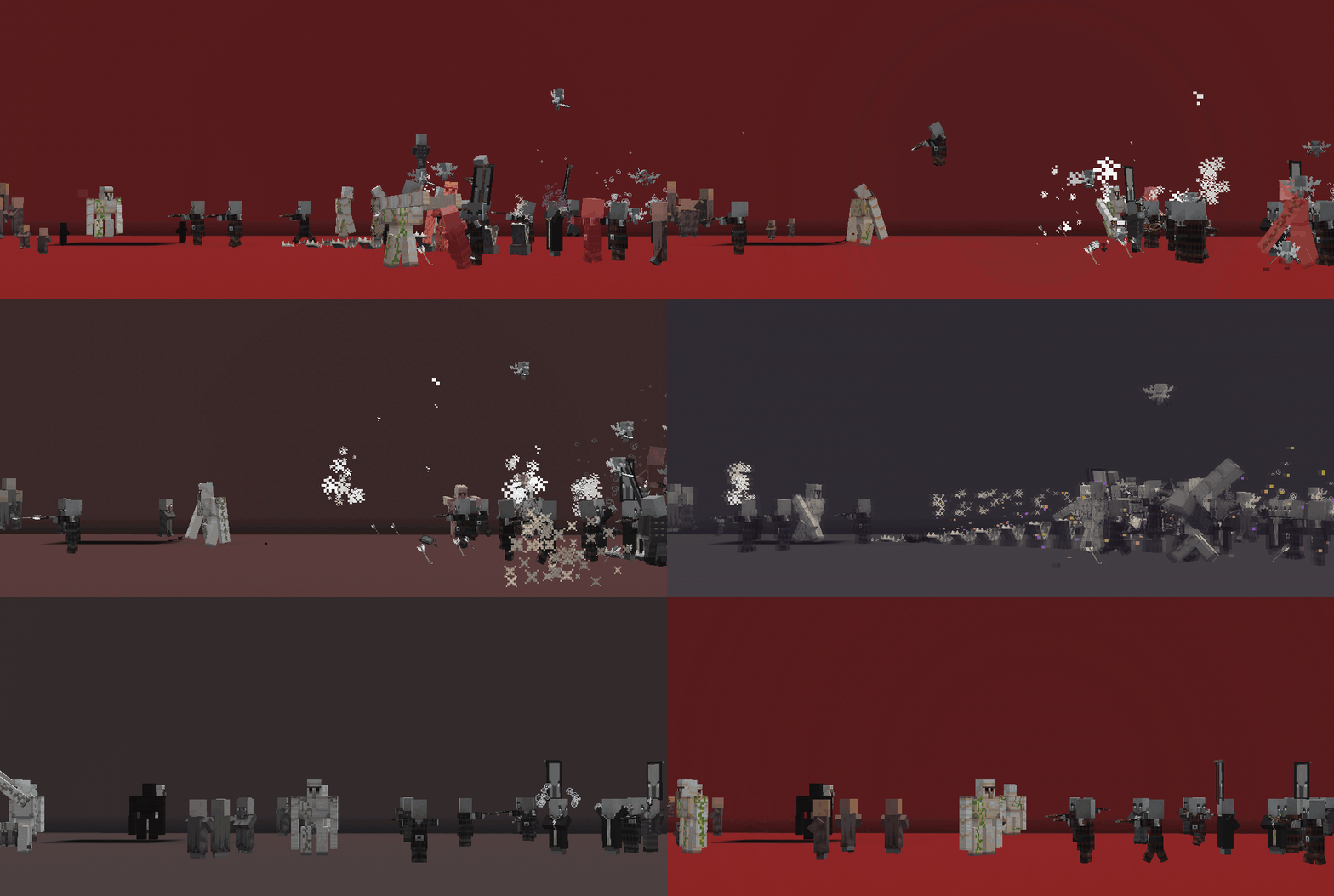
A golem fighting a group of mobs, stopped in the middle of the fight.

Projectiles shot at villagers slow down until they stop.

Animated textures and particles slowing down until they freeze.

Rain and snow slowing down, freezing, and then resuming.



Three arrows shot during stasis resume and hit their target.
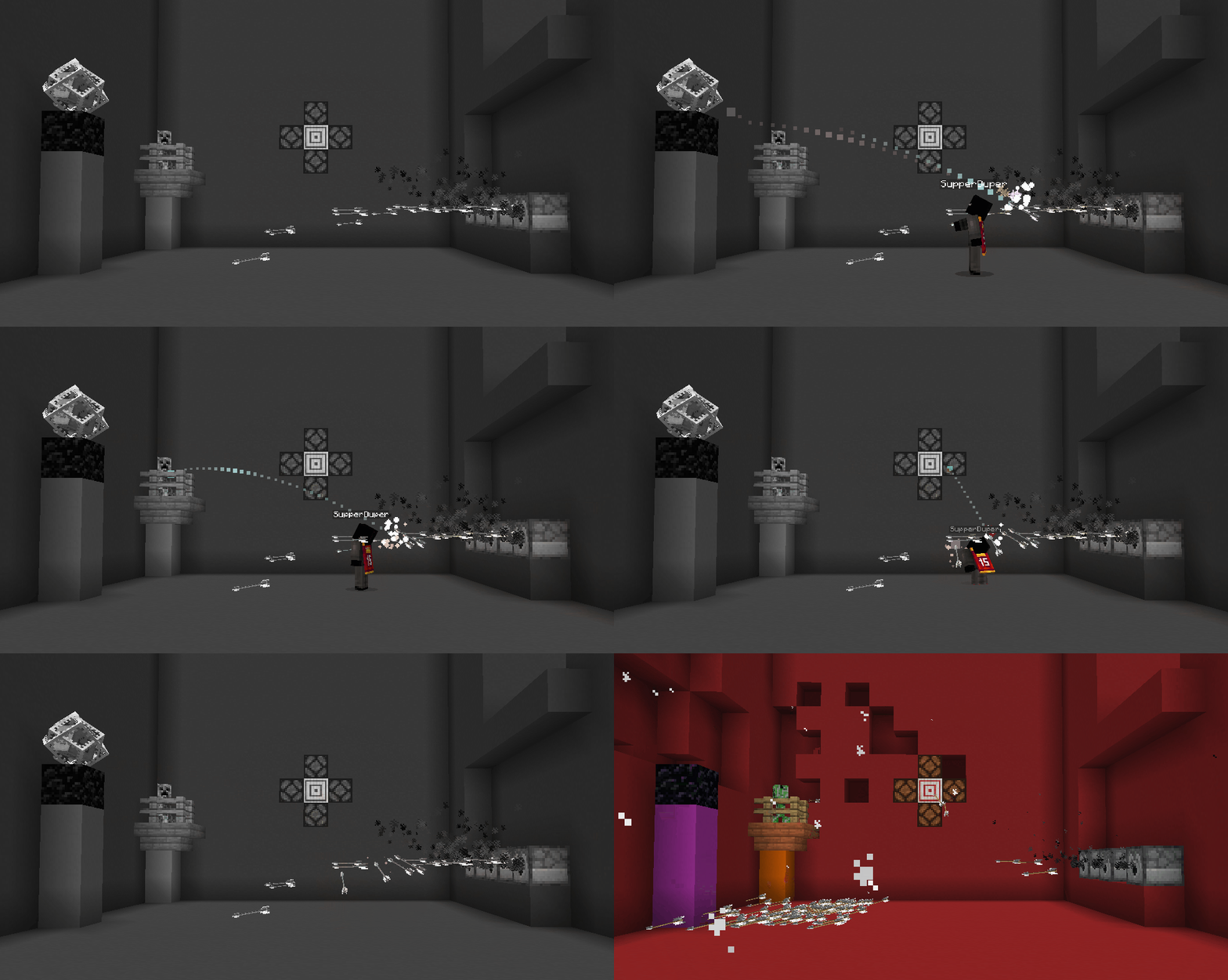
Don't like where a frozen proyectile is going? Hit it. It turns toward where you are looking, keeps its speed, and a colored trail shows where it will land.

Redstone actions are replayed in order when time resumes.

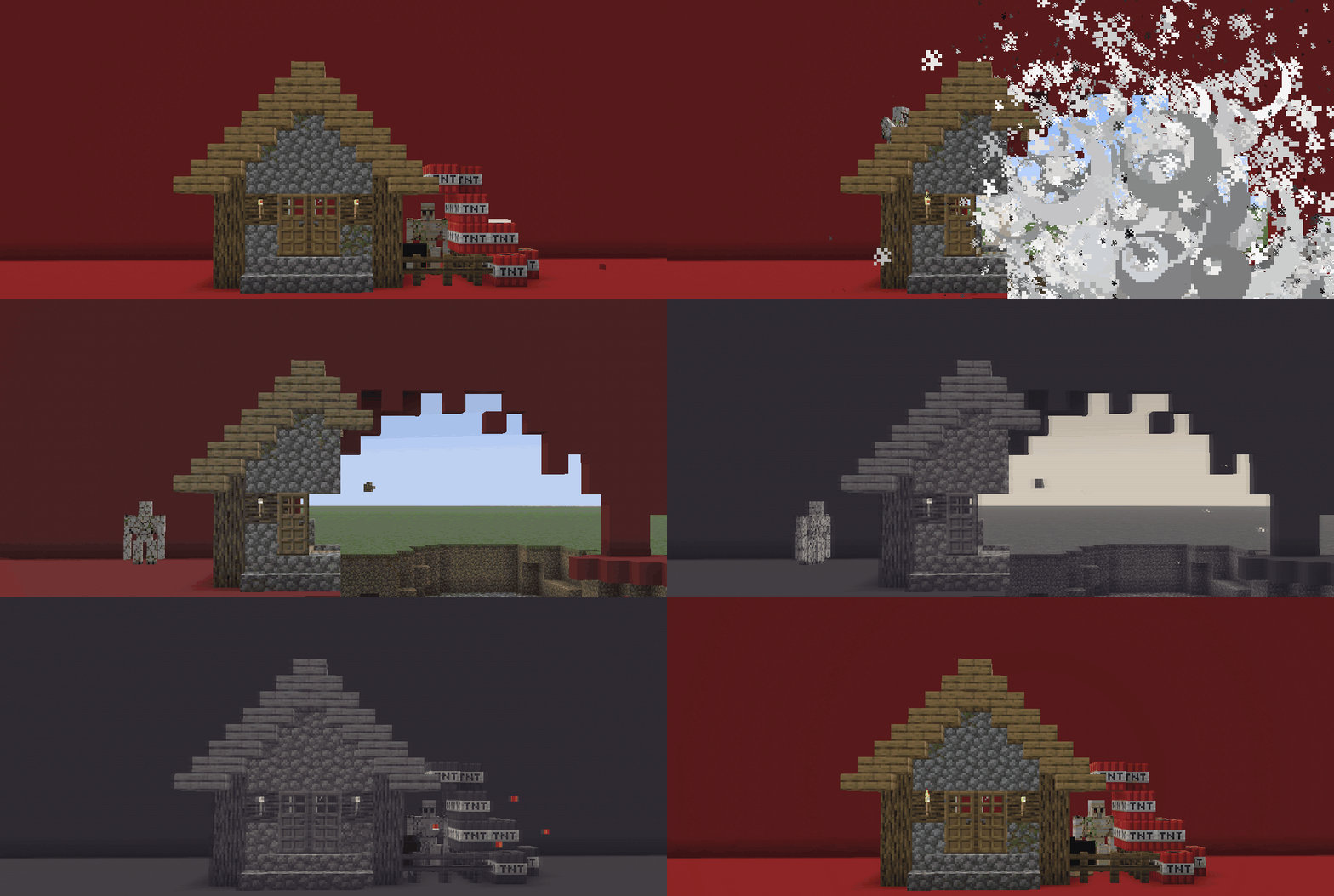
A creeper and a TNT block frozen while primed, then resuming.


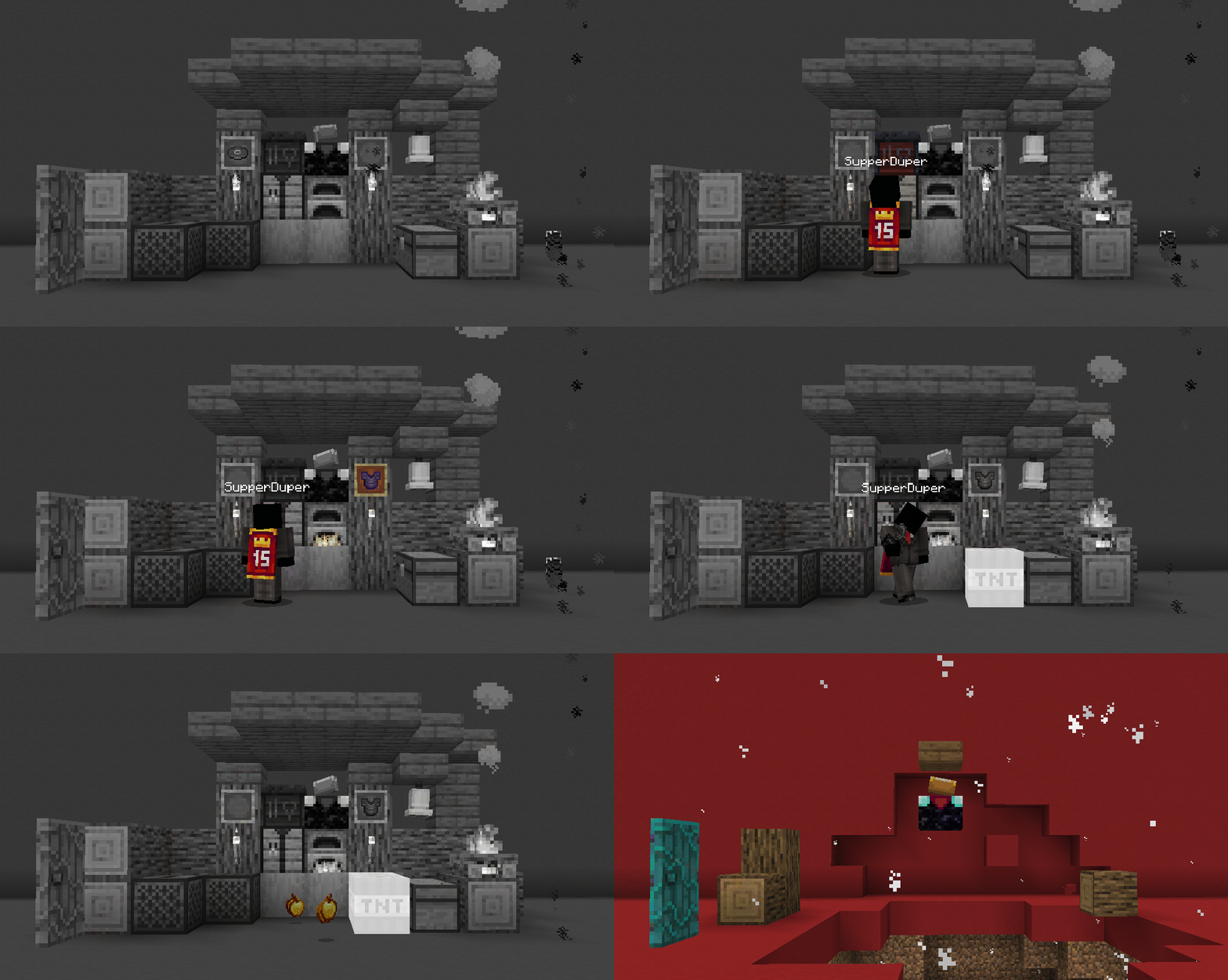
Interacting with doors, furnaces, chests, placed blocks, TNT and campfires: they all come back to life for a brief moment.
When you use a block while time is stopped, it comes back to life for a few seconds:
- It turns back to color.
- Its particles, sounds and animated textures come back.
- It works normally for a moment, then freezes again.
Drops come back to life too, and stay in color:
- What a block you break drops falls to the ground and can be picked up right away.
- Items you throw, or that players moving with you throw in Share Mode, fall and can be picked up, so you can hand things to each other while time is stopped. Items thrown by frozen players stay frozen in the air until time resumes.


Stopping time was not enough. With a Diamond Paradox or better, you can turn it back.
While time is stopped, the world keeps a record of the last seconds. Press R and it plays backwards, blocks return, explosions undo themselves, mobs walk back and get up, arrows fly back, items return to your inventory, and the sky and weather go back too. When time resumes, it continues from that moment, as if that future never happened.
What goes back in time
- Blocks broken, placed or blown up by anyone, including chests and their contents, signs and pots.
- Mobs: their position and health. Dead mobs come back, including tamed wolves, named mobs and dyed sheep.
- Redstone: levers, dispensers, pistons, lamps and the rest.
- Players: inventory, health, hunger, effects and fire. Other players go back too (can be turned off).
- Projectiles, dropped items, armor stands, item frames, minecarts and boats.
- Time of day and weather (can be turned off).
- Particles, and even the totem animation on your screen.
The Paradox itself is never rewound, so it can't be duplicated or lost to a rewind.
Rewind Charges 
Each rewind uses Rewind Charges. One charge holds 20 seconds (configurable), and a Paradox holds up to 4, so 80 seconds in total.
Empty charges can be refilled: right-click them with Temporal Grit in your inventory, like a bundle. Each grit adds 5 seconds.
Death rewind
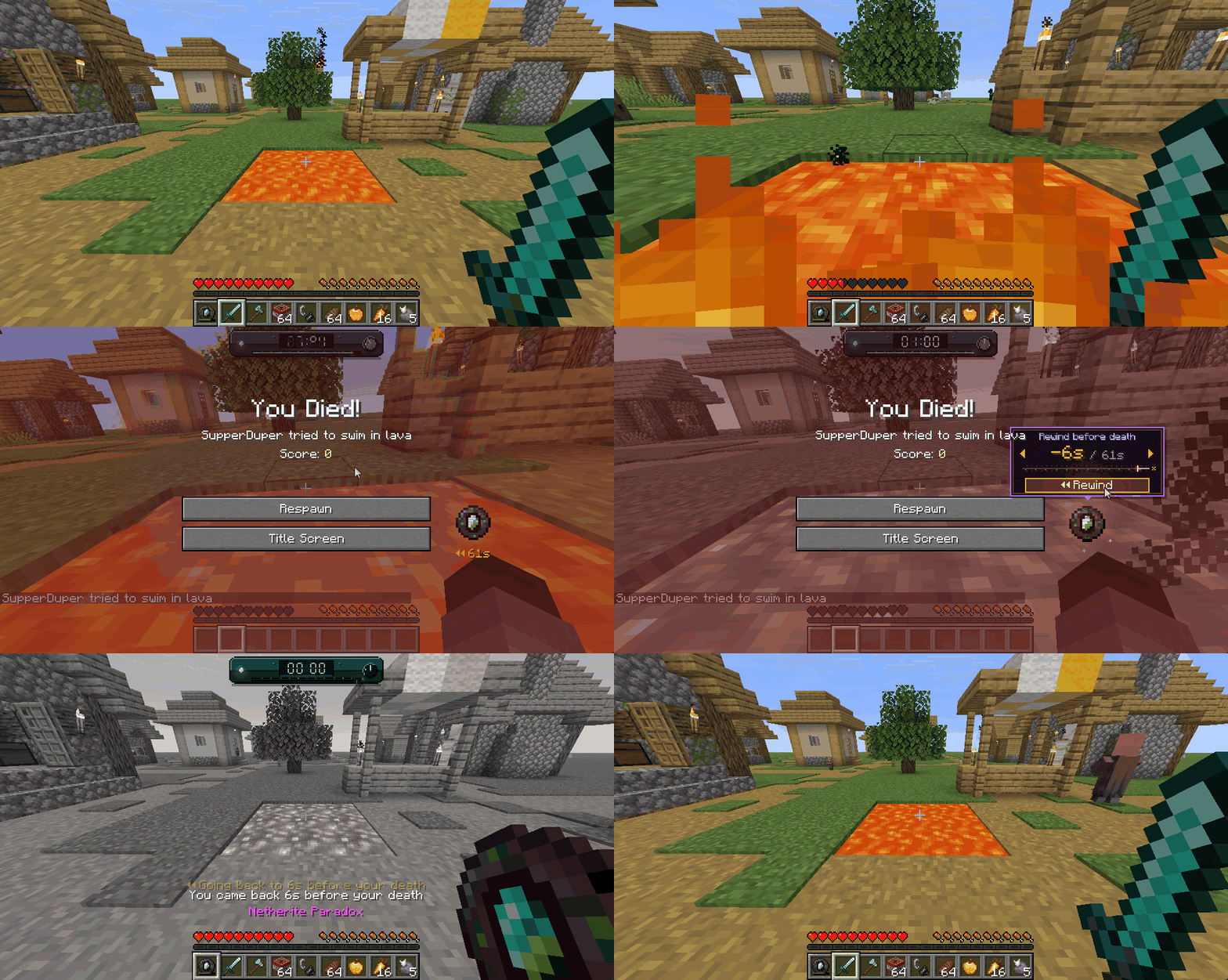
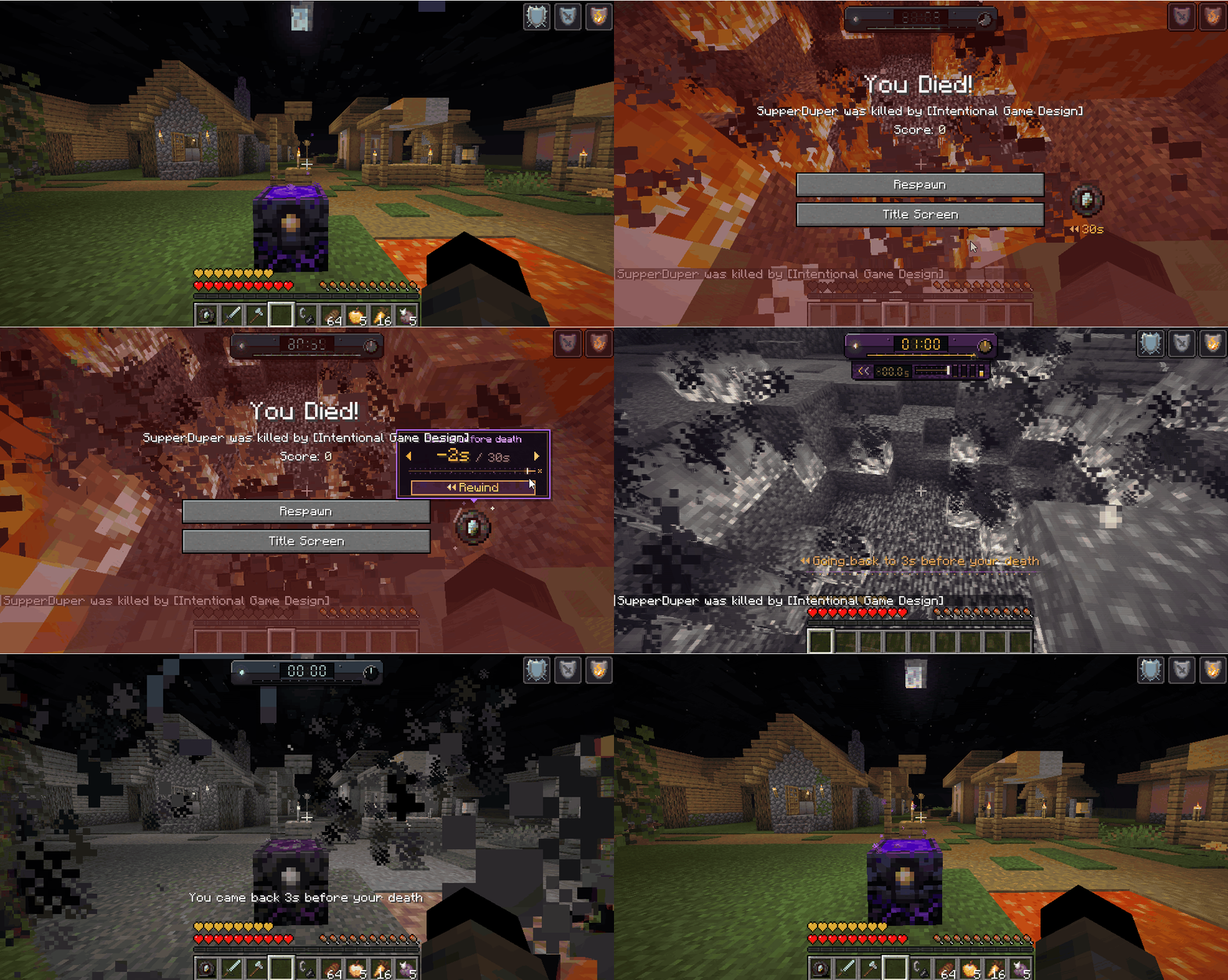
If you die carrying a Diamond or Netherite Paradox with Rewind Charges and Temporal Grit, time stops at the moment of your death. Choose how many seconds to go back from the death screen, and the death never happened.
You have 60 seconds to choose. If you respawn normally, the chance is gone.


Why stop time when you can see what's coming?
Hold right-click with a Netherite Paradox. Your body stays behind as a checkpoint, while a copy of you moves ahead into the future. Use the Paradox again and you return to that checkpoint from the past.
- It uses Rewind Charges: each second in the future costs half a second of charge, so it lasts twice as long as your charge.
- You return to your body when you use the Paradox again, when time runs out, or if you die. If you die, you lose what you found there, and the charges are still spent.
- Other players are not sent back. What they did while you were away is kept.
What you keep
- Blocks you mined, items you picked up, mobs you killed (and what they dropped), and items you threw.
- Changes you made to chests. If a chest was destroyed, it comes back with your changes inside.
- Item frames, armor stands and minecart chests you used.
What goes back
- Mobs, villagers and their trades, angry mobs, explosions, wardens and shriekers.
- Blocks you placed and arrows you shot. Those are used up.
- Your health, hunger, effects and game mode.
Only a Netherite Paradox can use Foresight. Golden and Diamond ones need to be reforged first.


Playing with friends? Choose whether they freeze with the world or move with you.
Each Paradox has its own Share Mode switch: the button on the left of the Control Panel. The setting is saved in the Paradox.
Share Mode OFF
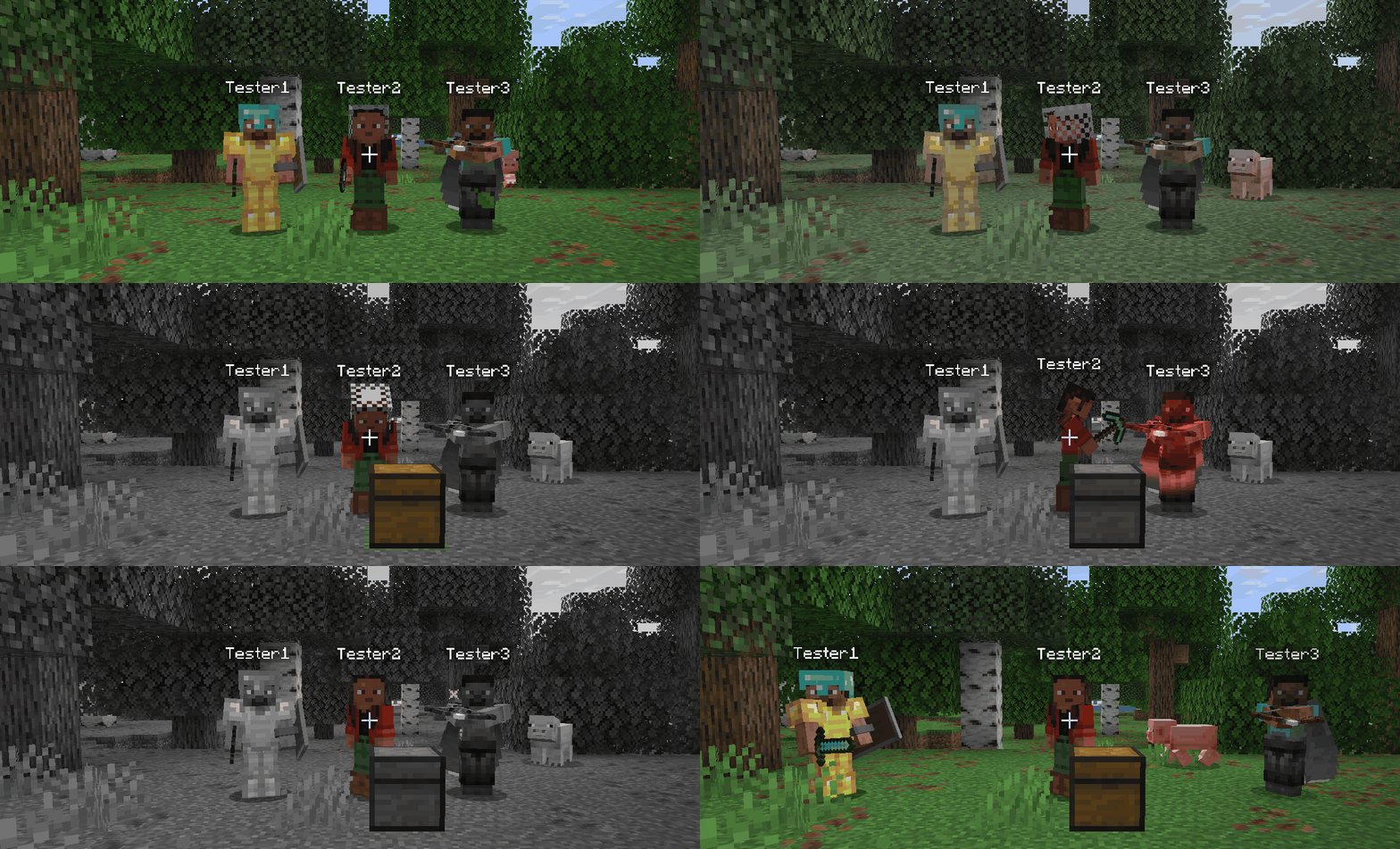
Only the player who stopped time is in color. Their hits on frozen players land when time resumes.
- Only you can move. Everyone else freezes with the world.
- You can still hit them, push them or break the blocks under them. They feel it only when time resumes, all at once and in order, knockback included.
- Frozen players can't move, attack or use anything until time resumes.
Share Mode ON
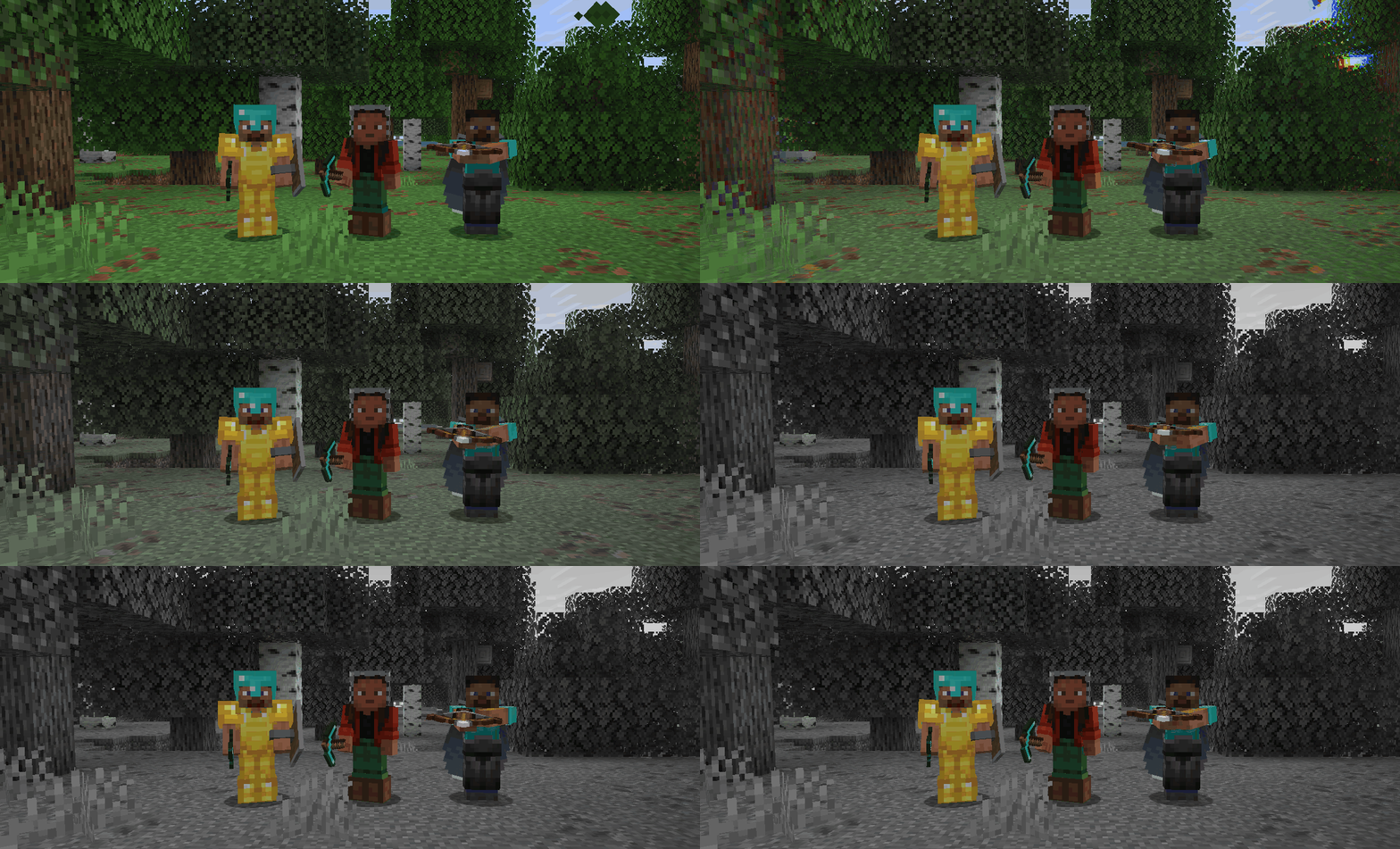
All 3 players in color while the world stays frozen.
- Everyone moves with you, in color, while the world stays frozen.
- Your friends can do everything you can: walk, build, break blocks, open chests and shoot. Their redstone actions join the same queue as yours.
- Players can hurt each other right away.
- The world can't hurt anyone yet: fire, lava and falls wait until time resumes.
In both modes
- Only the player who stopped time can rewind it or end it early.
- When you rewind, every player's inventory goes back too, so items can't be duplicated. Their position and health go back as well (can be turned off with RewindAffectsPlayers).
- Servers can force Share Mode on or off for everyone with AffectPlayersOverride. The button on the panel then shows it's locked.
Control Panel
The Paradox Control Panel
Sneak + right-click the Paradox to open it. It has two faces:
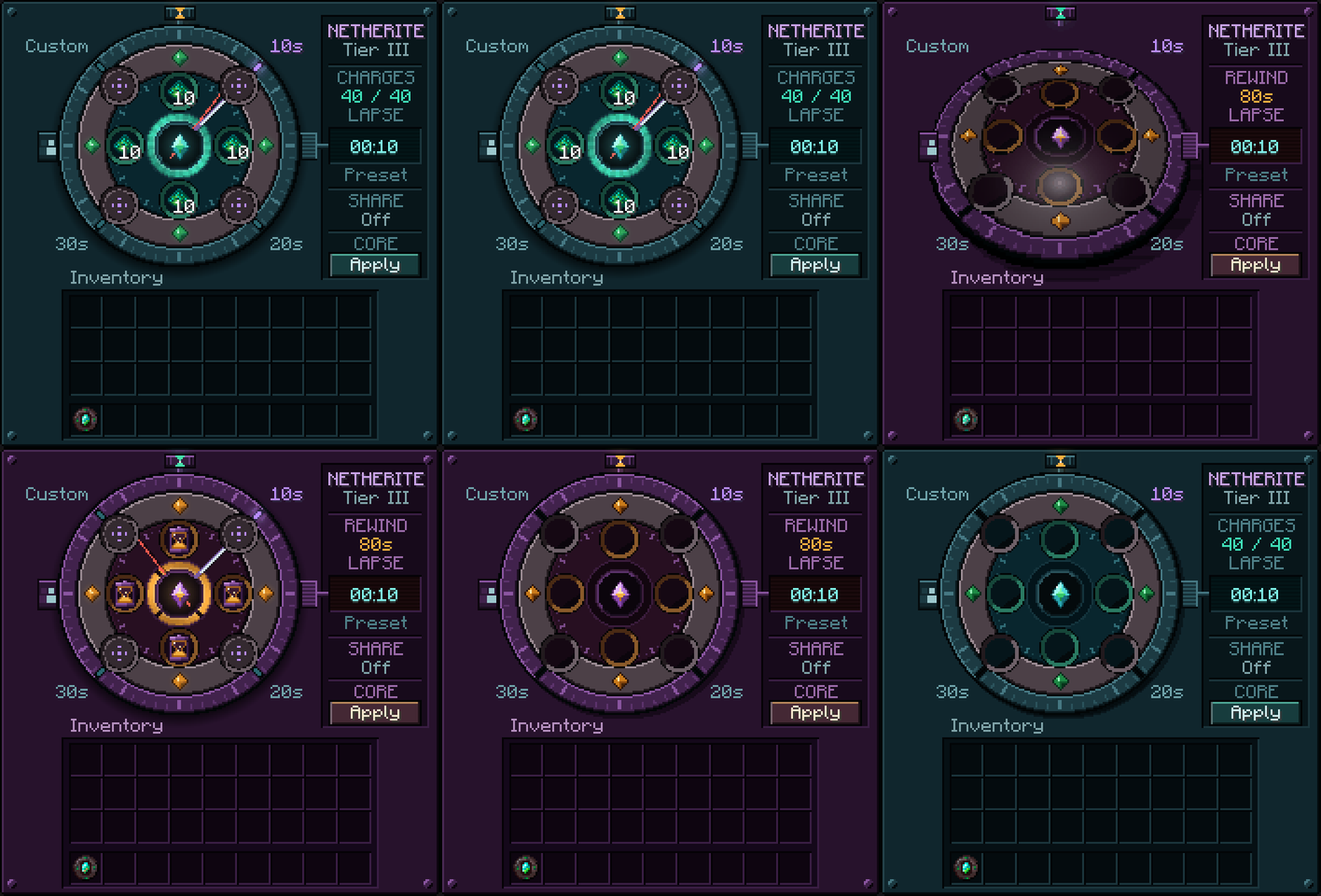
The stasis face and the rewind face.
- The dial: choose 10s, 20s, 30s or Custom, by clicking or scrolling.
- The 4 sockets on the stasis face hold Temporal Grit, one charge per stasis.
- The 4 sockets on the rewind face hold Rewind Charges.
- The top button flips between the two faces (Diamond and Netherite).
- The crown on the right sets the custom lapse (Netherite).
- The left button turns Share Mode on and off.
- The 4 corner sockets hold Resonators, used to reforge the Paradox to the next tier.
- Apply saves your changes. It becomes Reforge when all 4 Resonators are in place.
Tiers

| Lapses | Grit charges | Rewind | Foresight | |
|---|---|---|---|---|
 Golden Golden |
10s | 4 | No | No |
 Diamond Diamond |
10s, 20s, 30s | 12 | Yes | No |
 Netherite Netherite |
10s, 20s, 30s + Custom | 40 | Yes | Yes |
Crafting Recipes
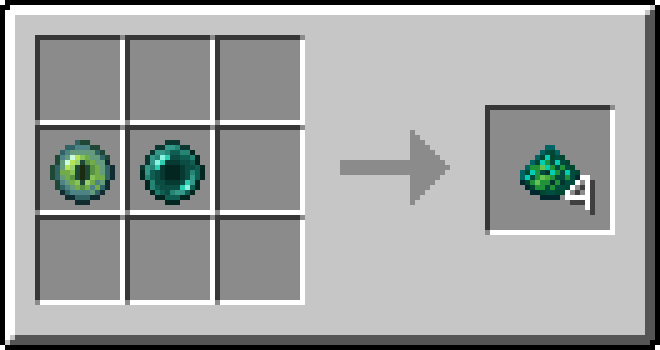
 Temporal Grit: Ender Eye + Ender Pearl
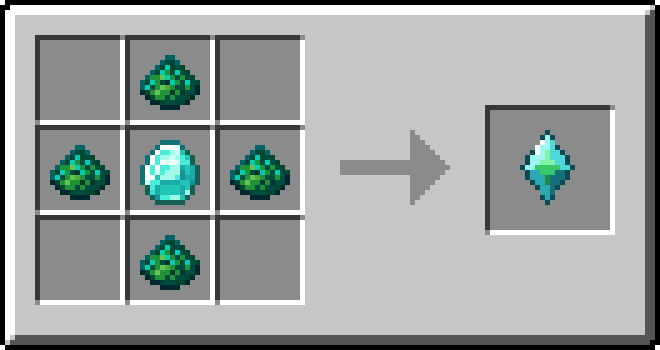
 Stasis Core: 4 Temporal Grit + Diamond
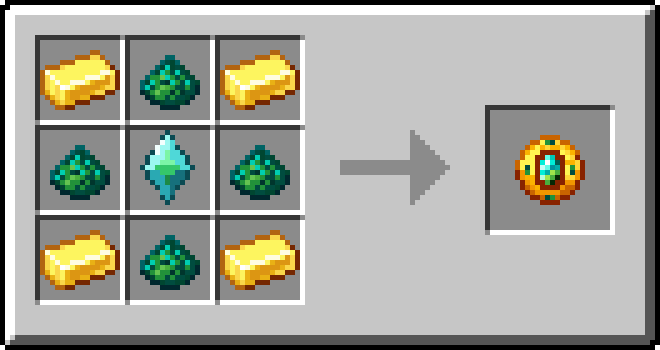
Paradox: 4 Gold Ingots + 4 Temporal Grit + Stasis Core
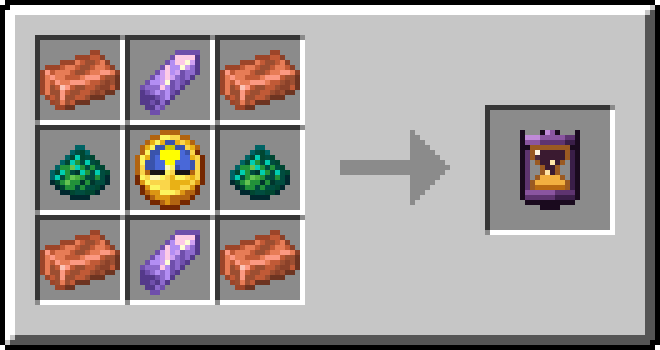
 Rewind Charge: 4 Copper Ingots + 2 Amethyst Shards + 2 Temporal Grit + Clock
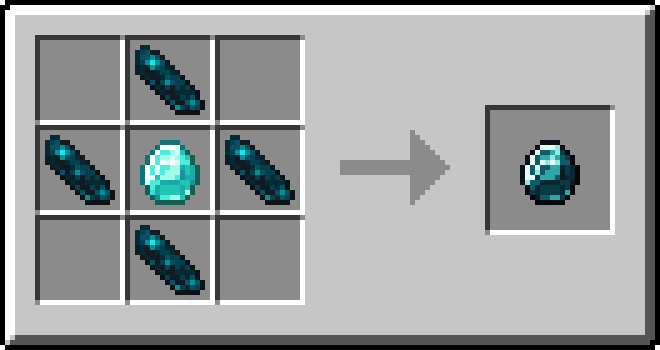
 Diamond Resonator: 4 Echo Shards + Diamond
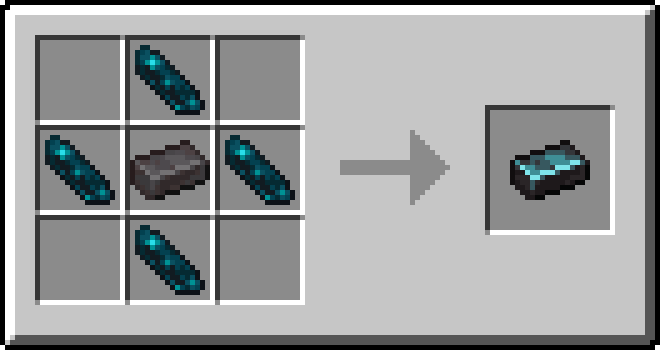
 Netherite Resonator: 4 Echo Shards + Netherite Ingot
Reforging your Paradox
- Place 4 Diamond Resonators in the corner sockets of the Control Panel. Apply turns into Reforge, press it (or the Stasis Core) to go from Golden to Diamond.
- Do the same with 4 Netherite Resonators to go from Diamond to Netherite.
Configuration
Everything can be changed in game with Mod Menu, or in config/stasis-paradox.json.
Trails
-
TrailsActive: Turns trails on or off.
-
TrailsRenderCapes: Shows the player's cape on trails.
-
TrailsAmountLimit: Maximum number of trails at once. The oldest fades first. (default 70)
-
TrailsGenerationType: How trails are created.
C = Continuous (a trail every X seconds)
S = Seconds (a trail every in-game second)
-
TrailsContinuousTimings: Seconds between trails when using C.
-
TrailsMidSecondsGeneration: Only for S. Adds a trail every half second.
Worlds you host / servers
-
AffectPlayersOverride: none lets each Paradox decide, force_shared forces Share Mode on, force_frozen forces it off.
-
CustomLapseMax: Longest custom lapse a player can set, as MM:SS (from 00:01 to 59:59).
-
CustomLapseMaxOperators: Same, for operators.
Rewind
-
RewindEnabled: Turns rewinding on or off. Foresight also needs it.
-
RewindMaxSeconds: How far back a rewind can go, and how much one charge holds. (5 to 60, default 20)
-
RewindRadius: How far around each player the world is recorded, in blocks. (16 to 128, default 48)
-
RewindTimeAndWeather: Also rewinds the time of day and the weather.
-
RewindAffectsPlayers: Also rewinds other players' position and health. Inventories always go back.
Transitions (worlds you host / servers)
- TransitionDuration: How long time takes to stop and resume, as a percentage of the full length: 0, or 50 to 100. Shorter transitions speed up their sounds to keep up. At 0, time stops and resumes at once, with only the bell. On a server, the server's value applies to everyone. (default 100)
Sounds (client only)
- SoundVolume, SoundStasisVolume, SoundRewindVolume, SoundInterfaceVolume: From 0 to 100.
Commands
- /stasis break: ends the current stasis right away (operators).
- /stasis start [seconds]: stops time without a Paradox (operators).
Note: use /stasis break if you set a very long custom lapse.
Compatibility
Works with Sodium, Iris (including shaders), Entity Model Features / Entity Texture Features, Fresh Animations and Not Enough Animations. Requires Fabric API.
Feedback
1.3 is a big update. If you find a bug or an incompatibility, please let me know in the CurseForge comments or through the Discord Server. Thank you!
Also, feel free to add the mod into any Modpacks you'd like!
