
Compatibility
Minecraft: Java Edition
Platforms


Links
Tags
Creators
Details
Licensed MIT
Published 4 years ago
Updated last month


Woodcutter
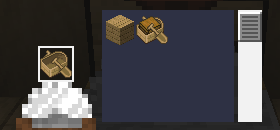
Use the stonecutter as a woodcutter!
This fully vanilla data pack adds new recipes to the stonecutter, letting it cut and recycle wood — the same way it already does for stone.
✨ Features
- Logs & wood: switch between logs, stripped logs, wood and stripped wood.
- Planks → wooden blocks: cut planks into stairs, slabs (×2), doors, trapdoors, fences, fence gates, buttons, pressure plates, signs, hanging signs, shelves, boats and chest boats (bamboo planks also give bamboo mosaic).
- Planks → utility blocks: any plank type gives sticks (×2), chests, barrels, bookshelves, chiseled bookshelves, lecterns and beehives.
- Recycling: turn stairs, fences, fence gates, doors, trapdoors, buttons, pressure plates, signs, hanging signs, shelves, boats and utility blocks back into planks — never waste wood on a bad build again. Boats and chest boats convert into each other.
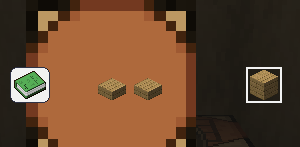
- Slabs → planks: two slabs placed side by side in a crafting table give back one plank.
- Sticks: cut sticks into armor stands, item frames and paintings, and back again.
- Bamboo: bamboo blocks, bamboo planks and scaffolding give back bamboo; bamboo gives scaffolding.
- No new blocks or items: purely new recipes, 100% vanilla. No commands to learn, no new UI.
🌳 Supported wood types
Works with every wood type in the game:


Oak, Dark Oak, Birch, Spruce, Jungle, Acacia, Mangrove, Cherry, Pale Oak, Poplar, Bamboo, plus the Nether variants Crimson and Warped.
Recipes
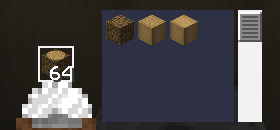
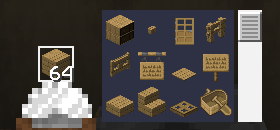
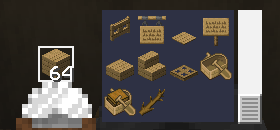
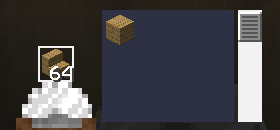
🕹️ How to use
- Install the data pack into your world's
datapacksfolder (see Installation). - Open a stonecutter as usual.
- Find your new wood recipes right next to the classic stone ones.
Survival- and multiplayer-safe, with zero performance impact.
📦 Compatibility
| Minecraft versions | 1.19.x · 1.20.x · 1.21.x · 26.1 · 26.2 · 26.3 |
| Type | Data Pack (no mods required) |
| License | MIT |
📥 Installation
Like any data pack: drop the downloaded folder into .minecraft/saves/<your_world>/datapacks/, then run /reload or restart the world.