
Compatibility
Minecraft: Java Edition
Platforms
Supported environments


Links
Tags
Creators
Details
Mining deepslate has always felt inconsistent. Same tools, same enchants, slower mining speed for no meaningful gameplay reason.
Instamine fixes that by reducing the hardness of selected blocks to match the hardness of regular stone. This means with Efficiency V & Haste II, affected blocks become practically instamineable, just like stone.
Features
- Makes deepslate and end stone instamineable out of the box
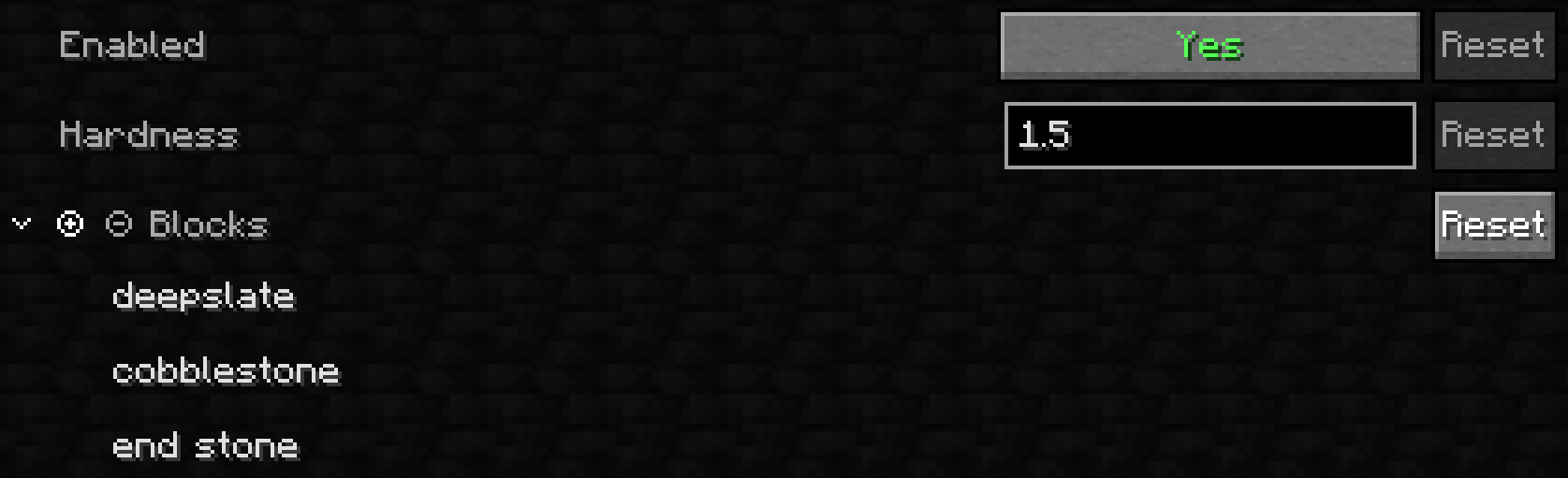
- Fully customizable block list through the Mod Menu config screen
- Configurable target hardness for those who have other things in mind
- Dedicated toggles for ores, logs and planks, plus a master on/off switch
- Works server-side without requiring clients to install the mod
How It Works
Instamine doesn't edit the blocks themselves. It hooks into the game's mining progress calculation. For a selected block, the formula is the same as vanilla's, except it divides by the configured hardness instead of the block's own.
Tool speed, enchantments and effects like Efficiency and Haste still apply as usual. The right tool is still needed for drops, and mining with the wrong tool is still slower. Only mining speed changes. Blast resistance and drops are untouched.
Configuration
The mod configuration includes the block list, the ore and log toggles, the hardness value and the master switch. All of it can be edited through Mod Menu, or directly in config/instamine.json after its generation.
Defaults
| Block | Vanilla hardness | Instamine hardness |
|---|---|---|
| Deepslate | 3.0 | 1.5 |
| End stone | 3.0 | 1.5 |
| Cobblestone | 2.0 | 1.5 |
| Cobbled deepslate | 3.5 | 1.5 |
| Ores | 3.0 - 4.5 | 1.5 |
| Logs, wood & planks | 2.0 | 2.0 (by default) |
1.5 is the vanilla hardness of stone, and yes, cobblestone is not instamineable in vanilla. It's also the default target, and every selected block uses the same value.
Toggles
Rather than typing blocks separately into the block list, ores and logs each get their own dedicated toggle in the config screen.
| Toggle | Spans | Default |
|---|---|---|
| Ores | All 18 stone, deepslate and nether variants | On |
| Logs | All 48 log/stem, wood/hyphae, and stripped variants | Off |
| Planks | All 13 overworld including bamboo planks and nether variants | Off |
Everything else, individual blocks like deepslate or end stone, still goes in the block list.
Config file
config/instamine.json is created on first launch with these defaults:
{
  "blocks": [
    "deepslate",
    "end stone",
    "cobblestone",
    "cobbled deepslate"
  ],
  "hardness": 1.5,
  "enabled": true,
  "ores": true,
  "logs": false,
  "planks": false
}
Dedicated servers don't have Mod Menu, so edit the file there.
Multiplayer
- Dedicated servers still need Cloth Config installed.
- Having the mod client-side only won't let you instamine on servers that don't have the mod installed.
Instamine works server-side for all players, technically even without the mod installed on their client. Installing it on the client too is recommended however, mainly so that the mining animation stays visually consistent.