
Compatibility
Minecraft: Java Edition
Platforms
Supported environments


Tags
Creators
Details
Heros Got Motion
What does it do?
Turns the Minecraft XP bar into a horizontal speedometer, based on the way you're facing
Specifically, if you're moving diagonally forwards, it will show a lower velocity than if you're moving straight forwards, as it's based on how fast you're going in the direction you're facing.
Makes your momentum and velocity a lot more obvious
Hides when you gain xp so you can still see your xp bar (how long it hides for is configurable)
The bar
- Fills up to full at sprint speed, so a full bar = you're sprinting
- Going faster than sprint (elytra, speed pots, ice, boats, whatever) stacks a second layer on top of the bar so you can still tell how much faster than sprinting you're going
- Walking backwards fills the bar in a different colour so you can tell the difference
- Smoothed between ticks by default so it doesn't jitter, can be turned off if you want the raw numbers
- Also shows up in the locator bar slot and when the xp bar is empty, so it doesn't disappear on you
Velocity text
Optional readout of your exact speed in bl/s in the middle of the screen, off by default
The text changes colour based on how fast you're going:
- White standing still
- Orange -> Yellow -> Green crouch -> walk -> sprint
- Cyan past sprint speed
- Red -> Purple -> Pink -> Blue going backwards, same idea
You can move it wherever you want with an X/Y offset and set the opacity
Velocity chart
Optional live graph of your speed over the last 5 seconds (100 ticks), off by default
- Shows your avg and max speed over that window
- Has a line marking sprint speed so you can see how far above/below it you are
- Bars are coloured the same way as the text
- Can be put in any corner or side of the screen, with padding so it doesn't overlap your other hud stuff
Speed anchors
The bar and colours are based on 4 "anchor" speeds: crouch, walk, sprint and max. Defaults are vanilla values (1.30 / 4.32 / 5.61 / 9.60 bl/s) but you can set them yourself, separately for forwards and backwards, if you're on a server with different movement speeds or just want the bar to scale differently.
Speed scale
By default the bar is relative to your movement speed attribute, so if you've got speed 2 or soul speed or whatever, sprinting still fills the bar exactly the same and the anchors scale with you. Turn it off if you'd rather the bar always be in absolute bl/s.
Velocity modes
- Horizontal / Total — horizontal only ignores falling/flying, total includes vertical (and uses your pitch too, so looking down while falling counts as forwards)
- Relative Velocity on / off — on is the default, based on the direction you're facing. Off just shows your raw speed regardless of which way you're looking, so strafing/backwards show as positive
How to configure
Mod Menu: 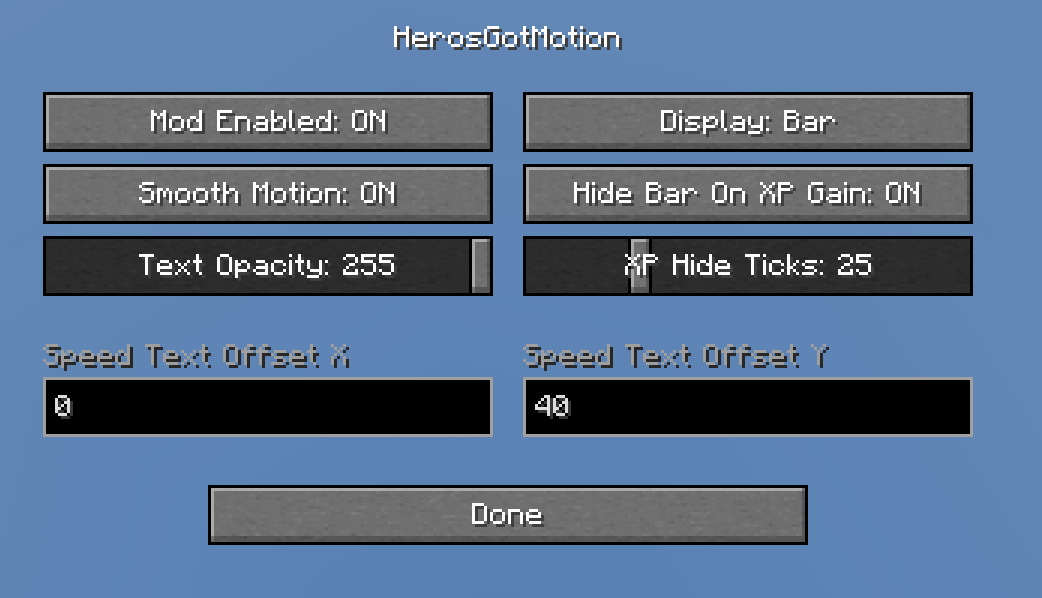
Every option is in there, plus a separate Speed Anchors screen with sliders for each anchor and a reset button.
Config file:
.minecraft/config/herosgotmotion.json
Made when the game first runs, same options as Mod Menu. Edit it and restart the game (or just use Mod Menu, it saves to the same file)
Compatibility
Realistically no server will disallow it, doesn't give any advantage, just a qol thing
Shouldn't realistically have any problems with any other mods.
Client side only, works fine on vanilla servers. Needs Fabric API, Mod Menu is optional but recommended for the config screen.
Contact
Any problems, questions, help: https://discord.gg/4ta7pM4bnr Let me know if there are any more incompatibilities in my discord!