Compatibility
Minecraft: Java Edition
Platforms
Supported environments


Tags
Creators
Details
Licensed ARR
Published 3 months ago
Updated 3 months ago
Armor Loadout
Armor Loadout is a lightweight Fabric mod that allows you to easily save and switch between up to 3 custom armor sets on the fly.
DISCLAIMER: This mod automates inventory management and equipment swapping. Please check the rules of the server you play on before using this in multiplayer. Some server owners, developers, or anti-cheat systems may restrict automated inventory interaction mods, which could result in a punishment or ban. Use this mod at your own discretion.
Features
- Quick Hotkey Swapping: Press
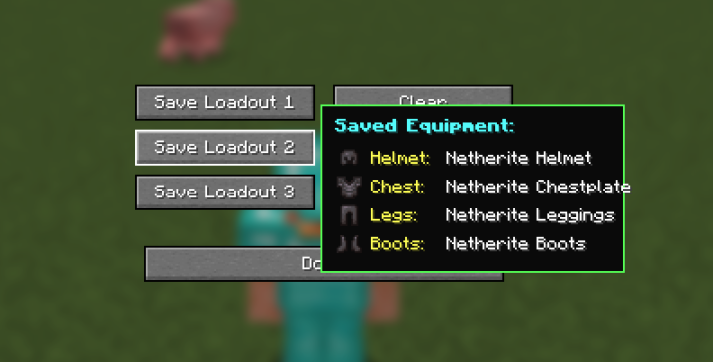
Ctrl + 1,Ctrl + 2, orCtrl + 3to instantly equip your saved armor sets. - Visual Tooltip Card: Hover over any loadout button in the settings menu to preview 2D item icons of your saved armor set.
- Smart Inventory Priority: Swapped armor pieces automatically return to your main inventory first without cluttering your hotbar.
- Custom GUI: Access the loadout manager screen anytime by pressing the
.(Period) key.
How to Use
- Wear the armor set you want to save.
- Press
.(Period) to open the Armor Loadout Settings menu. - Click Save Loadout 1, 2, or 3.
- Close the menu and press
Ctrl + 1,Ctrl + 2, orCtrl + 3anywhere in game to equip your set!
Dependencies
- Fabric API (Required)