
Compatibility
Minecraft: Java Edition
Platforms
Supported environments


Tags
Creators
Details
Full Description
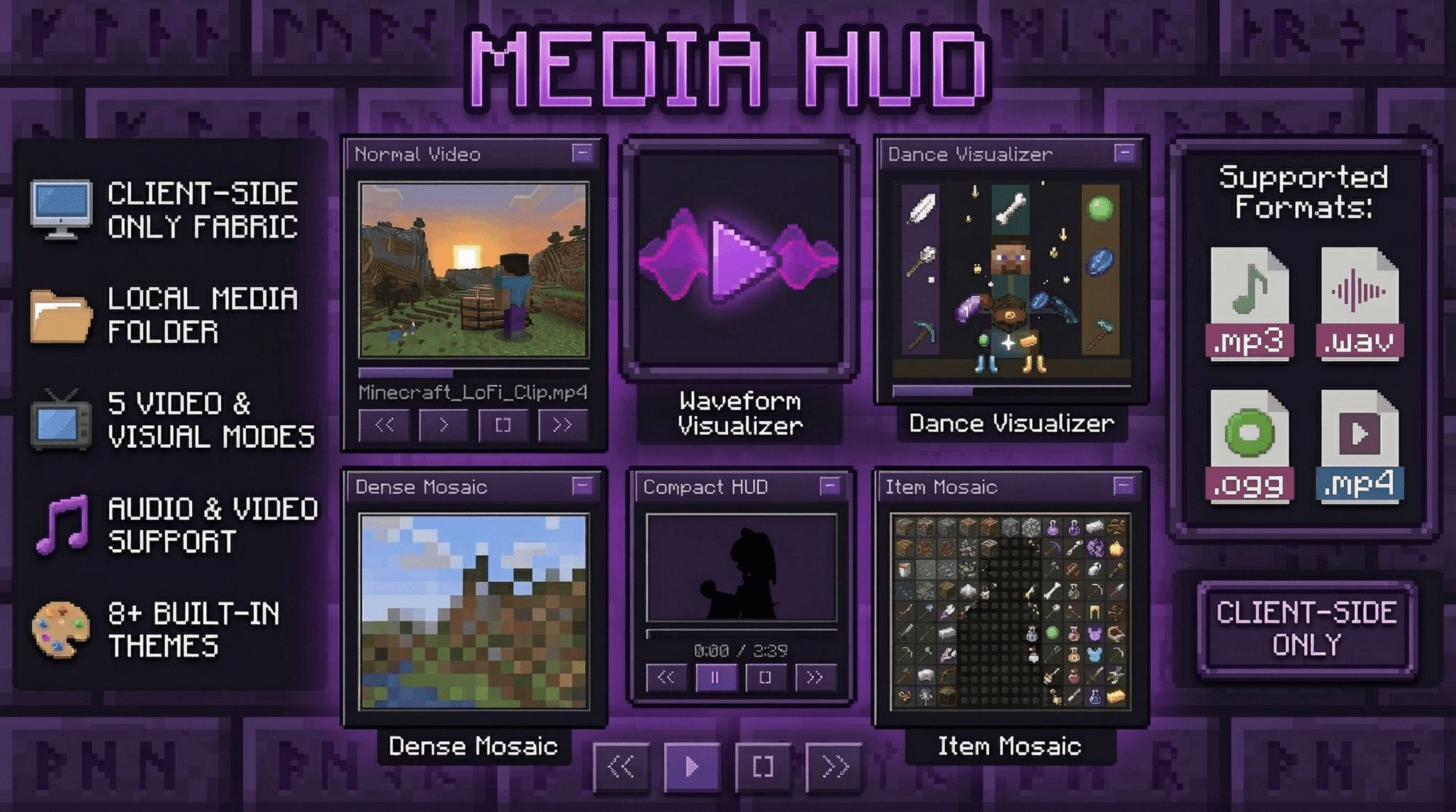
Media HUD adds a local media player directly to the Minecraft HUD.
It is built for players who want music, videos, and visualizers inside Minecraft without constantly alt-tabbing. You can scan a local media folder, load files directly, drag the player anywhere on the screen, switch between full and compact layouts, and choose between several visual modes ranging from standard video playback to Minecraft-style mosaic rendering.
This mod is client-side only and local-files only. It does not require server installation, it does not use streaming services, and it does not rely on online playback.
Features
- Client-side only Fabric mod
- Local file playback only
- Draggable HUD with saved position
- Full and compact HUD layouts
- Expandable library panel for folders and files
- Scrollable library panel with current-track follow behavior
- Audio playback for
mp3,wav, andogg - Video playback for
mp4 - Progress bar with click-to-seek
- Play, pause, stop, next, previous, loop, shuffle, and volume controls
- Filter modes for audio, video, or both
- Saved HUD scale and transparency settings
- Built-in HUD color themes
- Custom HUD theme colors with hex input
- Normal video mode with aspect-aware layout
- Waveform visualizer mode
- Dance visualizer mode
- Dense mosaic video mode
- Item mosaic video mode built around Minecraft item icon visuals
/mediaand/mcommand aliases
Supported Formats
- Audio:
mp3,wav,ogg - Video:
mp4
Recommended video format for the smoothest results:
H.264videoAACaudio.mp4container
Supported Minecraft Versions
Media HUD currently has working builds for:
1.20.51.20.61.211.21.11.21.21.21.31.21.41.21.51.21.61.21.71.21.81.21.91.21.101.21.11
Fabric API Version Guide
Use the Media HUD jar built for your exact Minecraft version, and match it with the Fabric API version line below:
- Minecraft
1.20.5-> Fabric API0.97.8+1.20.5 - Minecraft
1.20.6-> Fabric API0.100.8+1.20.6 - Minecraft
1.21-> Fabric API0.102.0+1.21 - Minecraft
1.21.1-> Fabric API0.116.9+1.21.1 - Minecraft
1.21.2-> Fabric API0.106.1+1.21.2 - Minecraft
1.21.3-> Fabric API0.114.1+1.21.3 - Minecraft
1.21.4-> Fabric API0.119.4+1.21.4 - Minecraft
1.21.5-> Fabric API0.128.2+1.21.5 - Minecraft
1.21.6-> Fabric API0.128.2+1.21.6 - Minecraft
1.21.7-> Fabric API0.129.0+1.21.7 - Minecraft
1.21.8-> Fabric API0.136.1+1.21.8 - Minecraft
1.21.9-> Fabric API0.134.1+1.21.9 - Minecraft
1.21.10-> Fabric API0.138.4+1.21.10 - Minecraft
1.21.11-> Fabric API0.141.3+1.21.11
Recommended:
- Fabric Loader
0.18.4or newer - Java
21
Installation
- Install Minecraft Java Edition for one of the supported versions above
- Install Fabric Loader
0.18.4or newer - Install the matching Fabric API version for your Minecraft version
- Use Java
21 - Put the correct versioned
mediahudjar in yourmodsfolder - Launch the game and use
/m uito open the interaction overlay
Media HUD is client-side only. A multiplayer server does not need to install it.
This public build is packaged for Windows x86_64.
No extra FFmpeg or JavaCV download is required for this release file.
This release package includes third-party notice material for bundled runtime components.
Command Guide
You can use either /m or /media.
They are identical aliases.
Basic HUD Commands
-
/m showShows the HUD. -
/m hideHides the HUD. -
/m toggleToggles the HUD on or off. -
/m uiOpens the drag-and-move interaction overlay. -
/m pos resetResets the HUD position back to its default location.
Playback Commands
-
/m playStarts playback of the currently selected media. -
/m pausePauses playback. -
/m stopStops playback. -
/m nextSelects the next track or video. -
/m prevSelects the previous track or video. -
/m seek <seconds>Seeks to a specific time in seconds. Example:/m seek 90 -
/m volume <0-200>Sets volume from0to200. Example:/m volume 75
Library and File Commands
-
/m folder <path>Sets the root media folder and scans it. Example:/m folder C:\Users\Name\Music -
/m refreshRescans the current media folder. -
/m load <path>Loads a specific local file directly. Example:/m load C:\Users\Name\Videos\clip.mp4 -
/m probe <path>Probes a local file through the media backend. Useful when checking whether a file is detected correctly.
Playback Option Commands
-
/m loopToggles looping on or off. -
/m loop onEnables looping. -
/m loop offDisables looping. -
/m shuffleToggles shuffle on or off. -
/m shuffle onEnables shuffle. -
/m shuffle offDisables shuffle. -
/m shuffle toggleToggles shuffle explicitly.
Filter Commands
-
/m filter audioShows only audio files in the library. -
/m filter videoShows only video files in the library. -
/m filter bothShows both audio and video files.
Render Mode Commands
-
/m mode normalStandard video preview mode. -
/m mode waveformAudio waveform visualizer mode. -
/m mode danceDance visualizer mode. -
/m mode mosaicDense mosaic video mode. -
/m mode itemmosaicItem-based mosaic video mode.
Resolution Commands
-
/m wave resolution <3-8>Sets waveform resolution. -
/m video resolution <64-2048>Sets video preview resolution in pixels. -
/m mosaic resolution <4-160>Sets dense mosaic resolution. -
/m itemmosaic resolution <4-160>Sets item mosaic resolution.
Higher values can look better, but they may also cost more performance.
HUD Layout Commands
-
/m hud mode fullUses the full HUD layout. -
/m hud mode compactUses the compact HUD layout. -
/m hud scale <50-200>Sets HUD scale as a percentage. Example:/m hud scale 125 -
/m hud transparency <0-80>Sets HUD transparency as a percentage. Example:/m hud transparency 25
Built-In Theme Commands
You can use either /m theme ... or /m hud theme ....
-
/m themeShows the current HUD theme. -
/m theme classicUses the Classic theme. -
/m theme midnightpurpleUses the Midnight Purple theme. -
/m theme bluemoonUses the Blue Moon theme. -
/m theme hackerUses the Hacker theme. -
/m theme sunsetUses the Sunset theme. -
/m theme obsidianUses the Obsidian theme. -
/m theme rosegoldUses the Rose Gold theme. -
/m theme frostUses the Frost theme. -
/m theme customSwitches back to your saved custom theme colors.
Custom Theme Color Commands
You can type hex colors without #.
Examples:
-
FFAABB -
/m theme colorShows your current custom theme colors. -
/m theme color gradientprimary <hex>Sets the first gradient color. -
/m theme color gradientsecondary <hex>Sets the second gradient color. -
/m theme color main <hex>Sets the main accent color. -
/m theme color border <hex>Sets the border color. -
/m theme color button <hex>Sets the button color. -
/m theme color text <hex>Sets the text color.
Notes:
- Setting a custom color automatically switches the HUD to the custom theme.
gradientprimaryandgradient_primaryboth work.gradientsecondaryandgradient_secondaryboth work.
Why Use It
- Keep music or video playback inside Minecraft without switching windows
- Use a Minecraft-themed HUD instead of an external desktop player
- Turn videos into stylized dense mosaics or item-based mosaics
- Run a compact layout during normal gameplay or use the full panel while browsing media
- Tune HUD scale, transparency, render resolution, and theme colors to match your setup
- Change the HUD vibe with built-in themes or your own custom palette
- Leave a world or server without worrying about media continuing to play in the background
Notes and Limitations
- Local files only. No YouTube, no streaming URLs, and no online media sources.
- This release is designed around local playback inside the game HUD, not as a full desktop media suite.
- High video, mosaic, and item-mosaic resolutions can still cost performance depending on the clip.
- Use the jar built for your exact Minecraft version.
- The best results come from using clean local files and a dedicated media folder.
- This packaged release bundles the Windows
x86_64FFmpeg runtime. Linux and macOS builds are not included in this file.
License and Third-Party Components
- Media HUD source code is licensed under
MIT. - This release bundles third-party runtime components, including JavaCV, JavaCPP, and the Windows
x86_64FFmpeg runtime via ByteDeco. - Third-party notices and source/compliance links are included in
THIRD_PARTY_NOTICES.md. - The FFmpeg runtime in this release comes from the standard ByteDeco preset artifacts, not the separate
-gplartifacts. - Public notice text to keep in the project page:
- This software uses libraries from the FFmpeg project under the LGPL.
- FFmpeg legal/compliance page: https://ffmpeg.org/legal.html
- Corresponding FFmpeg 7.1.1 source: https://ffmpeg.org/releases/ffmpeg-7.1.1.tar.xz
- ByteDeco preset source/build scripts: https://github.com/bytedeco/javacpp-presets/tree/1.5.12/ffmpeg