
Compatibility
Minecraft: Java Edition
Platforms
Supported environments


Links
Tags
Creators
Details
Licensed ARR
Published 4 months ago
Updated 4 months ago
AMS Pings adds lightweight multiplayer pings to Minecraft.
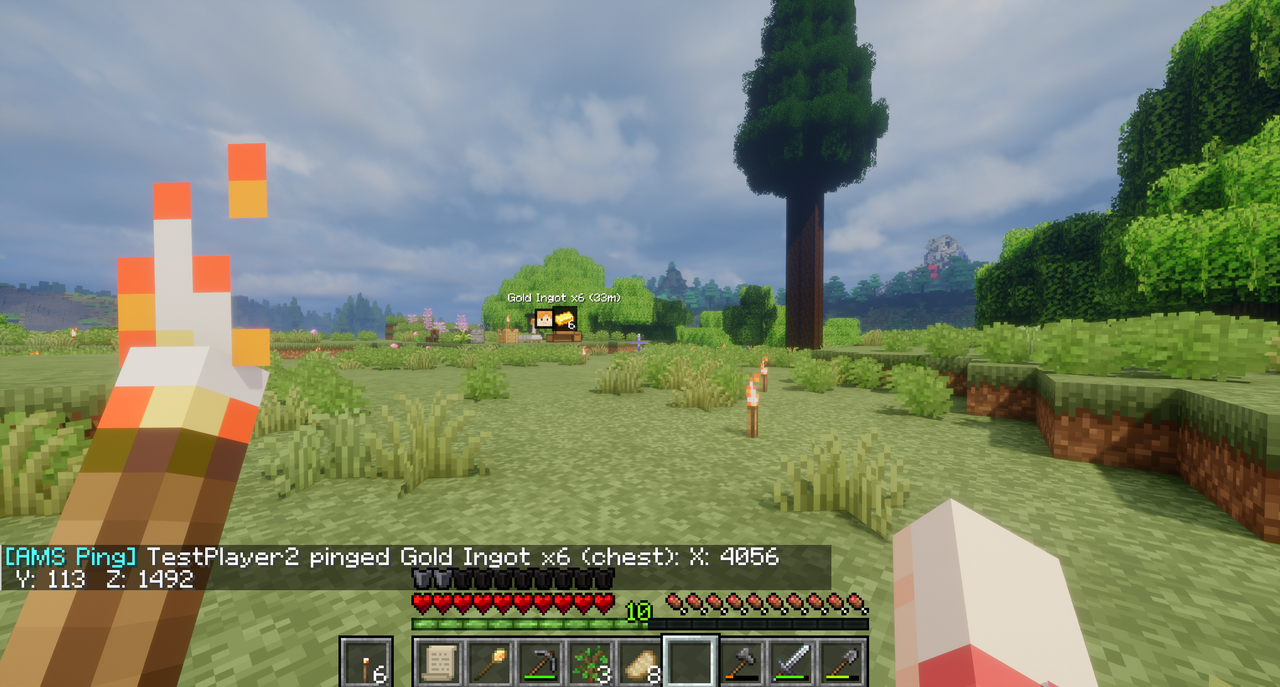
Ping your own position, point at a location in the world, or ping a hovered item from an inventory, chest, furnace, or other container. Pings show compact HUD markers with distance in meters and chat coordinates, so other players can quickly see where to go or what item was called out.
Default hotkeys:
V- ping your own location.B- ping the location you are looking at.Bwhile hovering an item in an inventory/container screen - ping that item.
Hotkeys can be changed in Options -> Controls -> Key Binds under AMS Pings.
Configuration is generated after first launch:
pingDurationMsdefault5000: how long pings stay visible.pingCooldownMsdefault5000: cooldown between pings per player.targetRangeBlocksdefault160: maximum distance for pinging the place you are looking at.markerSizedefault7: marker square size before HUD scaling.showDistancedefaulttrue: shows distance in meters.showOffscreenMarkersdefaulttrue: clamps offscreen pings to the screen edge.
Features
- Self-location pings.
- World location pings for the place you are looking at.
- Hovered item pings from inventories and containers.
- Player faces and item icons where useful.
- Distance in meters.
- Chat coordinates with
X,Y, andZ. - Offscreen edge markers.
- Configurable duration, cooldown, range, marker size, distance text, and edge markers.
Installation
Install the jar on the server and every client that should send or see pings.
Compatibility Notes
- Distant Horizons-only visual terrain may not be pingable because the mod needs an actual in-game surface to detect.
If you enjoy this mod, consider supporting my work.