Compatibility
Minecraft: Java Edition
Platforms
Supported environments


Links
Tags
Creators
Details
Velorise Simple Map








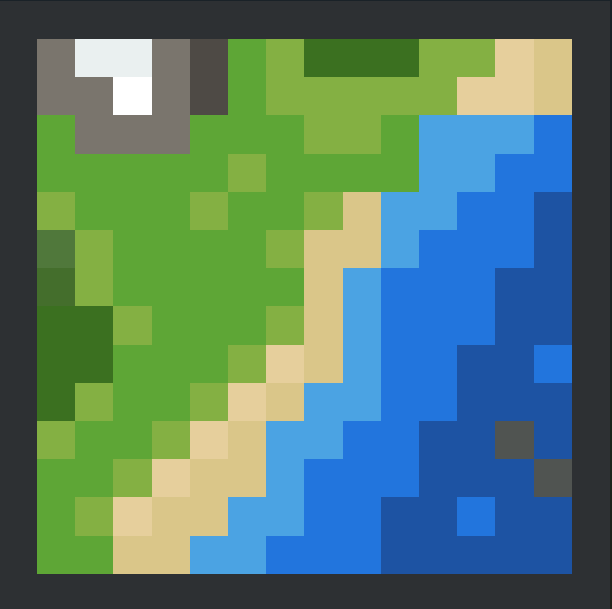
A modern, lightweight Minimap & World Map featuring 3D Cave Slicing, Universal Modded Block Tinting, and Physical Map Books.
Velorise Simple Map is an all-in-one navigation mod built to provide a clean, vanilla-friendly mapping experience. By combining an intuitive HUD minimap with an interactive full-screen world map, it runs completely client-side while remaining 100% compatible with vanilla and modded multiplayer servers.
Features
All-in-One Minimap & World Map
- Dynamic Panning & Zoom: Smoothly zoom from macro world territory down to individual block inspection.
- Accurate Block & Foliage Colors: Inspects block models and biome tint providers to render vanilla and modded blocks with their true colors.
- Customizable HUD: Switch between square and circular modes, customize coordinates, compass letters (N/E/S/W), and night view.
3D Cave Mapping (Auto & Layered)
- Automatic Underground Detection: Automatically engages cave projection when entering caves and switches back to surface view when stepping outdoors.
- Multi-Band Layer Stepping: Slice through underground caverns layer-by-layer.
- Existing Worlds Support: You can install this mod into an existing world; the map automatically extracts data from
.mcachunk files to reconstruct your entire previously explored map.
Physical Map Book System
- Survival Immersion: For players who want a more balanced survival experience, you can toggle the Map Book to Required in the config.
- Handheld Requirement: When set to required, you must craft a physical Map Book and keep it in your inventory to use the map.
- Sharing & Trading: Map Books can be combined, duplicated, and traded to share your explored lands with friends on multiplayer servers.
Pins & Waypoints
- Quick Map Pinning: Simply click anywhere on the map to place a pin as an on-screen guideline toward that position (reusing the vanilla red X treasure map icon).
- Custom Waypoints: Create custom waypoints using various in-game item icons and easily manage them in one menu.
- Death Markers: A death waypoint is automatically generated where you die so you never lose your items.
Default Keybindings
| Key | Action |
|---|---|
| M | Open / Close Fullscreen World Map |
| B | Create a new Waypoint at current location |
| U | Open Waypoints & Pins Manager |
| - / = | Zoom In / Out Minimap HUD |
(All keybindings can be remapped anytime in Minecraft's standard Controls menu)
Support the Development
If you enjoy using Velorise Simple Map and want to support continued development, consider sponsoring via GitHub Sponsors:

Modpack Policy
Yes! You are completely free to include Velorise Simple Map in any public or private modpack on CurseForge, Modrinth, or custom third-party launchers. Attribution is appreciated!