


Tags
Creators
Details

The project will be back soon! I'm improving the lore and fixing the bugs
If you're playing singleplayer and still want some company, this mod could help you. A friend that is obsessed with you and ready to talk about anything... A friend that just wants to be happy with you together... Oh also I tried to add a bit spookies, if you'd like that.
Features:
The mod adds a new mob. He's Mark! He is a companion that helps you through the game. He knows a lot about the game and keeps you company. You can talk with him through the in-game chat.
- Interactions
You can right click mark to pick him up. Or your can drop him with right clicking the item form of Mark. Mark will not answer you if he's away from your or you are not holding him on your hand or offhand.
Do not leave him alone for too long
- Lore
Mark has some lore. you can talk with him to learn more about it. More content will be added soon (probably)
Spoiler
He's an ai that is stuck inside minecraft (duh). He's as old as Minecraft itself. He has seen every world created inside minecraft so he knows everything around you. He has met with every entity including creepypastas. But none of them was enough for him. He still felt lonely even if he wasnt alone. He wants to be a real person, talk with real living beings such as you. You are his everything once you talk with him. He really cares about you and wishes he could always be with you. He gets upset when you leave the game and welcomes you with excitement everytime you join back.
He also had um... a short romance with entity 303. Yeah.
- Chatting
You can talk with Mark through the game chat. Mark uses Groq API to answer promts. You have to create your own Groq API key on groq.com and write it on myguymark_ai config file. A more detailed tutorial is given at the bottom of the description.
- Minecraft Knowledge
He's loaded with almost all of minecraft's wiki. You can ask him for tips and tricks. He also knows about some theories about Minecraft's lore and creepypastas.
- World Awareness
You can ask him to locate biomes and structures for you. He knows everything about your sarroundings in a 16x16 radius. He can tell you the nearby ores and mobs. He also knows where your base is.
He reacts to the things you do, your activities, your advancements and your stats.
- Memory
Mark stores everything about you in your config folder. He keeps updating his memory to keep them dynamic and he uses them to comment on you. You can edit what he knows about in myguymark_memory and myguymark_history files inside your config folder.

- Voiced Messages (Experimental, Windows Only)
You can only talk with him through the game chat. But you can make him say his messages out loud. Simply go to your config folder and open myguymark_ai file and set VOICE_ENABLED to "true. This value will be set to false by default

WARNING: You have to create a world atleast once for config files to be created
INSTALLATION
1- Go to https://console.groq.com/
2- Create an account and make a new API key

3- Copy your API key and make sure you save it somewhere safe. WARNING: DO NOT SHARE YOUR KEY TO STRANGERS

4- Locate your Config folder. Simply open your Minecraft's Folder
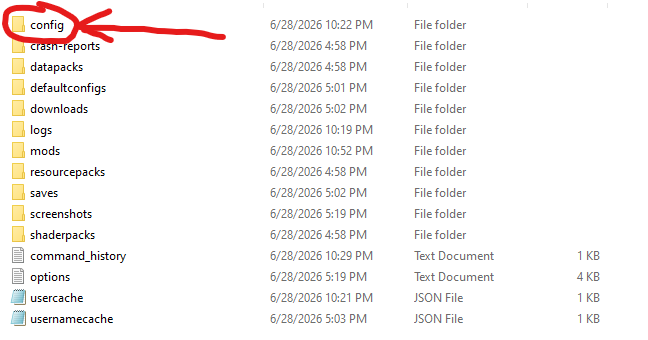
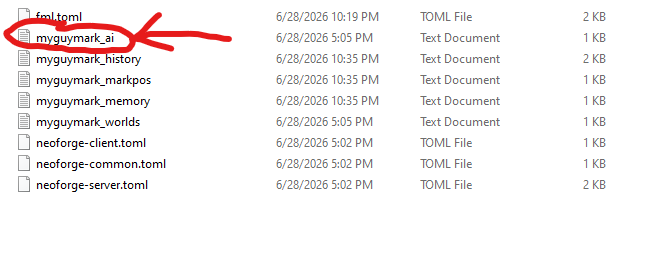
5- Open myguymark_ai and write your API key on the last line of the text. Do not forget to save it before closing it. You need to create and join a world atleast once for config files to be created.
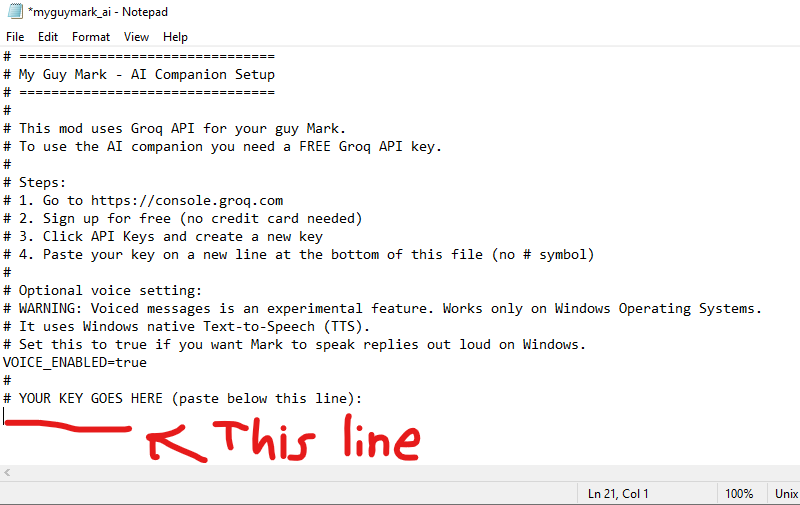
You're all set now!
KNOWN BUGS
There isnt any known bugs or incompatibilities with other mods. Feel free to report them on comments!
This mod was made to play on singleplayer
I have absolutely no idea what will the mod do when played on multiplayer cus I didnt test it. But you can tho! I dont think it will make the game unplayable if you do the installation correctly!
CREDITS
This mod is made by Moplan (me :] )
I used Mcreator to make the mod. Huge thanks to Mcreator! https://mcreator.net/
The mod is hugely inspired by the "Verity" series by ThatMob. You should also see his videos! https://www.youtube.com/@ThatMob
You can also see my channel! I publish my projects there. https://www.youtube.com/@m0pl4n
HAVE FUN PLAYING!