
Compatibility
Minecraft: Java Edition
Platforms
Supported environments


Links
Tags
Creators
Details
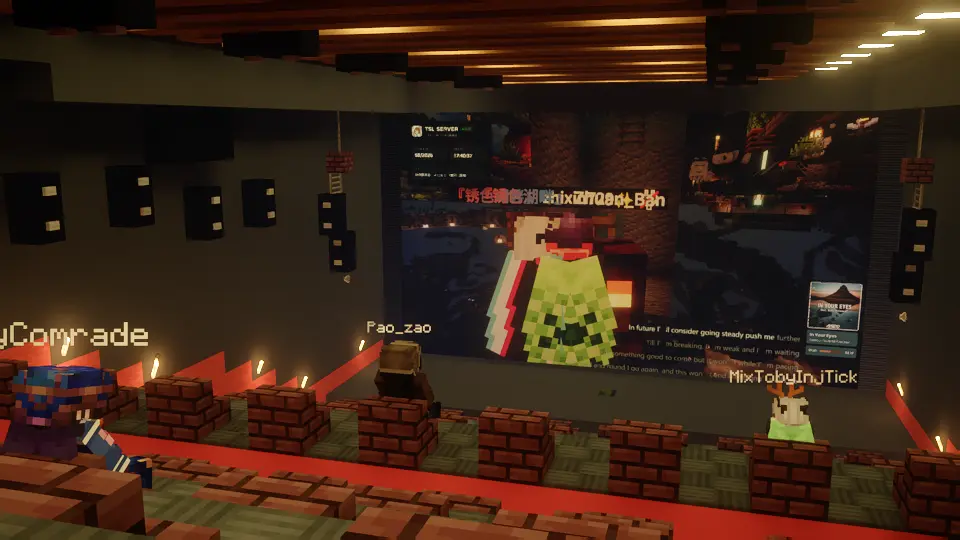
McediaTV 是什么?
McediaTV 是一个用于 Minecraft 的媒体播放与展示系统,核心能力是 基于频道(channel)的多客户端同步播放 与 面向播放器的展示管理。
它不是将播放状态分别保存在每一个播放器上,而是将播放状态统一组织到频道中。 服务端插件负责维护频道的媒体地址、播放状态、播放进度、播放速度和同步运行态;客户端订阅频道后,根据服务端发送的频道快照与同步数据执行播放。
这意味着同一个频道下的多个客户端可以围绕同一条播放时间线运行,而多个播放器也可以围绕同一个频道进行展示,而不是各自维护完全独立的播放状态。
核心功能
逐频道同步播放
- 以
channel为核心组织播放状态 - 服务端统一维护频道运行态
- 客户端订阅频道后接收频道快照与后续同步更新
- 同一频道下的多个客户端共享同一播放状态基准
多客户端共享同一频道
- 一个频道可以同时被多个客户端观看
- 当频道状态发生变化时,服务端会向订阅该频道的客户端广播更新
- 客户端重新进入服务器、恢复观看或重新建立订阅后,可以重新对齐到当前频道状态
播放器展示系统
- 支持创建和管理 MTV 播放器
- 播放器可以与频道关联,用于展示频道内容
- 多个播放器可以围绕同一个频道工作
- 频道内容与播放器实体分离管理,便于统一控制播放状态
播放控制与播放列表
- 支持媒体地址切换
- 支持播放、暂停、继续和同步控制
- 支持播放列表
- 支持多种播放顺序模式,例如顺序播放、随机播放和循环播放
GUI 管理
- 服务端插件提供
/mtv入口 - 主要操作流程通过 GUI 完成
- 可在游戏内管理播放器、频道以及相关展示设置
铁门遥控器
- 可将铁门重命名为“遥控器”作为快捷控制道具使用
- 手持该物品时,可快速操作最近的 MTV 播放器
- 适合在不打开完整 GUI 的情况下进行就近控制
- 该功能用于简化播放器的日常控制与现场操作流程
公共频道
- 支持公共频道的创建、搜索和管理
- 可在服务器内围绕同一频道内容进行共享访问与控制
- 不同玩家可根据权限配置拥有不同的管理与控制能力
服务端插件
McediaTV 必须配合配套的服务端插件使用。 如果没有服务端插件,则无法使用。
这是因为项目的核心机制以及控制 GUI 都依赖服务端维护频道状态并向客户端发布同步数据。 插件负责:
- 维护频道状态
- 管理频道订阅、取消订阅与心跳保活
- 向客户端发送频道快照、同步更新与移除通知
- 管理公共频道
- 在有观众时持续发布频道同步数据
- 为播放器展示系统提供统一控制入口
依赖
McediaCore
本项目依赖 McediaCore。
McediaCore 提供底层媒体播放相关能力,是运行 McediaTV 的必要依赖之一。
独立媒体解析 Mod
媒体内容的解析依赖于 独立的解析 Mod。 McediaTV 本身不负责实现所有媒体地址的解析逻辑,而是依赖额外的解析组件来处理具体的媒体来源与解析流程,现阶段只提供 Mcedia China Platforms 。
安装和使用前,请确认以下组件已经正确准备:
McediaTVMcediaCore- 加入的服务端已安装 Mcedia TV Plugin
- 对应的独立媒体解析 Mod
如果缺少上述必要组件,项目将无法完整工作,或无法正确解析和播放媒体内容。
FAQ
Q: 这会占用服务器带宽转发媒体内容吗?
不会按“服务器代替客户端转发整段媒体”的方式工作。 McediaTV 的服务端插件主要负责维护频道状态、处理订阅关系与发送同步数据,而不是作为媒体内容分发服务器去中转完整媒体流。
但实际播放时的网络行为仍取决于所使用的媒体来源、客户端环境以及解析 Mod 的实现方式。
Q: 能直接播放 YouTube、Bilibili 之类的平台链接吗?
这取决于你安装的 独立媒体解析 Mod。 McediaTV 本身不负责实现各类平台链接的解析;只有当对应解析 Mod 支持某个平台或某类链接时,这些链接才可能被正确解析并播放。
Q: McediaTV 自己负责媒体解析吗?
不是。 媒体解析依赖独立的解析 Mod。McediaTV 负责频道同步、播放器展示与播放控制体系,本身不承担全部媒体解析实现。
Q: 如何管理播放器和频道?
通过服务端插件提供的 /mtv 入口和 GUI 进行管理。
此外,也可以将铁门重命名为“遥控器”作为快捷控制道具,用于快速操作最近的播放器。
项目当前以基于容器的图形界面操作为主,并辅以遥控器方式进行就近控制。
Q: 一个频道可以同时被多个客户端观看吗?
可以。 频道是播放状态的中心。多个客户端订阅同一个频道后,会围绕同一频道状态进行同步播放。
Q: 多个播放器可以使用同一个频道吗?
可以。 播放器与频道可以关联,多个播放器可以围绕同一个频道展示相同内容,而不是每个播放器都各自维护一套独立播放状态。
Q: 没有服务端插件可以使用吗?
不可以。 McediaTV 必须配合配套的服务端插件使用;如果没有服务端插件,则无法使用。
Q: 如果频道状态发生变化,客户端会怎样?
当频道的媒体、播放状态、进度或其他运行态发生变化时,服务端会向订阅该频道的客户端发送更新。 客户端会根据收到的频道快照与同步数据重新对齐当前播放状态。
What Is McediaTV?
McediaTV is a media playback and display system for Minecraft. Its core functionality is channel-based multi-client synchronized playback and display-player-oriented management.
Instead of storing playback state separately on every individual player, McediaTV organizes playback state around channels. The server plugin maintains the media URL, playback status, playback position, playback speed, and synchronization runtime state for each channel. After subscribing to a channel, clients perform playback according to the channel snapshots and synchronization updates sent by the server.
This means multiple clients on the same channel can follow the same playback timeline, while multiple display players can also present content from the same channel instead of maintaining completely separate playback states.
Core Features
Per-channel synchronized playback
- Playback state is organized around
channels - The server maintains authoritative channel runtime state
- Clients receive channel snapshots and later sync updates after subscribing
- Multiple clients on the same channel share the same playback state baseline
Shared playback across multiple clients
- A single channel can be viewed by multiple clients at the same time
- When the channel state changes, the server broadcasts updates to subscribed clients
- After reconnecting, resuming viewing, or re-establishing subscriptions, clients can realign to the current channel state
Display player system
- Supports creating and managing MTV display players
- Display players can be linked to channels for presenting channel content
- Multiple display players can work around the same channel
- Channel content and player entities are managed separately for centralized playback control
Playback control and playlists
- Supports switching media URLs
- Supports play, pause, resume, and sync control
- Supports playlists
- Supports multiple playback order modes such as sequential, shuffle, and loop playback
GUI management
- The server plugin provides the
/mtventry point - Main operations are handled through the GUI
- Players, channels, and related display settings can be managed in-game
Iron Door Remote Control
- An iron door item can be renamed to
遥控器and used as a quick control tool - While holding it, players can quickly control the nearest MTV display player
- Useful for nearby control without opening the full GUI
- This feature is intended to simplify day-to-day operation and on-site control
Public channels
- Supports creating, searching, and managing public channels
- Public channels can be accessed and controlled within the server as shared channel content
- Different players can have different management and control permissions depending on server configuration
Server Plugin
McediaTV must be used together with its companion server plugin. Without the server plugin, McediaTV cannot be used.
This is because both the core synchronization mechanism and the control GUI depend on the server maintaining channel state and publishing synchronization data to clients. The plugin is responsible for:
- Maintaining channel state
- Managing channel subscribe, unsubscribe, and heartbeat keepalive
- Sending channel snapshots, sync updates, and removal notifications to clients
- Managing public channels
- Continuously publishing channel sync data while viewers are present
- Providing a unified control entry point for the display player system
Dependencies
McediaCore
This project depends on McediaCore.
McediaCore provides the underlying media playback capabilities and is one of the required dependencies for running McediaTV.
Independent Media Resolver Mod
Media resolution depends on an independent resolver mod. McediaTV itself does not implement parsing logic for all media URLs, and instead relies on additional resolver components to handle specific media sources and resolution workflows. At this stage, the only resolver mod currently provided is Mcedia China Platforms.
Before installation and use, make sure the following components are prepared correctly:
McediaTVMcediaCore- The server you are joining has Mcedia TV Plugin installed
- The corresponding independent media resolver mod
Q: Does this use server bandwidth to relay full media streams?
No, it does not work by having the server relay entire media streams to clients. The McediaTV server plugin mainly maintains channel state, handles subscriptions, and sends synchronization data. It is not intended to act as a full media distribution server.
Actual network behavior during playback still depends on the media source, client environment, and the implementation of the resolver mod.
Q: Can it directly play platform links such as YouTube or Bilibili?
That depends on the independent media resolver mod you install. McediaTV itself does not implement parsing for all platform URLs. Those links can only be resolved and played if the corresponding resolver mod supports that platform or link type.
Q: Does McediaTV itself handle media resolution?
No. Media resolution depends on an independent resolver mod. McediaTV focuses on channel synchronization, display player management, and playback control, rather than implementing every media parsing workflow itself.
Q: How do I manage players and channels?
Players and channels are managed through the /mtv entry point and GUI provided by the server plugin.
In addition, an iron door item can be renamed to 遥控器 and used as a quick control tool for the nearest player.
The project currently relies mainly on container-based GUI interaction, with the remote-control workflow as a nearby control option.
Q: Can one channel be watched by multiple clients at the same time?
Yes. The channel is the center of playback state. After multiple clients subscribe to the same channel, they perform synchronized playback around that shared channel state.
Q: Can multiple display players use the same channel?
Yes. Players can be linked to channels, and multiple players can display the same content through one shared channel instead of each maintaining a separate playback state.
Q: Can I use it without the server plugin?
No. McediaTV must be used together with its companion server plugin. Without the server plugin, it cannot be used.
Q: What happens when a channel state changes?
When the media, playback state, playback position, or other runtime state of a channel changes, the server sends updates to subscribed clients. Clients then realign their current playback state according to the received channel snapshots and synchronization data.