
Compatibility
Minecraft: Java Edition
Platforms
Supported environments


Links
Tags
Creators
Details
⚠️ Important: This is a Companion Mod!
Please note: This mod is a companion component for the MineBackup desktop application or FolderRewind and cannot function independently. You must first download and run the main application for this mod to work properly.
Additionally, for proper inter-process communication, the KnotLink server must be installed on your computer. Click Here to Download
Exception:Linux/MacOS users do not need to install the KnotLink server.
Overview
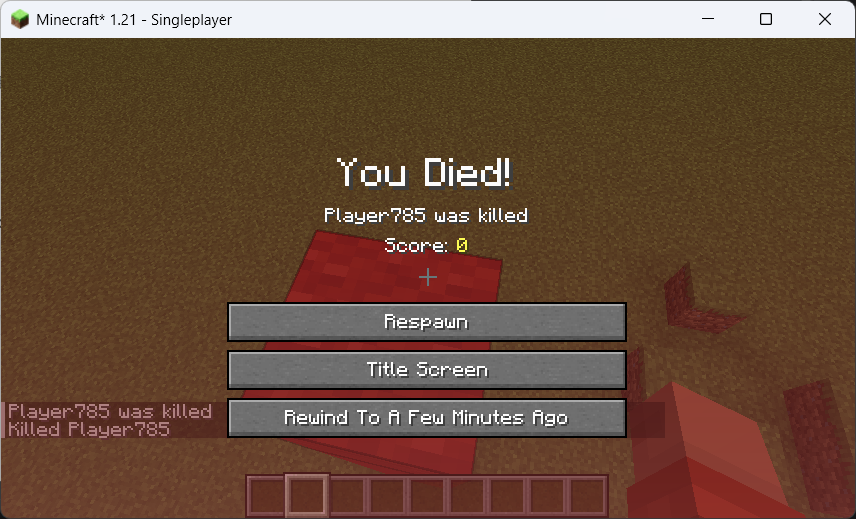
This lightweight mod adds a button to the game's death screen: "Rewind to X Minutes Ago". Clicking it allows the entire world to revert to a previous point in time.
The author created this mod because the vanilla "Keep Inventory" gamerule is often a dilemma: enabling it makes the game too easy, while disabling it can be too punishing for new players.
With this mod, by reasonably adjusting the rewind time limit and information display, you can reduce frustration during high-risk exploration, boss fights, and hardcore gameplay, without losing the pressure and stakes of survival.
Installation & Usage
-
Download the Main Program:
- Ensure you have downloaded MineBackup (Gen 1) or FolderRewind (Gen 2) from the links provided above (or the project page) and that it runs correctly on your computer.
-
Download MineRewind Plugin (Gen 2 Only):
- If you are using FolderRewind (Gen 2), it is recommended to download and install the MineRewind Plugin and create a Minecraft Saves configuration type instead of "Default".
- You can download this plugin from GitHub Releases or the provided cloud storage links.
- Gen 1 (MineBackup) does not require this plugin.
-
Install KnotLink Server (Windows Only):
- To enable inter-process communication, Windows users must install the KnotLink Server.
- Download from GitHub Releases or cloud storage.
- Linux/macOS users can skip this step.
-
Start KnotLink Service in Main Program:
- MineBackup: Enabled by default.
- FolderRewind: Disabled by default. If using this, you must manually enable it in the settings.
-
Download This Mod:
- Find the file matching your main program version on Modrinth or other mod pages.
-
Install the Mod:
- Singleplayer/LAN: Place the downloaded
.jarfile into the Minecraft client'smodsfolder. - Dedicated Server: Install into the server's
modsfolder. Client-side installation is optional for players connecting to the server.
- Singleplayer/LAN: Place the downloaded
-
Run Simultaneously:
- Launch your Minecraft game or server.
- Crucial: To function correctly, ensure the MineBackup/FolderRewind main program is running in the background while you play.
Configuration Setup
In addition to the steps above, you must add your save file to the main program's management list.
- See: Gen 1 Configuration Guide / Gen 2 Configuration Guide.
- For Gen 2 users, there are also tutorial videos available on Bilibili.
- See the FAQ at the bottom for why this "complex" method is used.
Optimizing Configuration
Due to the specific use case of this mod, you must adjust the main program's configuration to optimize the gaming experience. The author cannot account for every modpack or PC configuration, so please adjust based on the following:
- Backup Mode:
- "Overwrite Backup": Best performance. However, it only keeps one backup (the one used for "rewind" upon death).
- "Smart Backup" (Incremental): Second best performance. Use this if you want extra backups in case of accidents besides the death rewind point. WARNING: There is a catch when combined with "Safe Delete" (see below).
- "Full Backup": Backs up your save completely. Takes more space but provides peace of mind.
- Compression Level: Determines how much backups are compressed. Higher levels use more CPU/RAM and impact game performance. If you only use this mod for death rewind, set this to 0 (Store Only) for minimal impact and smooth gameplay.
- Limit Backup Count: This mod regularly sends backup requests to the main program. Limit the backup count to avoid excessive disk usage.
- Note: If "Safe Delete" is enabled with "Smart Backup", deleting old backups will trigger a "Merge" operation on the backup chain (Full-Smart-Smart-Full...), which consumes extra CPU/RAM.
- Note: If using "Overwrite Backup", it only updates the latest backup and does not create new ones, so it will not trigger the count limit.
- Backup Before Restore: Gives you a chance to regret the rewind. Disabled by default.
- Safe Restore: Do not disable this.
- Backup Blacklist & Restore Whitelist: Important! Add files related to Voxy and Distant Horizons (DH) to these lists. These mods consume huge amounts of space but do not need to be backed up for this functionality.
- CPU Threads: The default
0uses all available CPU threads, which may compete with the game and cause lag. Please adjust this to a suitable value. - Run with Low Priority: Enable this.
Version Recommendation:
- If you only want to use this mod, Gen 1 (MineBackup, ~3MB) is sufficient. Ensure you use version 1.14.0 or higher.
- Gen 2 (FolderRewind, ~60+MB) still has performance optimization room in version 1.6.0. If you see update 1.6.1, please use that instead.
Configuration Options
Editable via config/deathrewind.properties in your version folder (Right-click -> Open with Notepad).
intervalMinutes: Interval for automatically creating rewind points (in minutes).- Note: When you click "Rewind", it does not strictly go back
intervalMinutes. It rewinds to a random point between 0 ~ intervalMinutes.
- Note: When you click "Rewind", it does not strictly go back
showBackupInfo: Whether to display "Rewind Point Created Success/Failure" messages in the chat bar.forceDeathRewind: Enable "Force Rewind Mode". When enabled, the death screen only allows clicking the Rewind button.
Screenshots
FAQ
Q: Why not build the backup/restore logic directly into the mod? Why use an external program? A: As seen from the introduction, this logic is not simple. Using an external program offers several benefits:
- Better Performance: Minimizes negative impact on the game itself (stability, compatibility, etc.). The Gen 1 main program uses C/C++ and 7-Zip core, allowing for more optimizations than a mod can handle.
- Easier Maintenance: If backup/restore functions have issues, I only need to update the main program. I don't need to fix every linked mod individually.
- Easier Version Adaptation: This mod handles very simple tasks, making version adaptation extremely easy and reducing developer workload.
Q: Is it possible to remove the dependency on the external program in the future? A: There are no current plans, but everyone is welcome to develop an independent "Death Rewind" version. This decision was made primarily due to limited development energy.
Q: How is multiplayer support? A: Technically, in local LAN, if one player triggers a death rewind, the entire save reverts to the past, which is obviously not ideal. Currently, dedicated servers are not supported.
Q: Future Plans? A: Further improve the main program's remote command functionality to support "Precise Rewind" instead of the random 0~intervalMinutes value. Exploring feasibility for multiplayer support.