
Compatibility
Minecraft: Java Edition
Platforms
Supported environments


Tags
Creators
Details
Welcome to custom Actionbars!
 That mod adds a new GUI editor for creating actionbars with custom text colors, styles and even PNG images (heads or anything). It also stores actionbars in a .json file (templates will be saved in config, created actionbar will be saved in world folder)
Important note! That mod DO NOT change DEFAULT /title ... actionbar, it adds new type of actionbar that can stop default actionbar when playing! (/abm play "name" @p)
RU:
Этот мод добавит новый редактор для экшбаров с кастомным цветом текста, стилями и даже PNG картинками (головы или что-то ещё). Он также сохраняет экшбары в файле .json (шаблоны хранятся в папке конфига, созданные экшбары будут сохранены в папку с миром)Важно! Этот мод НЕ меняет ДЕФОЛТНЫЙ /title ... actionbar, он добавляет новый тип экшнбара, который может остановить обычный во время проигрывания! (/abm play "имя" @p)
How it works?
With /abm create "actionbar name" you can open an editor (or just type /abm and create new actionbar from manager), where you can set up your actionbar with custom fragments which can be set color and style. Also you can add head (it can be any PNG image from config/abm/heads folder, don't forget to click on "Reload PNG" button to refresh cache if you are added files during the game) and placeholders (%player% to add nickname and %health% to show current health)
RU:
С /abm create "имя экшнбара" вы откроете редактор (или просто /abm и сделайте новый экшнбар через менеджер), где можно создать ваш экшнбар с кастомными фрагментами, которым можно задать цвет и стиль. Также можно добавить _голову_ (это может быть любая PNG картинка в папке config/abm/heads, не забудьте нажать кнопку сброса кэша PNG, если вы добавили файлы во время игры) и _плейсхолдеры_ (%player% чтобы добавить никнейм и %health% для текущего здоровья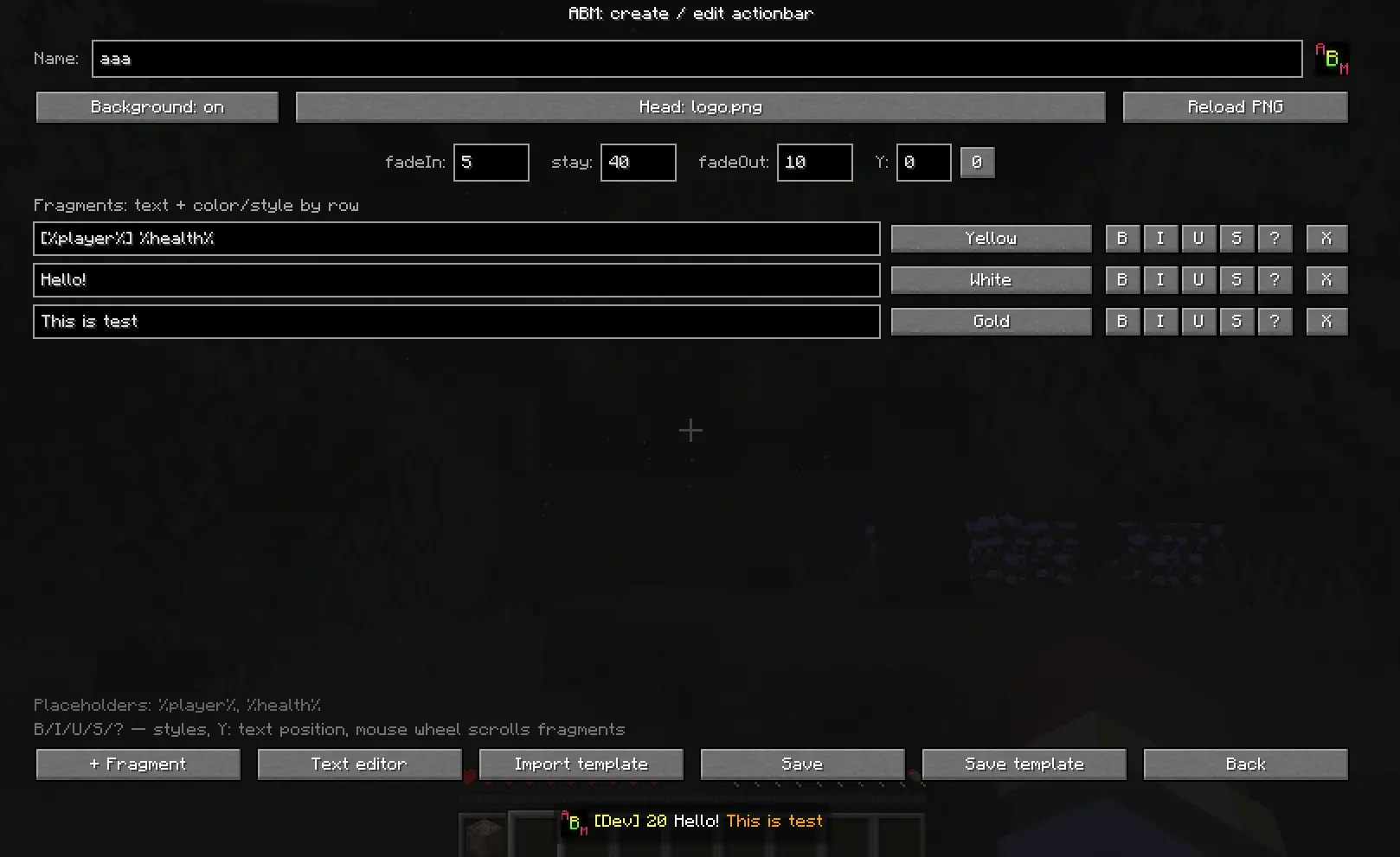
You can also save your actionbar template. It will be saved in config/abm/templates folder. All created actionbars are stored in the current world folder, so if you want to transfer them, you can just find .json file and place it to another world or in config.
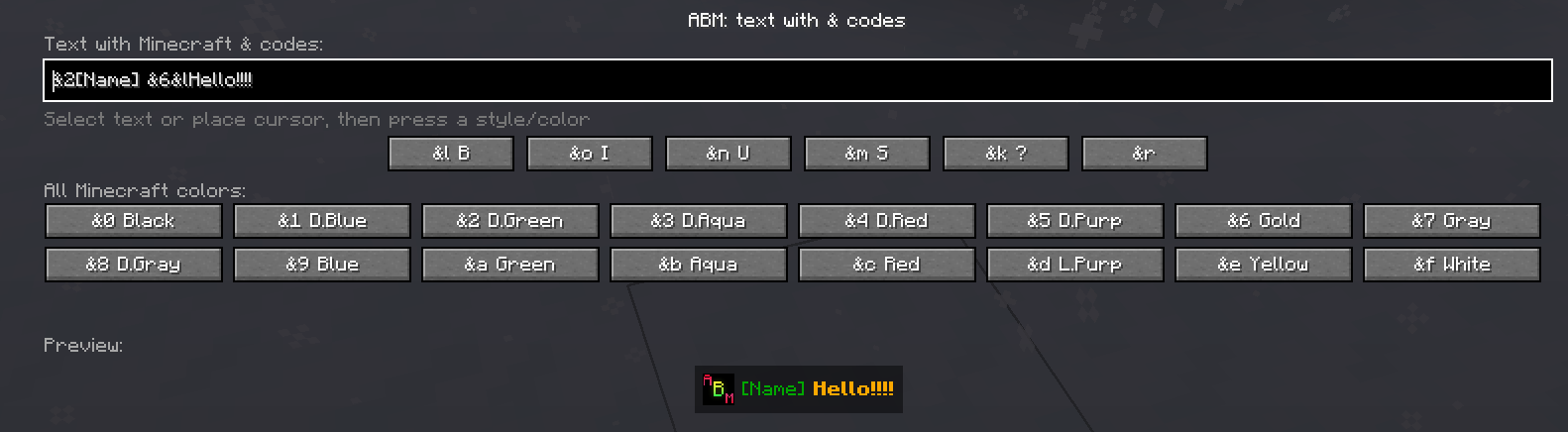
There is also a full text editor with & selection and etc.
RU: Вы можете сохранить шаблон экшнбара. Он будет сохранён в папку config/abm/templates. Все созданные экшнбары хранятся в папке текущего мира, поэтому, если хотите перенести их, просто найдите .json файл и переместите в другой мир или конфиг.
Здесь также есть полный редактор текста с & селектором и прочим.
Commands
/abm - open actionbar manager
/abm create "name" - instantly open up an actionbar editor with name set
/abm delete "name" - delete actionbar
/abm play "name" @a - play actionbar with your settings (@a,@p,@r or player name)
/abm play "name" @a <fadeIn> <stay> <fadeOut> - (@a,@p,@r or player name)
/abm make @a "name" <fadeIn> <stay> <fadeOut> "headFileName" "offsetY" - use actionbar without saving it (@a,@p,@r or player name)
RU: Команды
/abm - открыть менеджер экшнбаров
/abm create "name" - instantly open up an actionbar editor with name set
/abm delete "name" - delete actionbar
/abm play "name" @a - проиграть экшнбар с заданными настройками (@a,@p,@r или имя игрока)
/abm play "name" @a <fadeIn> <stay> <fadeOut> - проиграть экшнбар с другими настройками (@a,@p,@r или имя игрока)
/abm make @a "name" <fadeIn> <stay> <fadeOut> "headFileName" "offsetY" - использовать экшнбар без его сохранения (@a,@p,@r или имя игрока)
Here you can see how actionbar plays (it has HIGHER priority than chat)
RU:
Здесь можно увидеть, как проигрывается экшнбар (у него ВЫШЕ приоритет, чем у чата)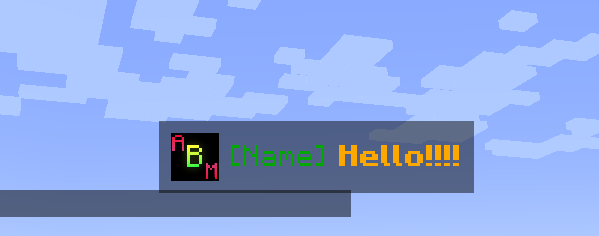
Need help?
More info on GitHub page! / Больше информации на GitHub странице!
Plans
- Click/hover events / События по клику/наводке