
Compatibility
Minecraft: Java Edition


Tags
Creators
Details
Licensed ARR
Published last month
Updated last month
Totems Alive
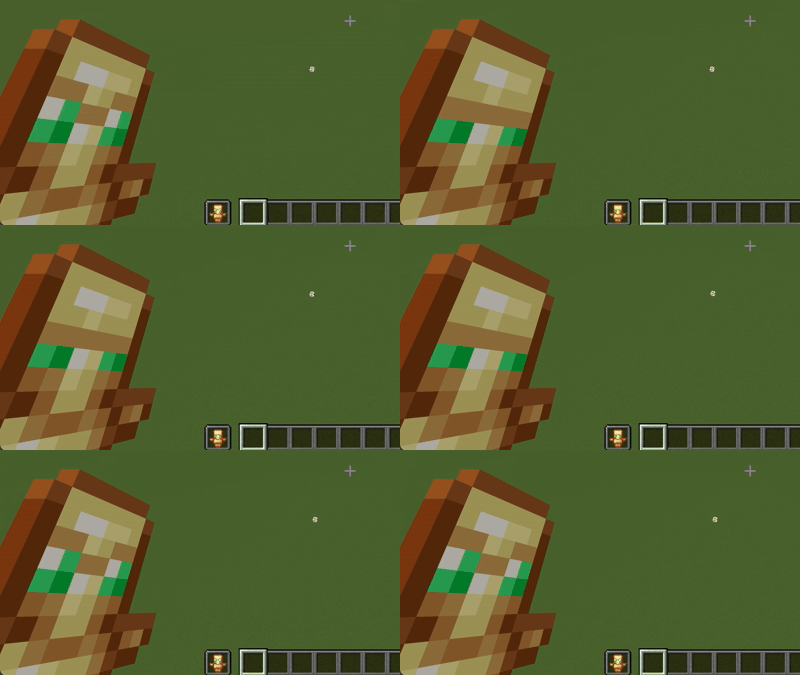
Totems Alive breathes subtle vitality into one of Minecraft's most iconic survival items. Instead of remaining a static golden relic in your off-hand, the Totem of Undying now blinks, looks around, and quietly observes your adventures. It gives the ancient artifact a soul of its own before it makes the ultimate sacrifice to save yours.
Features
- Expressive Animations: Smooth, periodic blinking and subtle eye-darting frames that seamlessly fit the vanilla pixel art style.
- Vanilla Friendly: Retains standard item resolution and palettes so it integrates cleanly alongside other standard texture packs.
- Pure Resource Pack: Built entirely using vanilla item animation (.mcmeta) mechanics with no mods or external loaders required.
Installation Guide
- Download the Pack: Download the
Totems Alive.zipfile to your computer. Do not unzip the folder. - Open the Resource Pack Folder: Launch Minecraft, navigate to Options > Resource Packs, and click the Open Pack Folder button.
- Move the File: Drag and drop the downloaded
Totems Alive.zipfile directly into the folder that opened. - Activate the Pack: Return to the Minecraft menu, locate Totems Alive under the "Available" column, click the arrow to move it to "Selected", and click Done.