
Compatibility
Minecraft: Java Edition
Platforms


Tags
Creators
Details
This datapack adds a new craftable item called, Sulfur Camouflage Brush!
This new item "camouflages" your Sulfur Cubes with a block inside, granting them infinite invisibility! But don't worry—to remove the "camouflage" from your Sulfur Cube, simply take out the block inside using a pair of vanilla Minecraft Shears. Perfect for creating mini-games or other projects where you need to hide the Sulfur Cube—displaying only the block inside it—for your single-player, multiplayer, server, or LAN world!
How do you craft it? See below:
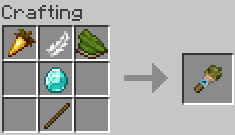
You only need: 1 stick, 1 diamond, 1 feather, 1 golden carrot, and 1 green dye.
How do I use it? It's easy.
-
First, place any block that can be put inside a Sulfur Cube.
-
Second, take your newly crafted Sulfur Camouflage Brush and right-click while looking at your Sulfur Cube.
-
Third, enjoy your Sulfur Cube with infinite invisibility!
How do I install it in my world?
First, install the latest version of the datapack and resource pack compatible with your Minecraft version.
The datapack is the .zip file named
Sulfur Camouflage Brush Datapack.zip
and the other .zip file—the resource pack—is named
Sulfur Camouflage Brush.zip
Take the Sulfur Camouflage Brush Datapack.zip file, do not extract it, navigate to your world folder—located at C:\Users\username\AppData\Roaming.minecraft\saves\NameOfYourWorld—open the datapacks folder, and place the file there.
For the resource pack, take the Sulfur Camouflage Brush.zip file, go to C:\Users\username\AppData\Roaming.minecraft\resourcepacks, and place it there—again, without extracting it.
You will know it worked when a message appears in your world or server chat stating that the datapack has loaded, as shown below:

As for the resource pack, you will know it is working if, upon crafting the item, it does not display the default carrot on a stick texture.
Q.A.
Q: Is it possible to make a Sulfur Cube invisible—without a block inside—using the Sulfur Camouflage Brush?
A: No. The Sulfur Camouflage Bush only works with Sulfur Cubes that have blocks inside them.
Q: Is it compatible with other mods?
A: No. The Sulfur Camouflage Brush works only with vanilla Sulfur Cubes.
Q: How do I remove the "camouflage" from my Sulfur Cube?
A: As previously mentioned, use Shears to extract the block from inside the Sulfur Cube, and that's it! The infinite invisibility is removed.
Q: Why does my Sulfur Camouflage Brush have the texture of a carrot on a stick?
A: Check your Minecraft resource packs to ensure the Sulfur Camouflage Brush texture is installed and applied! Otherwise, it will display the default carrot on a stick texture.
Q: Does it work on a server?
A: Yes! It works perfectly on servers or LAN worlds!