
Compatibility
Minecraft: Java Edition
Platforms


Tags
Creators
Details
💰 Economy Craft
A Datapack that adds a complete money system to your Minecraft world!
With Economy Craft, you can transfer money between players using physical currency or your bank account.
Screenshots
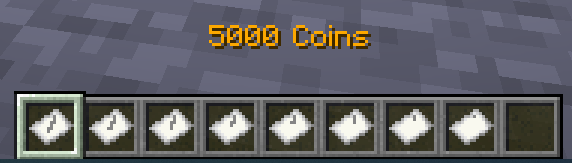



Using
💸 Sending Money
To send money, just type:
/trigger ec.pay
and follow the instructions.
💵 Withdraw and Deposit
To withdraw money from your in-game bank account, use this command:
/trigger ec.withdraw set $amount$
$amount$ can be any number — the datapack will give you your money.
For example, if you type /trigger ec.withdraw set 19302, you’ll get 3×5000, 4×2000, 3×100, and 2×1.
You can also do the opposite and deposit your cash into your bank account. Just type:
/trigger ec.deposit
For Admins
If you're an admin and want to install this datapack, simply place the zip archive into your world’s datapacks folder.
You can modify player balances directly using the scoreboard:
/scoreboard players set $player$ ec.money $amount$      # Sets a player's balance
/scoreboard players add @a ec.money $amount$            # Adds an amount of money to all players
/scoreboard objectives setdisplay sidebar ec.money      # Displays balances (visible to all players)
If you want to uninstall the datapack, run this command:
/function sc_economycraft:uninstall
Then delete the datapack archive file.
⚙ Customization
The datapack is fully customizable. You can change textures for existing banknote denominations — or even add or remove denominations entirely.
🏷 Changing the Currency Name
You may also want to rename your currency — and you can easily do that.
Locate the file in your resource pack:
/assets/sc_economycraft/lang/en_us.json // And all languages you need
"scec.money":"Money",
"scec.moneyformat":"%s Coins",
"item.scec.cash_1":"1 Coin",
"item.scec.cash_10":"10 Coins",
"item.scec.cash_50":"50 Coins",
"item.scec.cash_100":"100 Coins",
"item.scec.cash_200":"200 Coins",
"item.scec.cash_500":"500 Coins",
"item.scec.cash_1000":"1000 Coins",
"item.scec.cash_5000":"5000 Coins",
🎨 Change Texture for present denominations
Simply replace the texture files in your resource pack. They are located in:
/assets/sc_economycraft/textures/item/
💵 Remove and add denominations
Removing or adding denominations requires a bit more setup. Open the file:
/data/sc_economycraft/functions/settings.mcfunction
Find the following lines:
# Default banknote denominations
# All value must be unique and in ascending order
data modify storage sc_economycraft:banknotes values set value [{v:1}, {v:10}, {v:50}, {v:100}, {v:200}, {v:500}, {v:1000}, {v:5000}]
data modify storage sc_economycraft:banknotes length_minus_one set value 7

# Default timeout duration (in ticks)
scoreboard players set timeout_duration ec.SETTINGS 600
To add or remove denominations:
- Modify the list inside
values set value [...].- Each entry has the format
{v:<denomination>}. - Example: to remove 5000 and add 2000, change it to
data modify storage sc_economycraft:banknotes values set value [{v:1}, {v:10}, {v:50}, {v:100}, {v:200}, {v:500}, {v:1000}, {v:2000}]
- Each entry has the format
- Update
length_minus_oneto match the number of denominations minus one.- In the example above, there are 8 denominations → set it to 7.
data modify storage sc_economycraft:banknotes length_minus_one set value 7
- In the example above, there are 8 denominations → set it to 7.
Tipp
If you add new denominations that don’t exist in the default setup, you’ll also need to create corresponding files in your resource pack:
/assets/items/cash_$your_value$.json:{ "model": { "type":"minecraft:model", "model": "sc_economycraft:item/cash_$your_value$" } }/assets/models/cash_$your_value$.json{ "parent": "minecraft:item/generated", "textures": { "layer0": "sc_economycraft:item/cash_$your_value$" } }/assets/textures/cash_$your_value$.png(This is the actual texture image for your new banknote.)- And also you need to make localization for your new denominations (see here)
This Datapack Follows Conventions
You can read them here
