
Compatibility
Minecraft: Java Edition
Platforms
Supported environments


Links
Tags
Creators
Details
This Datapack adds a Magical Book Of Commands, that lets you create, modify, and delete both Block and Item displays, even in survival!
Whereas Axiom allows you to edit Display Entities in Creative (with op), this datapack gives you access to Display Entities & editing for Any gamemode and Any permission level.
Book V2.0 is released!
Update your books with the built in button or /trigger slothsdisplayeditor.modify set 999 !

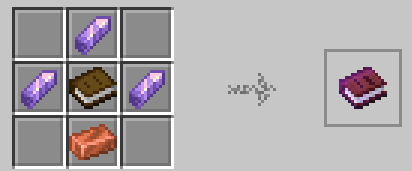
By crafting 3 amethyst shards, a book, and a copper ingot, you gain access to a magical command book that lets you
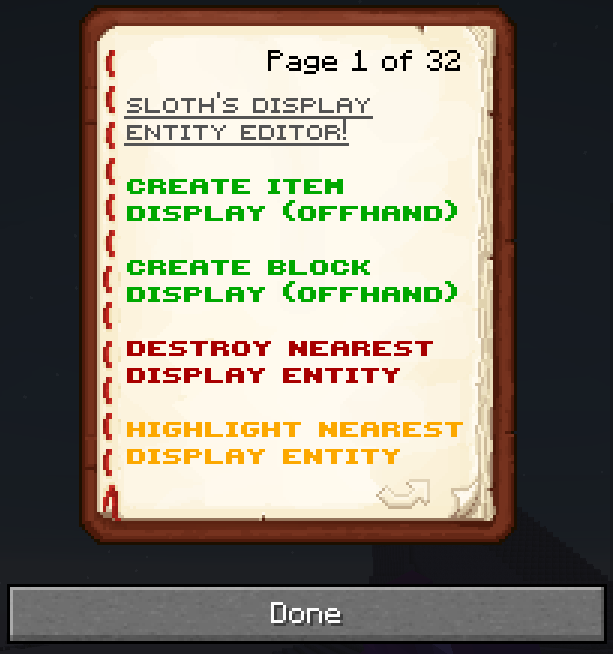
- Turn whatever item or block is in your offhand into a block or item display entity
- Turn a nametag into a Text Display
- Use a book and quill to Write Text to the Text Display
- Highlight the nearest display entity
- Delete the nearest display entity
- Move the nearest display entity
- Scale the nearest display entity
- Rotate the nearest display entity
- Edit the block properties of the nearest display entity
- Override the sky/block lighting
- Change Billboard (Fixed, vertical, horizontal, center)
- Change wall/regular [for blocks like torches and signs]
- Set view range
- Set shadow strength
- Set text display background
- Set text display opacity
- Many more!
By locking a display, it means that the command book cannot edit/update/move/etc until you unlock it, with the only function available being highlighting. Because a locked display cannot be edited, Highlighting one will give it a yellow highlight, and also highlight the nearest editable display (the displays your book will ACTUALLY edit [except for unlocking])
The book has a built in update function, (On page 2, or /trigger slothsdisplayeditor.modify set 999) so should the book change to accomodate future additions and updates, you dont need to craft a new book!
Whilst Axiom and other mods may let you edit display entities in creative, this datapack allows you to create and modify display entities in survival mode, whilst still being balanced. To create a display entity, you hold an item in your offhand, and it will turn it into a block or item display, whilst removing 1 count of the item in your offhand. When you delete the entity, it summons itself as an item for you to pick back up!
This even works for text displays, however they require specifically a name tag, but will drop it once killed.
There are some secret things, such as Flint & Steel becoming fire when turned into a block display for example.
Piston heads are a special case so they have to be summoned with their own button while holding a piston.
Utilises Quack by Eroxen to rotate the entities
https://modrinth.com/datapack/quaternions
Compatible with Declarative UI by CJDev
Code & Bug reporting -- https://github.com/mrslothkid/Display-Entity-Editor