
Compatibility
Minecraft: Java Edition
Platforms


Creators

Details
LeaderBoards Datapack 1.21.6+
A Datapack to place LeaderBoards Ranking players of your server on a given scoreboard objective
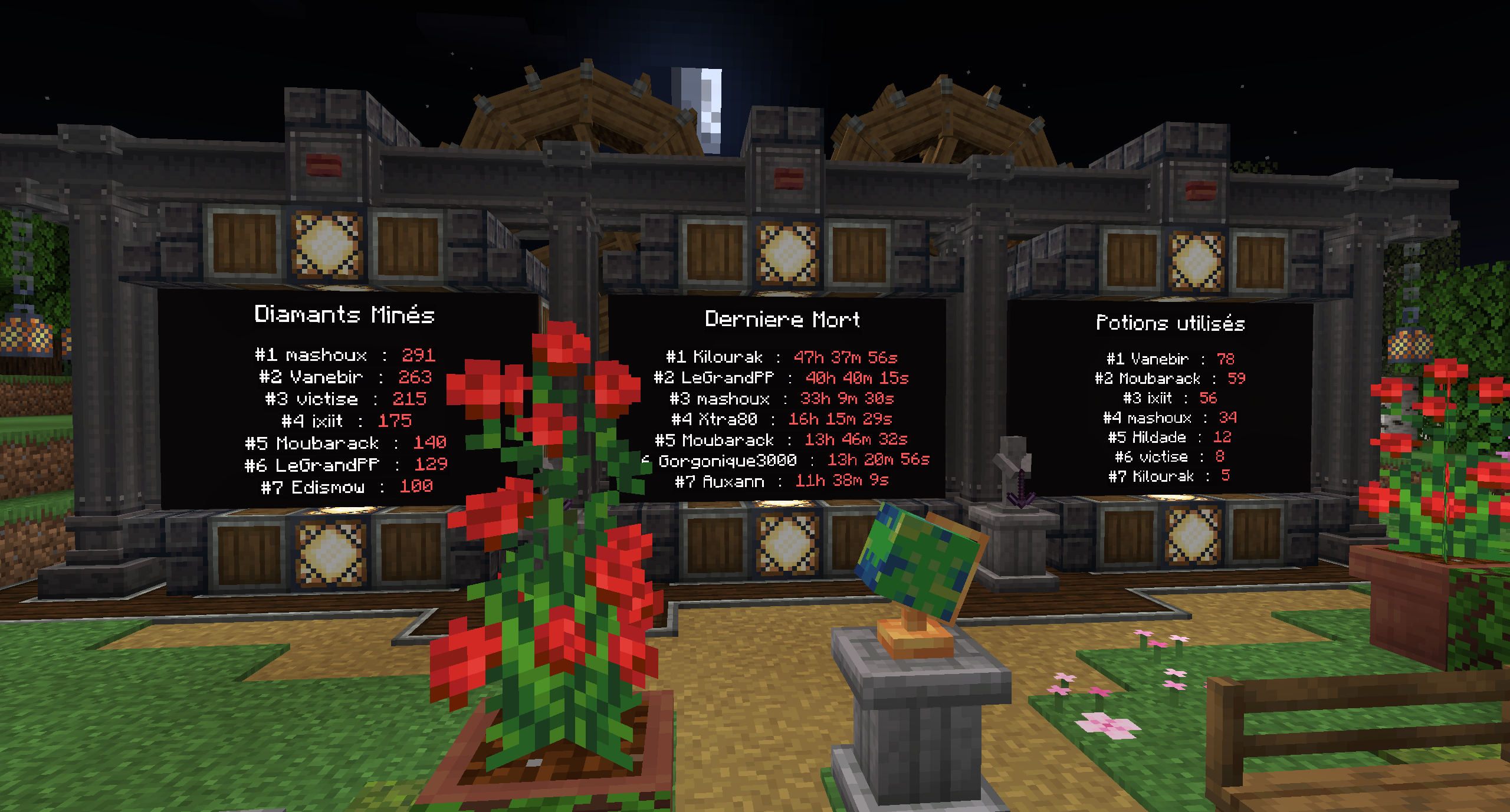
How to use
LeaderBoards Datapack 1.21.6+ uses the Dialog feature to provide an easy to use interface to create and edit Leaderboards
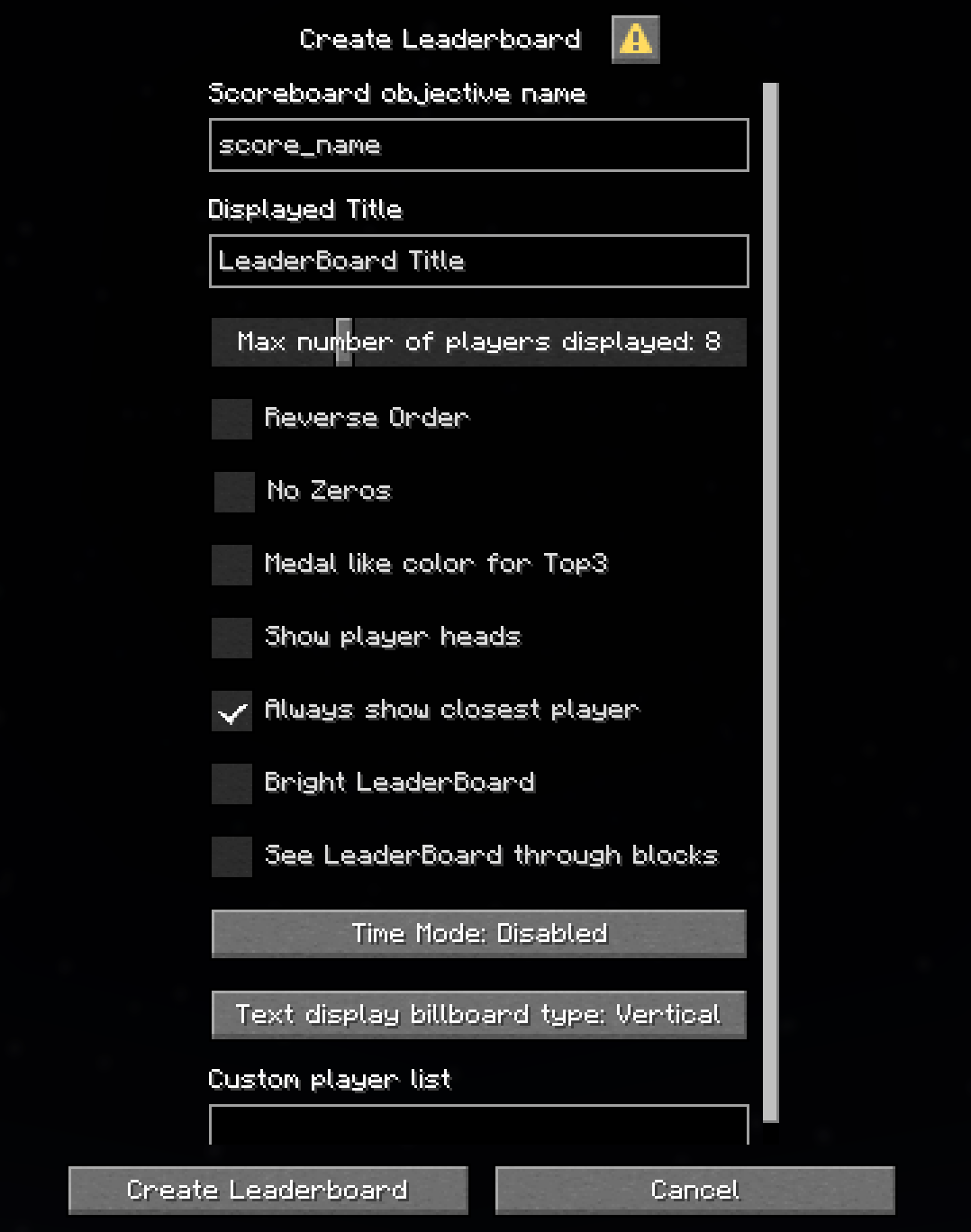
Add a LeaderBoard
/function leaderboard:_dialog/add_leaderboard_dialog
-
Scoreboard objective name is the most important parameter, it sets the scoreboard objective to be displayed in the Leaderboard. This MUST match the exact score name.
Example: if you create a scoreboard with the command:/scoreboard objectives add score_name dummy "My score", the Scoreboard objective name to use will bescore_nameand NOTMy score -
Displayed Title is the name that will be displayed on top of the leaderboard
-
time_mode option displays the score as a time with hours, minutes, seconds and 1/20th of a second (ticks). It requires the given score to be a time in ticks.
Extended, keeps ms even when value is larger than 1 hour
Stopwatch, is more suited for the new/stopwatchcommand release in 1.21.11. It requires the given socre to be a time in ms. To get such a time you can use the following example:/execute store result score @p score_name run stopwatch query minecraft:foo 1000Note that the x1000 scaling allows to get a time in ms -
reverse_order option reverses the order of the players in the LeaderBoard. Puts the lowest score first
-
no_zero option removes players with either no score or a score that equals 0 from the LeaderBoard. This is especially useful in reverse mode to avoid having new players at the top of the LeaderBoard by default
-
billboard option sets the billboard type that the LeaderBoard will use
It can be set to vertical, horizontal or fixed
When using fixed billboard type, the direction is set from the head direction of the player executing the command
tips: you can use/tp @s ~ ~ ~ x y, with x and y set to the rotation if you want the leaderboard to be aligned to a specific angle -
medal_color option adds medal like colors the the top 3 ranks
-
show_heads option adds the player heads next to it's name (1.21.9+ only)
-
always_show_closest_player option highlights the line of the nearest player. If this player's rank is not present in the base list (cause of max_players option), it will add an extra line under the default one with the closest player score
-
bright option sets the text_displays with constant full brigthness
-
Custom player list this is an advanced feature, leave empty to get the default list of player built by the datapack
This parameter allows to use a different storage list for a specific Leaderboard. This can be used to display scoreboard scores that aren't directly related to a player. For example a custom objective tracking teams scores
The syntax is<storage_name> <list_name>
For example if you create your list this way:/data modify storage my_storage:custom_namelist names set value ["Team1","Team2","Team3"]you need to usemy_storage:custom_namelist namesin the Custom player list field
warning: this might have some unexpected behaviour when used withalways_show_closest_playerand a list that does not contain the nearest player
Remove a LeaderBoard
This will remove the nearest LeaderBoard
/function leaderboard:commands/remove_leaderboard
Edit a LeaderBoard
This will edit the nearest LeaderBoard
/function leaderboard:_dialog/edit_leaderboard_dialog
Uninstall
/function leaderboard:commands/uninstall
(Only keeps the storage leaderboard:namelist in case you want to re-enable it)
Back compatibility
Versions of the datapack prior to 1.21.6 are still available but won't be updated anymore
You can find tutorials on how to use legacy verisons on the Github link
Contact
Feel free to join the discord for any question, bug report or feature request
Discord invite