
Compatibility
Minecraft: Java Edition
Platforms
Supported environments


Tags
Creators
Details

01 · Your music. Your friends. Your world.
Upcoming 1.1 preview: cassettes, listening groups, speakers and clear personal/shared controls.

02 · Make a mixtape.
Upcoming 1.1 preview. Your imported music becomes a cassette you can pass to a friend.

03 · Record it. Gift it. Play it.
Upcoming 1.1 preview. Hand over a physical in-game item, not just a temporary playlist link.

Modular soundbar - six connected segments
Six soundbar segments playing as one connected group in a vanilla-built listening lounge. Real in-game capture, Autoradio 0.4.0 on Minecraft 26.3; no shaders or image editing.

04 · One group. A shared programme.
Upcoming 1.1 preview. Create a server listening group and tune compatible devices to it.

05 · F7 for now. F12 for more.
Upcoming 1.1 preview. Use F7 for quick contextual choices and F12 for full device and listening-group controls.

06 · Party Speaker
Take the music with you or make a place for it in your build.

07 · A speaker for every build.
The same Party Speaker in sixteen Minecraft dye colours.

08 · Fill the room, together.
Link Party Speakers into a supported shared assembly.

09 · Modular Soundbar
Build a clean horizontal audio setup for a room or stage.

10 · Find your soundtrack.
Built-in stations, your Custom library and Internet radio.

11 · Shared music. Personal choice.
Upcoming 1.1 preview. Set your listening level without taking over the shared programme.

12 · Ready for the next session.
Upcoming 1.1 preview. Update the server and clients together, then keep your music.
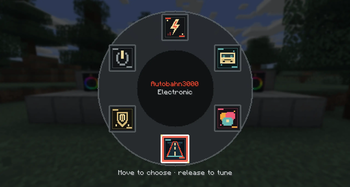
Choose a station
The radial station wheel keeps tuning fast and leaves the road visible behind it. Captured directly in Minecraft 26.2.
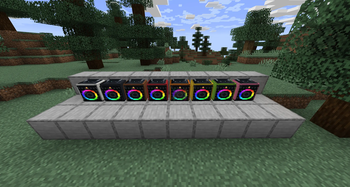
Party Speakers in Minecraft colors
Recolorable Party Speakers with audio-reactive RGB lighting, shown in a real Minecraft 26.2 world.

Automobility: Autoradio — a closer look
Presentation composed from the actual exported game-model geometry and original textures. Not an in-game screenshot. Automobility vehicle models are shown for the relevant optional integration.

Internet radio - find your station
Search the Radio Browser directory by country, genre and language, then choose a stream. Real in-game capture, Autoradio 0.4.0 on Minecraft 26.3.
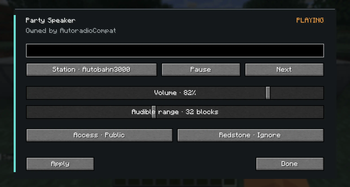
Party Speaker controls
Station, playback, volume, audible range, access and redstone controls for a placed Party Speaker. Captured directly in Minecraft 26.2.