
Compatibility
Minecraft: Java Edition
Platforms
Supported environments


Links
Tags
Creators
Details
Licensed CC-BY-NC-SA-4.0
Published 3 months ago
Updated last month
IMPORTANT:
This mod only works in singleplayer only and cannot and will not be used on multiplayer servers. If you want one that works in multiplayer as well, use this:
https://www.curseforge.com/minecraft/mc-mods/block-locator
Overview
Block Locator (Finder) is a Minecraft mod that lets you quickly find blocks in both singleplayer or multiplayer worlds. It comes with a custom menu that is easy to use and has many features to help you find what you need.
Usage
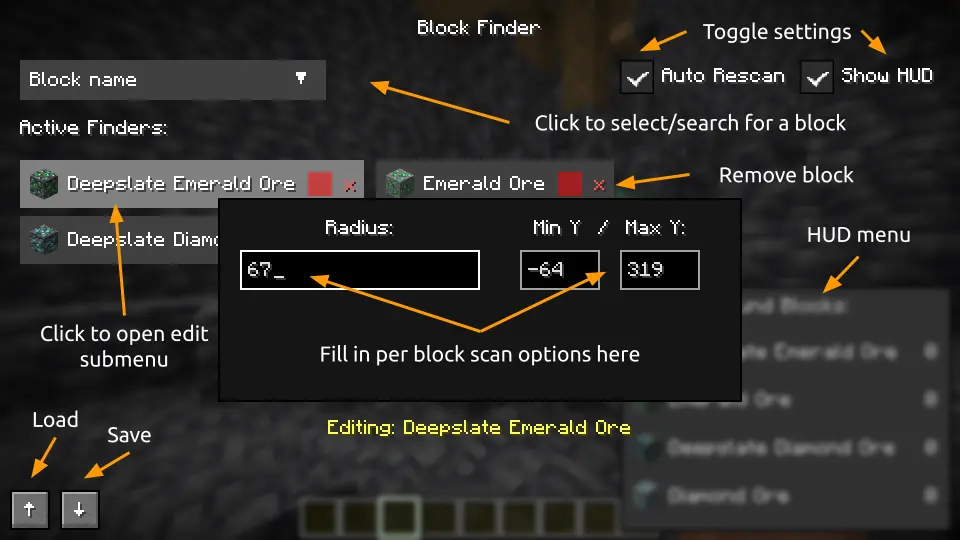
- Open menu: Press 'V' to open the Block Finder menu. If key is taken up, check your keybinds and assign a new one for this menu.
- Add blocks: Click on the dropdown widget and search for your wanted block. Select it to add to the active pool. Many can be added at a time.
- Configure scan settings: Click on one of your blocks and it should bring up a menu to edit scan radius from yourself, color, minimum Y-level, and maximum Y-level.
- Clear block: Click the red 'x' to remove that block from the active pool.
- Toggle Auto Scan: Updates the scanned blocks when the player starts moving.
- Toggle HUD: Shows a live update GUI of the amount of found blocks.
- Submit button: Click to start the scan.
- Clear All button: Click to remove all active pool blocks.
- Load/Save buttons: Import or export JSON for scan configurations (↑ for Load, ↓ for Save).
Dependencies
Make sure to install Fabric API valid for the Fabric mod.
Features
- Highlights matching blocks with x-ray outlines visible through walls.
- Search for multiple block types in a single scan.
- Customize scan radius and minimum/maximum Y-level for each tracked block.
- Assign a unique outline color to every tracked block.
- Quickly find blocks with block icons and friendly searchable dropdown.
- Performs scans on a separate thread to reduce gameplay stuttering.
- Updates results when blocks are broken/placed.
- Has a live HUD giving counts of found blocks.
- Saves and loads configurations through JSON.
- Works with Iris shaders (report issues as needed).
Note to player:
- If you notice "jumping" issues with the tracer lines, turn off View Bobbing in settings (Options → Accessibility Settings → View Bobbing: Off)
- If you run into display problems on Wayland with Forge or Neoforge, run your Minecraft instance with X11.
- If you want to request me to make a release for a different Minecraft version, or if there are any issues, suggestions, please add them to the GitHub https://github.com/echen0719/block-finder/issues or https://docs.google.com/forms/d/e/1FAIpQLSeA5xHOVSt4gOofTIGXKj6x84aETpXDe4h4o3GRChpovcCMpg/viewform so I can improve this mod (with a label please).
Credits
Author: @echen0719 (GitHub)