
Compatibility
Minecraft: Java Edition
Platforms
Supported environments


Links
Tags
Creators
Details
CartanMod
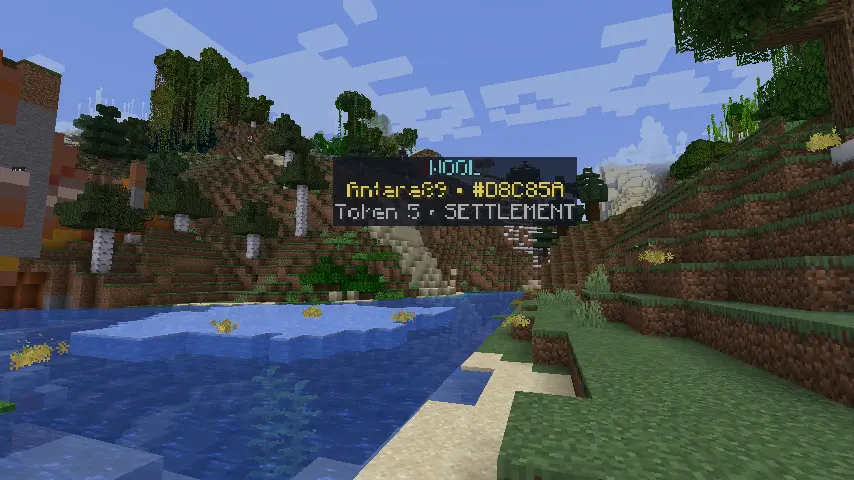
Turn an entire Minecraft world into a living, persistent, Catan-inspired strategy game.
CartanMod transforms the Overworld into a multiplayer board where every 16×16 biome chunk is a resource tile. Explore the landscape, choose a colour, establish settlements, roll for production, trade resources, grow cities into Capitals, construct Great Projects, form teams, complete contracts, and compete for crowns—all while continuing to build and adventure in a normal Minecraft world.
Instead of placing a small board on a table, CartanMod uses the world itself. Forests become sources of wood, dry biomes produce brick, wet biomes produce wool, plains and meadows provide grain, and high or stony terrain yields ore. Every tile receives a production token, claimed chunks are outlined in their owner's colour, and settlements, cities, harbors, and the bandit all become part of a board that can stretch as far as your community wants to take it.
CartanMod works equally well as a focused game night, a long-running survival-server metagame, or a large community land-and-economy system. Games are saved with the world, new players can join after a game has begun, and there is no forced score limit—the world continues until an operator decides it is time for a new board.
Highlights
- A Catan-inspired economy played directly across Minecraft's biome chunks
- Coloured chunk claiming with settlements, specialized cities, mobile outposts, production tokens, and visible borders
- Turn-based rolling, building, banking, harbors, the bandit, and resource production
- Persistent games that survive server restarts
- Capitals and five staged Great Projects that make late-game development matter
- A polished in-game panel with lobby, building, Empire, cards, resources, rules, and local-map controls
- Personal Contracts, risky Merchant Contracts, and twelve different Council action cards
- Teams with shared building access, elected leaders, empire names, treasuries, and public works
- Optional physical resource items, secure personal vaults, cargo delivery, tracking, and raiding
- Protected claims with configurable building, mining, PvP, fire, and explosion rules
- Support for late joining and as many as 1,000 seated players
- Configurable timed production for long-running or asynchronous servers
- Extensive commands with the short
/ctnalias for convenience
How the world becomes the board
CartanMod uses ChunkBiomes so that every chunk has one clear biome identity. That biome determines the resource represented by the tile:
| Terrain | CartanMod resource |
|---|---|
| Forested biomes | Wood |
| Dry biomes | Brick |
| Wet biomes | Wool |
| Plains and meadows | Grain |
| High and stony biomes | Ore |
Production tokens are assigned to tiles, just like numbered spaces on a tabletop board. When a player rolls, every settlement on the matching number produces one resource and every city produces two. A roll of seven activates the bandit instead: place it on a claimed tile to block production and, when allowed, steal a resource from its owner.
Ocean, river, beach, and swamp areas may also contain deterministic harbors. Settle one to improve your bank trades. Merchant Harbors offer 3:1 trading for any resource, while specialist harbors offer 2:1 trading for their named resource. Harbor locations are derived from the world itself, so they remain stable across restarts.
Settle, expand, and specialize
Each player begins by choosing a unique colour. Six familiar named colours are available, but players can also enter an exact hex colour or let CartanMod generate a distinct automatic colour. On their first turn, every player places two free founding settlements. The second settlement grants a starter bundle of wood, brick, wool, and grain so expansion can begin immediately.
After founding, a new settlement must touch land you already control and costs one wood, one brick, one wool, and one grain. Each ordinary settlement can take one permanent specialization: cities double production and add a crown, Trading Posts improve bank rates, Fortresses repel the bandit and Saboteur, and Guild Halls provide Council-card purchases. Specializations are mutually exclusive, so economic growth, defense, and card access remain meaningful choices.
A settlement is worth one crown, a city is worth two, and a Capital is worth three. Completed Great Projects also grant prestige crowns. Crowns provide a clear, unlimited measure of progress without forcing the server to end at an arbitrary score. The live sidebar keeps the active player, current phase, claimed-tile count, bandit position, turn skips, and leading standings visible without revealing anyone's private resource hand.
The Overworld spawn chunk remains a neutral sanctuary and can never be claimed. A player's first settlement also becomes their personal respawn point.
Each player can also deploy one mobile Caravan Outpost in a distant unclaimed chunk. It costs wood and brick, activates after a delay, and has a relocation cooldown. The outpost protects a remote build from fire and explosions without producing resources, granting crowns or harbor rates, extending settlement adjacency, or creating PvP and raid immunity.
Capitals and the late game
A developed City can become a player's one Capital. The City must sit at the heart of a connected cluster with three directly adjacent owned claims and at least three distinct settlement specializations. Players qualify through Merchant Level 2 or by completing three personal Contracts, so Capitals remain available with either the physical-resource economy or the default virtual-resource mode.
Establishing a Capital is a major investment of wood, brick, wool, grain, and ore. In return, it retains double production and its Council chamber, becomes worth three crowns, and unlocks the Era of Empires: five persistent, three-stage Great Projects. Only one may be under construction at a time, and every stage requires a new bundle of resources contributed at the project's anchor.
| Great Project | Where it begins | Permanent reward |
|---|---|---|
| Grand Market | Trading Post | Improves one otherwise-worse bank trade to 2:1 each turn. |
| Citadel | A well-connected Fortress | Protects the Citadel and directly adjacent owned territory from the bandit and Saboteur. |
| University | Guild Hall after completing Contracts and acquiring a Council card | Lets the player choose the type of each future personal Contract. |
| Monument | City or Capital | Awards two prestige crowns. |
| Harbor Network | Capital supported by owned harbors or Trading Posts | Reroutes each physical-resource Merchant Contract once. |
Every project other than the Monument grants one prestige crown on completion. Active stages, completed projects, anchors, rewards, and prestige persist through restarts. Floating claim labels show construction progress and completed landmarks, while the local map distinguishes Cities, Capitals, active construction, and completed Great Projects.
Claims that matter in normal Minecraft
Claimed tiles are more than coloured spaces on a map: they are protected parts of the Minecraft world.
By default, only the owner can build, break, or interact with blocks in a claim. PvP is disabled when either player is inside protected territory, fire cannot burn or spread there, and explosions cannot damage claimed blocks. Owners can permanently trust individual players in a specific claim, while teammates automatically receive shared building and interaction access across one another's territory. A Diplomat Council card can also grant temporary guest access.
Each claimed tile receives a floating label showing its resource, owner, production number, settlement specialization, and any active or completed Great Project. Players can optionally show nearby labels for unclaimed chunks as well. For a cleaner strategic overview, the in-game map presents an authoritative 11×11-chunk view with resource colours, claim borders, Cities, Capitals, project landmarks, specializations, harbors, and the bandit.
Servers that want a stricter land game can enable mining restrictions for all regular players. Operators keep an administrative bypass, Nether and End building remains unrestricted, and a configurable block allowlist makes it possible to exempt universal resources such as snow or sculk.
Trading and economic choices
Resources are private, and ordinary bank trades begin at four matching cards for one card of another type. Claimed harbors, Council cards, trade pacts, embargoes, and team public works can all change the available rates or reshape the market for a turn.
The default resource system uses private virtual balances, keeping the experience streamlined and preventing cards from cluttering normal inventories. Players can check their hand in the panel or with /cartan resources.
For a more physical survival experience, server owners can enable real resource items. Wood, brick, wool, grain, and ore then exist as custom CartanMod items that can be carried, transferred, delivered, tracked, or raided. Players also receive a persistent private CartanMod vault, with commands and an optional automatic-deposit mode for managing their resources safely.
Resource storage restrictions are configurable. With the secure defaults, ordinary CartanMod resources cannot simply be hidden in Ender Chests, shulker boxes, hoppers, or other storage systems. This keeps the economy enforceable and prevents automation from bypassing the intended risk. Full inventories use normal dropped-item behaviour, and resources earned while a player is offline are queued for delivery when they return.
Contracts and merchant progression
Personal Contracts add persistent goals beyond expansion. Accept a Contract and work toward one of several objectives, such as settling normal tiles, constructing a city, receiving dice-produced resources, completing bank trades, or contributing to team Public Works. Finishing a Contract awards a random Council card, and all progress survives restarts. Completing a University Great Project lets its owner select future Contract types instead of relying on a random draw.
When physical resources are enabled, Merchant Contracts create a second, much riskier activity. Accept a public delivery, bind the required loose resources as contract cargo, and carry them to a distant neutral chunk before the deadline. The route is publicly announced, the supplied Merchant Route Compass points toward the destination, and other players may be able to track the carrier while the cargo is exposed.
Cargo cannot be replaced with ordinary resources, passed to another player, or hidden in a vault, chest, hopper, shulker box, or Ender Chest. Successful deliveries advance a personal three-level Merchant career. Higher levels can demand larger cargo loads and longer journeys while offering improved reward tables containing resources, Council cards, or crowns. Thresholds, route lengths, deadlines, cargo multipliers, and weighted rewards are all configurable by the server owner.
Merchant progress also provides a configurable path to the End. By default, /cartan travel end requires three crowns and Merchant Level 2 without consuming either requirement.
Council action cards
Once you own a City, Capital, or Guild Hall and have rolled for the turn, you may buy a random Council card for one ore, one wool, and one grain. Each Council chamber can fund one purchase per turn, but only one card may be played by a player during that turn.
The twelve cards introduce tactical decisions without replacing the core economy:
| Council card | Effect |
|---|---|
| Surveyor | Reveals the resources and production tokens in the surrounding 3×3 chunks. |
| Pioneer | Reduces the cost of your next normal settlement that turn. |
| Harvest Festival | Immediately produces from the tile beneath you. |
| Merchant Charter | Improves your bank trades to 3:1 for the turn. |
| Road Convoy | Settles a neighbouring unclaimed chunk for wood and brick. |
| Saboteur | Moves the bandit to claimed territory outside Fortress or Citadel protection without stealing. |
| Trade Pact | Gives another seated player a 2:1 bank trade. |
| Embargo | Blocks bank trades involving a chosen resource until your next turn. |
| Fortify | Allows one of your tiles to keep producing through the bandit. |
| Public Works | Advances a team project toward permanent 3:1 bank trades. |
| Diplomat | Temporarily grants another player build and interaction access to a claim. |
| Election Campaign | Adds an extra ballot for a teammate during an active election. |
Cards remain private and persistent. They can be reviewed and played from commands, while the panel provides quick controls for common location-based actions.
Teams, empires, and elections
Players can remain independent or organize themselves into persistent teams. Joining an existing team creates a request that must be accepted by its elected leader or an operator. Teammates retain their personal colours and claims, but they can build and interact throughout the team's territory, and their claim, Capital, and Great Project crowns combine into a team score.
Teams include:
- An elected leader with player-run ballots and tie handling
- A custom Empire name displayed on every team tile
- A persistent shared resource treasury
- Leader-controlled withdrawals for accountable shared spending
- Team-wide Public Works progression
- Join requests, approvals, denials, and saved rosters
Elections can be opened by any member, completed automatically when everyone has voted, or closed early to resolve the ballots already cast. Council cards can even influence an active campaign.
Exploration, tracking, and raids
CartanMod encourages movement through the spaces between protected settlements.
The craftable Tracker Compass points toward the nearest online player in the same dimension who is outside all claimed chunks and carrying CartanMod resources. Its needle updates while held and can be refreshed with a right-click.
In physical-item mode, the craftable Raid Hook turns that information into a high-risk encounter. Use it on another player in unprotected territory to seize loose CartanMod resource stacks from their inventory, cursor, and nested vanilla container items. Raids are blocked inside claimed territory and between teammates, do not touch protected vault balances, and have a cooldown after a successful strike. An integration API is available for compatible backpack or accessory mods to expose their extra inventories to the same raid rules.
Designed for small groups and large communities
CartanMod supports up to 1,000 seated players. Automatic colours use separated golden-angle hues, nearby border effects are region-aware, production and ownership lookups are indexed, and the sidebar condenses the standings into a readable leaderboard.
New players may join an active game without interrupting the current turn. They are added to the end of turn order and receive the same two-settlement founding phase when their first turn arrives.
If a player stalls or disconnects, online participants can vote to skip the current turn. A strict majority is required by default, operators can skip immediately, and servers may optionally let regular players bypass the vote. Skipping still resolves production correctly before moving to the next player.
For persistent servers where a traditional turn-by-turn production pace is too slow, timed production can roll globally on a configurable interval. Players keep normal build and trade turns, while the shared timer delivers resources to eligible settlements—even during asynchronous play. Offline production has its own configurable grace period so disconnected players cannot accumulate unlimited wealth.
In-game interface
Press C to open the CartanMod panel. It brings the essential parts of the game together in one place:
- Join, colour selection, and game-start controls
- Turn actions, building, bank trades, and bandit controls
- An Empire tab for establishing a Capital and managing Great Projects
- A private resource and CartanMod-vault readout
- Current Contracts and private Council cards
- Tile, harbor, and player information
- An interactive local world map
- A compact rules reference
Optional key binds for Roll CartanMod Dice and End CartanMod Turn are included in Minecraft's Controls menu and are unbound by default. Server responses also remain available in chat, so command-focused players can use the entire game without depending on the panel.
Both /cartan and the shorter /ctn command root are supported. Start with /cartan help for the full in-game command list.
Quick start
- Install CartanMod and its required dependencies on the server and participating clients.
- Join the world and press C, or choose a colour with
/cartan join <color>. - Have an operator or the server console run
/cartan start. - On your first turn, place two free founding settlements with
/cartan claim. - On later turns, use
/cartan roll, build or trade, then finish with/cartan end. - Develop specialized settlements, establish a Capital, and construct Great Projects through the panel's Build and Empire tabs.
- Use
/cartan map,/cartan harbor,/cartan cards,/cartan contracts, and/cartan helpas you explore the wider systems.
The operator command /cartan reset deliberately clears the saved board and begins a fresh game. Ordinary server restarts do not reset progress.
Persistence and configuration
CartanMod saves its board in the Overworld's normal saved data. Players, colours, resource hands, claims, settlement specializations, Capitals, active Great Project stages, project anchors and rewards, prestige crowns, turn state, founding progress, bandit location, Council cards, Contracts, Merchant progress, teams, elections, treasuries, public works, permissions, and temporary effects are restored after a restart. The live sidebar returns automatically when the world loads.
Server owners can customize the experience in config/cartanmod.properties. Major options include:
- Virtual or physical resource items
- Resource storage restrictions and automatic vault behaviour
- Mining restrictions and globally breakable block overrides
- First-join and seated-player game modes
- Timed production interval and message visibility
- Offline production grace time
- Player turn-skip permissions
- Merchant cargo, distance, deadline, progression, and rewards
- Crown and Merchant-level requirements for End travel
Change configuration while the server is stopped. Options that alter the resource model should be changed between games and followed by a deliberate board reset.
Requirements
- Minecraft: Java Edition 1.21.1
- Java 21 or newer
- Fabric Loader 0.18.4 or newer
- Fabric API
- ChunkBiomes (
chunkbiomes-1.0.0.jar)
Install CartanMod alongside Fabric API and ChunkBiomes. For multiplayer, use matching mod versions across the server and participating clients.
CartanMod is an independent, Catan-inspired Minecraft project. It is designed for communities that enjoy settlement building, negotiation, territorial strategy, risky journeys, and a world that keeps telling its story long after the first roll.