
Compatibility
Minecraft: Java Edition
Platforms
Supported environments


Links
Tags
Creators
Details
Cell⁴
Infinite ME Storage Cells for Applied Energistics 2
Cell⁴ is an AE2 addon designed for modpack development. It adds Infinity Cells that can be bound to specific items via NBT or data components, allowing infinite extraction from the ME network. Inserted matching items are silently discarded, consuming no actual storage.
Supported versions: 1.20.1 (Forge), 1.21.1 (NeoForge), 26.1.2 (NeoForge)
Infinity Cell Types
- Infinity Item Cell — bind specific items/fluids, including entries with full NBT/components
- Infinity Tag Cell — bind all items matching tags and/or from specified mods
- Infinity ModID Cell — bind all items from a mod
- Portable Infinity Item / Tag / ModID Cell — portable variants using AE2's portable terminal UI, with configurable energy
Cell Configurator
The Cell Configurator is an in-game tool for editing cell data visually. Right-click while holding it to open the configuration GUI, then place a cell into the slot.
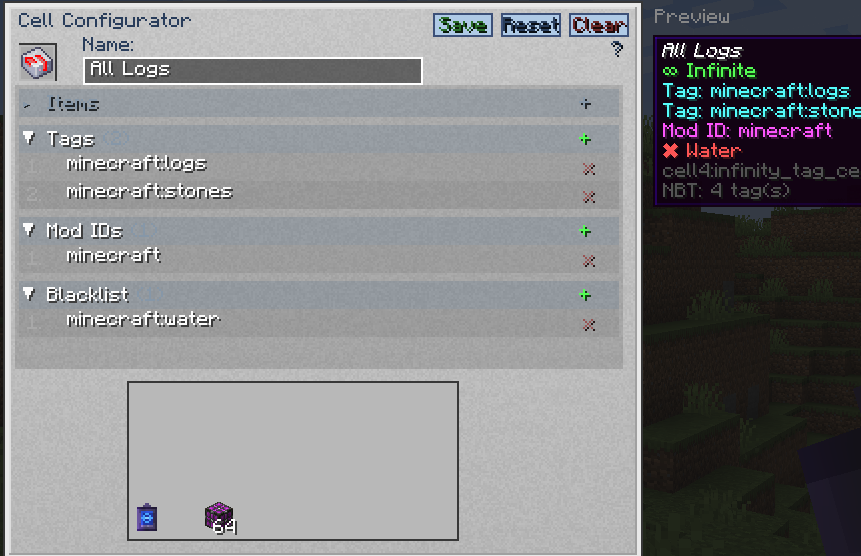
- Editable fields change based on the cell type placed in the slot.
- Inactive fields cannot be focused.
- Each entry has its own field. Add entries with the
+button, by holding an item and clicking the Item / Blacklist section, or by dragging items from JEI / REI / EMI. - In the blacklist field, prefix tags with
#(e.g.#minecraft:birch_logs) and mod IDs with@(e.g.@mekanism). - Press Tab to cycle between editable fields, Enter to save, or click Save / Reset / Clear.
- The right side shows a Preview panel with the cell tooltip as it would appear in your inventory; a custom name updates in real time.
| Cell Type | Editable Fields |
|---|---|
| Item Cell | cell4item, cell4blacklist |
| Tag Cell | cell4tag, cell4modid, cell4blacklist |
| ModID Cell | cell4modid, cell4blacklist |
| Portable variants | Same as the corresponding base cell, plus energy fields |
Workbench UI
The left sidebar can switch to an AE2 cell-workbench-style UI for Infinity Item Cells:
- 63 configuration slots per page plus the cell slot.
- Binding, replacing, or removing an entry saves automatically.
- Clicking an empty slot appends in order; clicking an occupied slot replaces it.
- Free page navigation, including blank pages.
Commands
/cell4 gui— open the Cell Configurator/cell4 texfile— open the custom texture folder
Data Keys
| Key | Target | Example |
|---|---|---|
cell4item |
Specific items/fluids or full item entries | "minecraft:diamond" |
cell4tag |
Tag | "minecraft:logs" |
cell4modid |
Mod ID (Tag Cell also supports this) | "mekanism" |
cell4blacklist |
Exclude items/tags/mods (optional) | See below |
cell4name |
Custom display name (optional) | "My Diamond Cell" |
cell4texture |
Custom texture name (optional) | "example" |
cell4power |
Portable cell current energy | 5000.0d |
cell4power_max |
Portable cell capacity | 100000L |
cell4power_cost |
Energy per extracted item | 20L |
cell4power_charge |
Charge per tick | 8.0d |
1.20.1 stores these keys as raw NBT (
{...}). 1.21.1 & 26.1.2 store them inside data components ([custom_data={...}]).
Portable energy rules: max=0 means no power and no energy bar; max>0 && cost=0 shows the bar but consumes no power; max>0 && cost>0 consumes energy per item.
Item Entries
On 1.20.1, cell4item accepts plain IDs, id{full NBT}, and full compounds {id:"...",Count:1,tag:{...}}. Nested NBT, including data from other mods such as AE2 portable cells, is preserved.
On 1.21.1/26.1.2, cell4item accepts plain IDs, id[components], id{custom_data:{...}}, and full compounds {id:"...",count:1,components:{...}}. Components registered by other mods are supported.
Version notes for components:
- 1.21.1:
minecraft:enchantments={levels:{'minecraft:sharpness':5}}. - 26.1.2: enchantments use a bare map
{'minecraft:sharpness':5}; attribute modifiers use a bare list;dyed_coloris an int. - Text components: prefer
{text:'...'}on 26.1.2;'{"text":"..."}'is treated as plain text.
Command Examples
1.21.1 & 26.1.2 use [custom_data={...}] syntax; 1.20.1 uses {...} syntax. Tag namespace: c: in 1.21.1/26.1.2, forge: in 1.20.1.
Single Value
# 1.21.1 / 26.1.2
/give @p cell4:infinity_item_cell[custom_data={cell4item:"minecraft:diamond"}]
/give @p cell4:infinity_tag_cell[custom_data={cell4tag:"minecraft:logs"}]
/give @p cell4:infinity_modid_cell[custom_data={cell4modid:"mekanism"}]

# 1.20.1
/give @p cell4:infinity_item_cell{cell4item:"minecraft:diamond"}
/give @p cell4:infinity_tag_cell{cell4tag:"minecraft:logs"}
/give @p cell4:infinity_modid_cell{cell4modid:"mekanism"}
Multiple Values
# 1.21.1 / 26.1.2
/give @p cell4:infinity_item_cell[custom_data={cell4item:["minecraft:diamond","minecraft:oak_log"]}]
/give @p cell4:infinity_tag_cell[custom_data={cell4tag:["minecraft:logs","c:ingots/iron"]}]
/give @p cell4:infinity_modid_cell[custom_data={cell4modid:["mekanism","thermal"]}]

# 1.20.1
/give @p cell4:infinity_item_cell{cell4item:["minecraft:diamond","minecraft:oak_log"]}
/give @p cell4:infinity_tag_cell{cell4tag:["minecraft:logs","forge:ingots/iron"]}
/give @p cell4:infinity_modid_cell{cell4modid:["mekanism","thermal"]}
Tag Cell with Mod ID Filter
The Infinity Tag Cell supports both cell4tag and cell4modid simultaneously:
# 1.21.1 / 26.1.2
/give @p cell4:infinity_tag_cell[custom_data={cell4tag:"minecraft:logs",cell4modid:"mekanism"}]
/give @p cell4:infinity_tag_cell[custom_data={cell4tag:["minecraft:logs","c:ingots/iron"],cell4modid:["mekanism","thermal"]}]

# 1.20.1
/give @p cell4:infinity_tag_cell{cell4tag:"minecraft:logs",cell4modid:"mekanism"}
/give @p cell4:infinity_tag_cell{cell4tag:["minecraft:logs","forge:ingots/iron"],cell4modid:["mekanism","thermal"]}
Items with NBT / Components
# 1.21.1
/give @p cell4:infinity_item_cell[custom_data={cell4item:["minecraft:diamond_sword[minecraft:custom_name={text:'Test Sword'},minecraft:enchantments={levels:{'minecraft:sharpness':5}}]","minecraft:stone{custom_data:{CustomTag:'test'}}","{id:'minecraft:golden_apple',count:1,components:{'minecraft:custom_name':{text:'Full'}}}"]}]

# 26.1.2
/give @p cell4:infinity_item_cell[custom_data={cell4item:["minecraft:diamond_sword[minecraft:custom_name={text:'Test Sword'},minecraft:enchantments={'minecraft:sharpness':5},minecraft:attribute_modifiers=[{type:'minecraft:attack_damage',id:'test:atk',amount:10,operation:'add_value',slot:'mainhand'}]]","minecraft:stone{custom_data:{CustomTag:'test'}}"]}]

# 1.20.1
/give @p cell4:infinity_item_cell{cell4item:["minecraft:diamond_sword{Enchantments:[{id:'minecraft:sharpness',lvl:5}],display:{Name:'{\"text\":\"Test Sword\"}'}}","minecraft:stone{CustomTag:'test',CustomNumber:42}","{id:'minecraft:golden_apple',Count:1,tag:{CustomTag:'full'}}"]}
Portable Cell with Energy
# 1.21.1 / 26.1.2
/give @p cell4:portable_infinity_item_cell[custom_data={cell4item:"minecraft:diamond",cell4power:5000.0d,cell4power_max:100000L,cell4power_cost:20L,cell4power_charge:8.0d}]

# 1.20.1
/give @p cell4:portable_infinity_item_cell{cell4item:"minecraft:diamond",cell4power:5000.0d,cell4power_max:100000L,cell4power_cost:20L,cell4power_charge:8.0d}
Blacklist
Blacklist entries support three types:
- Item — plain identifier (e.g.
minecraft:birch_log) - Tag — prefixed with
#(e.g.#minecraft:birch_logs) - Mod ID — prefixed with
@(e.g.@mekanism)
# 1.21.1 / 26.1.2
/give @p cell4:infinity_tag_cell[custom_data={cell4tag:"minecraft:logs",cell4blacklist:"minecraft:birch_log"}]
/give @p cell4:infinity_modid_cell[custom_data={cell4modid:"mekanism",cell4blacklist:["mekanism:steel_ingot","#c:ingots/steel","@thermal"]}]

# 1.20.1
/give @p cell4:infinity_tag_cell{cell4tag:"minecraft:logs",cell4blacklist:"minecraft:birch_log"}
/give @p cell4:infinity_modid_cell{cell4modid:"mekanism",cell4blacklist:["mekanism:steel_ingot","#forge:ingots/steel","@thermal"]}
Blacklisted items are shown in the cell tooltip with a ✖ marker.
Custom Textures
Set cell4texture to a texture name (the cell4textrue typo is also accepted):
/give @p cell4:infinity_item_cell[custom_data={cell4item:"minecraft:diamond",cell4texture:"example"}]
Place <name>.png and optional <name>.png.mcmeta in config/Cell4/.pack/assets/cell4/textures/item/. Open it with the Configurator's folder button or /cell4 texfile, then press F3+T to reload.
Mod Compatibility
- JEI / REI / EMI: the item panel moves aside when the preview appears, and items can be dragged onto the configurator.
- 1.20.1 / 1.21.1: JEI + REI + EMI.
- 26.1.2: JEI + REI (EMI has no 26.1 version).
Building
./gradlew build
The output JAR will be in build/libs/.
Dependencies
| Minecraft | Loader | AE2 |
|---|---|---|
| 1.20.1 | Forge 47.1.0+ | 15.0.23+ |
| 1.21.1 | NeoForge 21.1.169+ | 19.2.17+ |
| 26.1.2 | NeoForge 26.1.2.55-beta+ | 26.1.8-alpha+ |
Attribution
This mod references the design of ExtendedAE's InfinityCell for the infinite extraction concept and getAsIntMax() display logic. The Tag Cell and ModID Cell are original extensions of this concept.