Compatibility
Minecraft: Java Edition
Platforms
Supported environments


Links
Tags
Creators
Details
# CheapAway
You may have encountered this situation: a bunch of coal lies on the ground with a single diamond among them, but you can't quickly pick up just the rarest diamond — very frustrating and uncomfortable. Or when there's too much loot and you want to discard the worthless items, you have to check each one individually? Very frustrating and uncomfortable.
Thus, the CheapAway mod was born! With the support of RarityCore, you can now choose to refuse pickup for items below a specified rarity, or quickly discard items below a specified rarity from your inventory.
# Usage
You can define default values for each feature in the config file.
In-game, you can perform specific operations in several ways:
- Toggle pickup filter: hotkey or command
- Set the pickup filter rarity: command
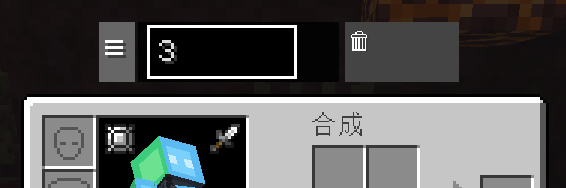
- One-click item discard and parameter adjustment: floating panel in the GUI
# Floating Panel Description
The floating panel is only displayed in the survival inventory.
- The three lines on the far left can be dragged to reposition the floating window
- The input box in the middle sets the target rarity
- Click the trash can button on the right twice to discard all items below the specified rarity
# Screenshots