
Compatibility
Minecraft: Java Edition
Platforms
Supported environments


Tags
Creators
Details
Chimage is a Minecraft mod that lets you paste, preview, and share images directly in the in-game chat.
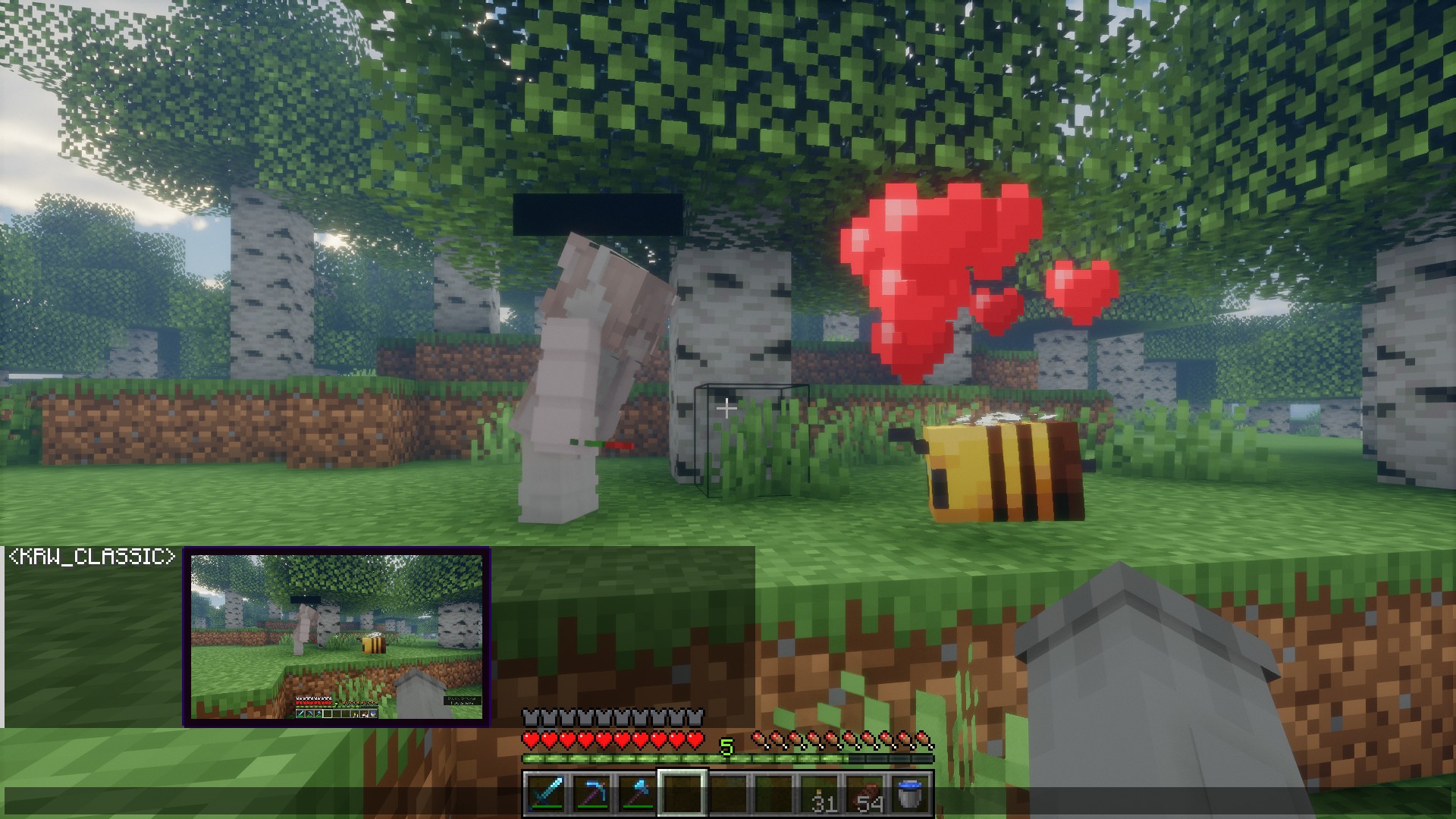
Aiming to support both Fabric and Forge on every Minecraft version from 1.16.5 onwards.
How to use
Using Chimage is straightforward. There are three ways to attach an image to your chat message:
- Clipboard: Simply press
CTRL + Vwhile the chat bar is open. (With image or image file in clipboard) - Drag & Drop: Drag an image file from your computer directly into the Minecraft window while the chat is open.
- URL Loading: Type
!(your_url)in the chat, or simply type!and pressCTRL + Vwith an image link. Chimage will automatically fetch it directly from the web!
Once you've attached an image, a small preview window will appear above your chat bar. This lets you confirm the image before sending it.
Features List
- Clipboard Paste: Press
CTRL + Vwhile the chat is open to send images from your clipboard. - Drag & Drop: Drag image files from your computer directly into the game window while the chat is open.
- URL Loading: Fetch images, GIFs, and gallery links (like Imgur, Tenor, and Klipy) instantly by pasting links or typing
!(url). - Attachment Drawer: Open the attachment drawer at any time to pick images from your computer, attach F2 screenshots, or start a blank canvas.
- Real-Time Preview: See a preview window of your image to confirm before sending, with an animated border indicator during upload cooldowns.
- In-Chat Rendering: View images sent by other players directly within the chat box.
- Fullscreen Viewer: Click any image in chat to view it in fullscreen with zoom support.
- Remix Button: Click the Remix button on an image sent by another player to open it in the editor, modify it, and send back your own version.
- Private Message Support: Share images directly in private messages (
/msg,/tell, etc.) with configurable command support. - Image Metadata: Hold
SHIFTwhile hovering over an image to see its details. - Quick Download: Use
SHIFT + Left Clickon an image to save it to your computer. - Quick Copy: Use
CTRL + Left Clickon an image to copy it straight to your clipboard. - Spoilers: Mark images as spoilers to keep them blurred in chat until hovered or clicked.
- Vanilla Compatibility: Vanilla clients can view images via clickable fallback links (if enabled by the server).
- Client-Side Downscaling: Enforce a resolution limit to automatically downscale large incoming images, reducing memory usage and improving performance.
- Highly Configurable: Adjust maximum image sizes, rendering limits, behaviours, and more.
- Built-in Image Editor: Draw, erase, pick colors, crop, and resize images before sending them.
- Immersive Paintings Integration: Export your edited images directly into the world as custom paintings or graffiti!
Image Editor
Chimage features a robust built-in Image Editor, allowing you to quickly modify images right before sending them in chat.
Features include:
- Pen & Eraser: Draw or erase directly on the image with customizable brush sizes.
- Color Picker: A fully-featured RGB/HSL/HSV & Alpha color picker to select the exact color you need.
- Resize: Scale the image up or down, optionally locking the aspect ratio.
- Crop: Quickly crop out the important parts of the image.
- Undo / Redo: Made a mistake? Use
Ctrl+ZandCtrl+Yto undo or redo your actions.
View Editor Screenshots
(Screenshots coming soon)
Immersive Paintings Integration
If you have the Immersive Paintings mod installed alongside Chimage, a new export button will appear inside the Image Editor!
This feature allows you to take any image or any drawing you've made inside the editor and instantly convert it into a custom painting or graffiti item. You can then place it anywhere in your Minecraft world!
Commands
/chimage config- Manage your Client and Server configurations directly from chat./chimage server- Commands to manage the Built-in HTTP Server (status,start,stop,getActiveFiles,getLatestLog, etc)./chimage access- Manage the Access List (mode,add,remove,list) to control exactly who is allowed to send images./chimage debug- Trigger test downloads or enable developer overlay options (viewBoundingBoxes,verbose)./chimage version- Check the mod version, game version, and loader type.
Server Compatibility
Vanilla Servers The mod is disabled on vanilla servers. In order to upload and share images, the server must also have the mod installed.
Vanilla Clients (Link-based fallback) If a player connects without the mod installed, they can still "see" the images via link-based fallbacks! The server converts uploaded images into clickable web links for vanilla clients to open in their browser. (Note: Server owners must configure this feature themselves).
Server & Web Viewer Setup
Chimage includes a built-in HTTP server that allows vanilla clients or out-of-game users to view uploaded images directly in a browser with a sleek UI!
1. Extract Web Files
Find the ImageHost.zip provided alongside the mod JAR under Supplementary resources. Extract this zip directly into the root folder of your Minecraft server (the same folder that contains your mods folder, server.properties, etc.). It must create a folder exactly named ImageHost.
Example path: /path/to/server/ImageHost/index.html
2. Configure Settings
Open your config/chimage-server.json file (or simply use the in-game Mod Menu -> Chimage -> Hosting tab) and adjust the following settings:
"enableClickableLinks": true- Allows the mod to send web links in chat instead of falling back to raw data if a player doesn't have the mod."clickableLinkUrlPlaceholder": "http://images.yoursite.com/"- The base URL given to players. Make sure to include the trailing slash! If you do not have a domain or reverse proxy, you can also use your IP and port like"http://1.2.3.4:8080/"."enableBuiltInHostServer": true- Turns on the built-in HTTP server."builtInHostServerPort": 8080- The port the server will run on (change this if 8080 is already used).
3. Optional: Nginx Reverse Proxy
If you want to use a domain name (like images.yoursite.com) without exposing the port, you can use Nginx to reverse-proxy traffic to Chimage.
server {
    listen 80;
    server_name images.yoursite.com;

    location / {
        proxy_pass http://localhost:8080;
        proxy_set_header Host $host;
        proxy_set_header X-Real-IP $remote_addr;
    }
}
You can easily secure this with HTTPS by installing Certbot and running certbot --nginx -d images.yoursite.com! (If you do this, remember to change your clickableLinkUrlPlaceholder to "https://images.yoursite.com/")
4. Testing the Server
You can check if the internal HTTP server is running and manage it directly in-game using the following commands:
/chimage server status- Check if the HTTP server is running and see its current uptime./chimage server startorstop- Manually turn the built-in HTTP server on or off./chimage server getActiveFiles- Check how many uploaded images are currently stored and being served./chimage server getLatestLog- View the most recent HTTP server access logs right in your chat./chimage server getWebsitePath- Verify the directory from which the server is serving your HTML files.
Bleeding Edge Builds
You can download the newest, bleeding-edge versions of the mod directly from the official website: https://chimage.krwclassic.com/
(Warning: These versions are in active development and might be unstable!)
Planned Features (TODO)
1.3.1
- Aspect ratio buttons (crop, expand, and resize when unlinked ratio instead of a size slider)
- Text tool expandable top toolbar with e.g. text background option
- More native textures in editor (swap top toolbar and color widget with dirt bar and stone button texture)
1.4.X
- Add an option to configure mouse polling rate for drawing tools
- Fix ~1.16.5 updating older messages based on some settings like vanilla mode
- Gallery (saving images and gifs)
- Editor use tutorial with toasts (how to move, shortcuts etc.)
- "Update available" toast on world join if user is OP (Server to all operators on chat too)
- Multiple images support??? 1.3.X | arrows to cycle thru attached images (auto cycle thru img config)
- Allow Image Editor for gifs with drawing tool excluded
- Layers
- Video support (1.3.X/1.4.X)
- Download progress bar
- Range version support (1.16.x instead of 1.16.5)
Unknown
- Make Renderium (and switch from rendering with spam of preprocessor blocks)
- Finish writing BaLLib and switch from using Cloth Config (because of feature parity across cloth versions)
- Discord Chat addon (messages and images between discord and mc chat)
View Editor Screenshots
(Screenshots coming soon)
Immersive Paintings Integration
If you have the Immersive Paintings mod installed alongside Chimage, a new export button will appear inside the Image Editor!
This feature allows you to take any image or any drawing you've made inside the editor and instantly convert it into a custom painting or graffiti item. You can then place it anywhere in your Minecraft world!
Commands
/chimage config- Manage your Client and Server configurations directly from chat./chimage server- Commands to manage the Built-in HTTP Server (status,start,stop,getActiveFiles,getLatestLog, etc)./chimage access- Manage the Access List (mode,add,remove,list) to control exactly who is allowed to send images./chimage debug- Trigger test downloads or enable developer overlay options (viewBoundingBoxes,verbose)./chimage version- Check the mod version, game version, and loader type.
Server Compatibility
Vanilla Servers The mod is disabled on vanilla servers. In order to upload and share images, the server must also have the mod installed.
Vanilla Clients (Link-based fallback) If a player connects without the mod installed, they can still "see" the images via link-based fallbacks! The server converts uploaded images into clickable web links for vanilla clients to open in their browser. (Note: Server owners must configure this feature themselves).
Server & Web Viewer Setup
Chimage includes a built-in HTTP server that allows vanilla clients or out-of-game users to view uploaded images directly in a browser with a sleek UI!
1. Extract Web Files
Find the ImageHost.zip provided alongside the mod JAR under Supplementary resources. Extract this zip directly into the root folder of your Minecraft server (the same folder that contains your mods folder, server.properties, etc.). It must create a folder exactly named ImageHost.
Example path: /path/to/server/ImageHost/index.html
2. Configure Settings
Open your config/chimage-server.json file (or simply use the in-game Mod Menu -> Chimage -> Hosting tab) and adjust the following settings:
"enableClickableLinks": true- Allows the mod to send web links in chat instead of falling back to raw data if a player doesn't have the mod."clickableLinkUrlPlaceholder": "http://images.yoursite.com/"- The base URL given to players. Make sure to include the trailing slash! If you do not have a domain or reverse proxy, you can also use your IP and port like"http://1.2.3.4:8080/"."enableBuiltInHostServer": true- Turns on the built-in HTTP server."builtInHostServerPort": 8080- The port the server will run on (change this if 8080 is already used).
3. Optional: Nginx Reverse Proxy
If you want to use a domain name (like images.yoursite.com) without exposing the port, you can use Nginx to reverse-proxy traffic to Chimage.
server {
    listen 80;
    server_name images.yoursite.com;

    location / {
        proxy_pass http://localhost:8080;
        proxy_set_header Host $host;
        proxy_set_header X-Real-IP $remote_addr;
    }
}
You can easily secure this with HTTPS by installing Certbot and running certbot --nginx -d images.yoursite.com! (If you do this, remember to change your clickableLinkUrlPlaceholder to "https://images.yoursite.com/")
4. Testing the Server
You can check if the internal HTTP server is running and manage it directly in-game using the following commands:
/chimage server status- Check if the HTTP server is running and see its current uptime./chimage server startorstop- Manually turn the built-in HTTP server on or off./chimage server getActiveFiles- Check how many uploaded images are currently stored and being served./chimage server getLatestLog- View the most recent HTTP server access logs right in your chat./chimage server getWebsitePath- Verify the directory from which the server is serving your HTML files.
Bleeding Edge Builds
You can download the newest, bleeding-edge versions of the mod directly from the official website: https://chimage.krwclassic.com/
(Warning: These versions are in active development and might be unstable!)
Planned Features (TODO)
1.3.1- Aspect ratio buttons (crop, expand, and resize when unlinked ratio instead of a size slider)
- Text tool expandable top toolbar with e.g. text background option
- More native textures in editor (swap top toolbar and color widget with dirt bar and stone button texture)
1.4.X
- Add an option to configure mouse polling rate for drawing tools
- Fix ~1.16.5 updating older messages based on some settings like vanilla mode
- Gallery (saving images and gifs)
- Editor use tutorial with toasts (how to move, shortcuts etc.)
- "Update available" toast on world join if user is OP (Server to all operators on chat too)
- Multiple images support??? 1.3.X | arrows to cycle thru attached images (auto cycle thru img config)
- Allow Image Editor for gifs with drawing tool excluded
- Layers
- Video support (1.3.X/1.4.X)
- Download progress bar
- Range version support (1.16.x instead of 1.16.5)
Unknown
- Make Renderium (and switch from rendering with spam of preprocessor blocks)
- Finish writing BaLLib and switch from using Cloth Config (because of feature parity across cloth versions)
- Discord Chat addon (messages and images between discord and mc chat)