
Compatibility
Minecraft: Java Edition
Platforms
Supported environments


Links
Tags
Creators
Details
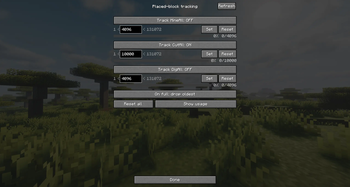
Advanced Placed-Block Tracking
Advanced Placed-Block Tracking The core system that safeguards your builds. Independently toggle tracking for each function and set precise limits on remembered blocks using text inputs or sliders. You can also define the overflow behavior (e.g., dropping
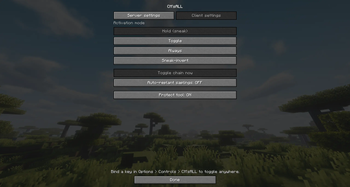
Per-Player Client Preferences
Under the "Client settings" tab, individual players can choose their preferred activation mode (Hold, Toggle, Always, or Sneak-invert), toggle personal auto-replanting, and enable tool protection to prevent breaking favorite gear.
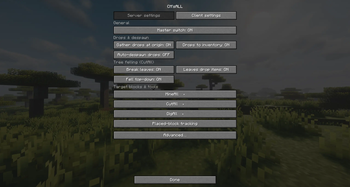
Server Settings Menu
The main configuration hub accessible via the pause screen. Easily toggle the master switch, manage drop options (gather at origin / directly to inventory), and customize tree-felling behaviors such as leaf-breaking and top-down felling.
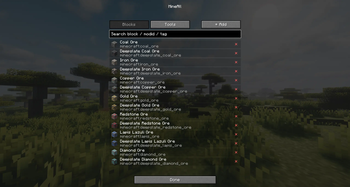
Block List & Quick Removal
View all registered blocks for each harvesting function. Easily remove any vanilla or modded block from the chain list with a single click on the "×" button.
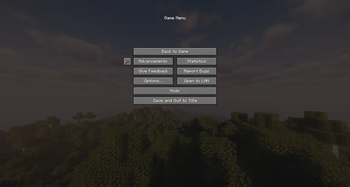
Seamless Game Menu Integration
A custom iron-pickaxe button is added directly to the left of the "Advancements" button in the pause menu (Esc). This allows immediate access to all mod settings at any time, eliminating the need to type cumbersome commands in the chat.
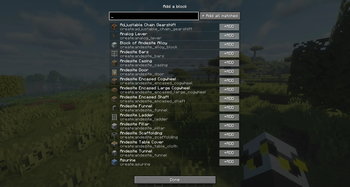
Seamless Modded Block Integration
Search through any block in the game registries to expand your harvest lists. Supports full text matching and bulk-adding from other major mods (such as Create, shown here) via the "Add all matches" button.