Compatibility
Minecraft: Java Edition
Platforms
Supported environments


Tags
Creators
Details
New textures
from 1.6.4 forward
![[NEW UI] Expedition Board](https://cdn.modrinth.com/data/HtRy1shF/images/1638d53e05f679b9cf364c8fbb45911f625a75f1_350.webp)
[NEW UI] Expedition Board
![[NEW UI] Admin Panel](https://cdn.modrinth.com/data/HtRy1shF/images/69442671134c3bb7906973978ed4988efdc829ae.png)
[NEW UI] Admin Panel
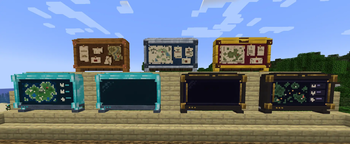
![[OLD MODELS] All board tiers](https://cdn.modrinth.com/data/HtRy1shF/images/7bdcfd977eb684c27a765bd476c84bd0fe4ccdfa_350.webp)
[OLD MODELS] All board tiers
All board tiers and how they look once placed.
![[OLD UI] Expedition Board](https://cdn.modrinth.com/data/HtRy1shF/images/a3d55fa1af7ecf951808407ea3d31cdf5d903ac5.png)
[OLD UI] Expedition Board
We can see the selected pokemons and expedition, the Power requirement is met, we can see the success rate and the "GO!" button is green.
![[OLD UI] Admin GUI - Expeditions](https://cdn.modrinth.com/data/HtRy1shF/images/2ac2f1bf96ea56262e95de51fb1b0d3d2f385a72_350.webp)
[OLD UI] Admin GUI - Expeditions
This is the Admin only GUI. Inside this tab, there is the list of existing Expeditions, with the buttons to save, create a new one, or delete the selected one. on the right side we can see all the editable values of the expedition.
![[OLD UI] Admin GUI - Loot Tables](https://cdn.modrinth.com/data/HtRy1shF/images/e1734cfb36431c7adae95eb271cd1f6f8dc0e3a8_350.webp)
[OLD UI] Admin GUI - Loot Tables
This is the Admin only GUI. Inside this tab, we can see the Loot tables for the different expeditions, they are categorized in 3 tiers (Common. Uncommon and Rare). We can edit existing loots, remove them or add new ones.
![[OLD UI] Admin GUI - Loot Tables - Select new Item](https://cdn.modrinth.com/data/HtRy1shF/images/02b57460dbf7cce5fe55a91642749736335316ce_350.webp)
[OLD UI] Admin GUI - Loot Tables - Select new Item
This is the Admin only GUI. Inside the Loot Tables tab, we can see a sub menu where the user can see all the items/blocks and select any of those to add to the loot table easily.