
Compatibility
Minecraft: Java Edition
Platforms
Supported environments


Tags
Creators
Details







⚒️ Collapsible Game Rules
"Tame the chaos of world creation—every rule, cleanly organized at your fingertips."
📖 Introduction
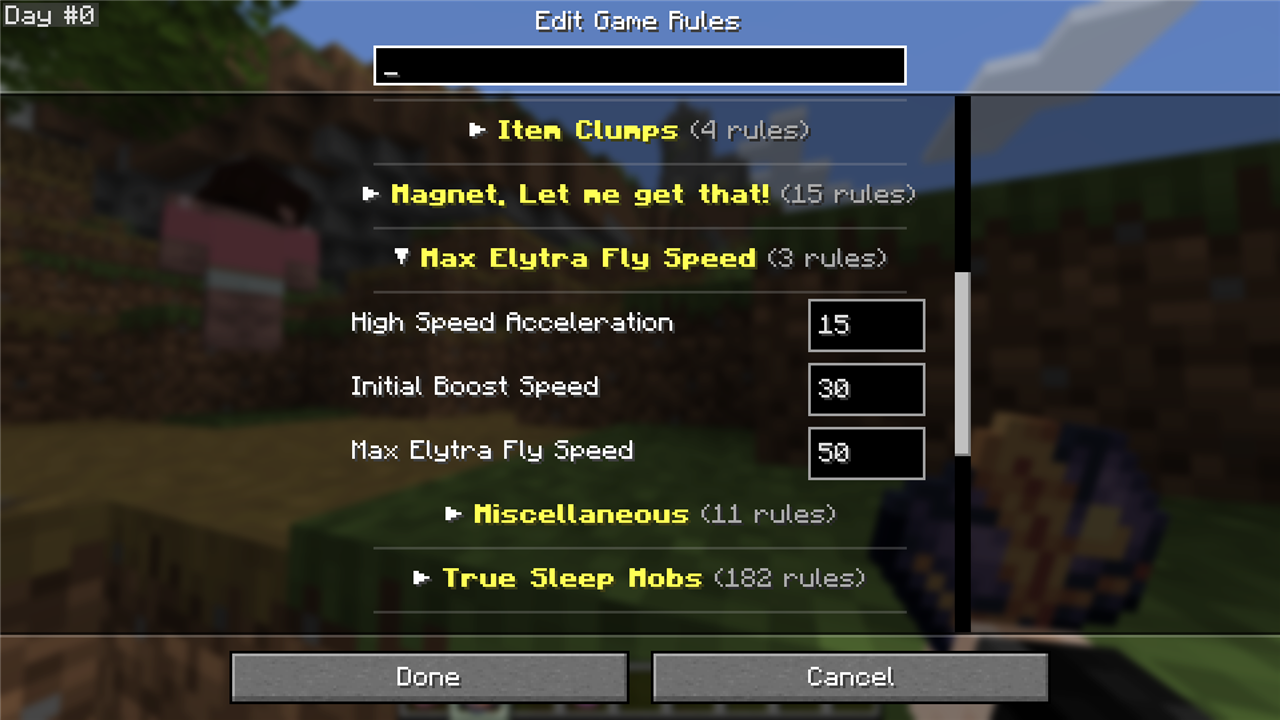
Minecraft's default Edit Game Rules screen is an intimidating, endless wall of disorganized settings. The moment you install gameplay mods or create a complex world, dozens upon dozens of custom rules get tossed into a flat, sluggish list. Finding a single specific toggle—like keep inventory, mob griefing, or crop ticks—turns into a frustrating marathon of squinting and scrolling.
Collapsible Game Rules completely modernizes the Game Rules screen. It transforms the flat list into an elegant, hierarchical interface with folding category drawers, instant global fold/unfold toggles, real-time search auto-expansion, dedicated per-category defaults resetting, and persistent layout memory across game sessions. Built from the ground up as a 100% client-side quality-of-life upgrade, it runs with zero server footprint and zero allocation churn on the render path.
[!IMPORTANT] 1 Jar 1 Version Policy: I build 1 dedicated JAR for each Minecraft version (e.g. MC 26.2, MC 26.3). Please download the exact build that matches your Minecraft installation.
Dependency Callout:
- Minecraft 26.2+ (Modern Era): Requires both Fabric API AND Dasik Library (
v1.7.0+).- Zero Server Requirement: This is a 100% client-side visual overhaul. You can install it on your client and join any vanilla, Fabric, Forge, Paper, or Purpur server without needing the mod installed on the server!
✨ Features
📂 Hierarchical Collapsible Categories
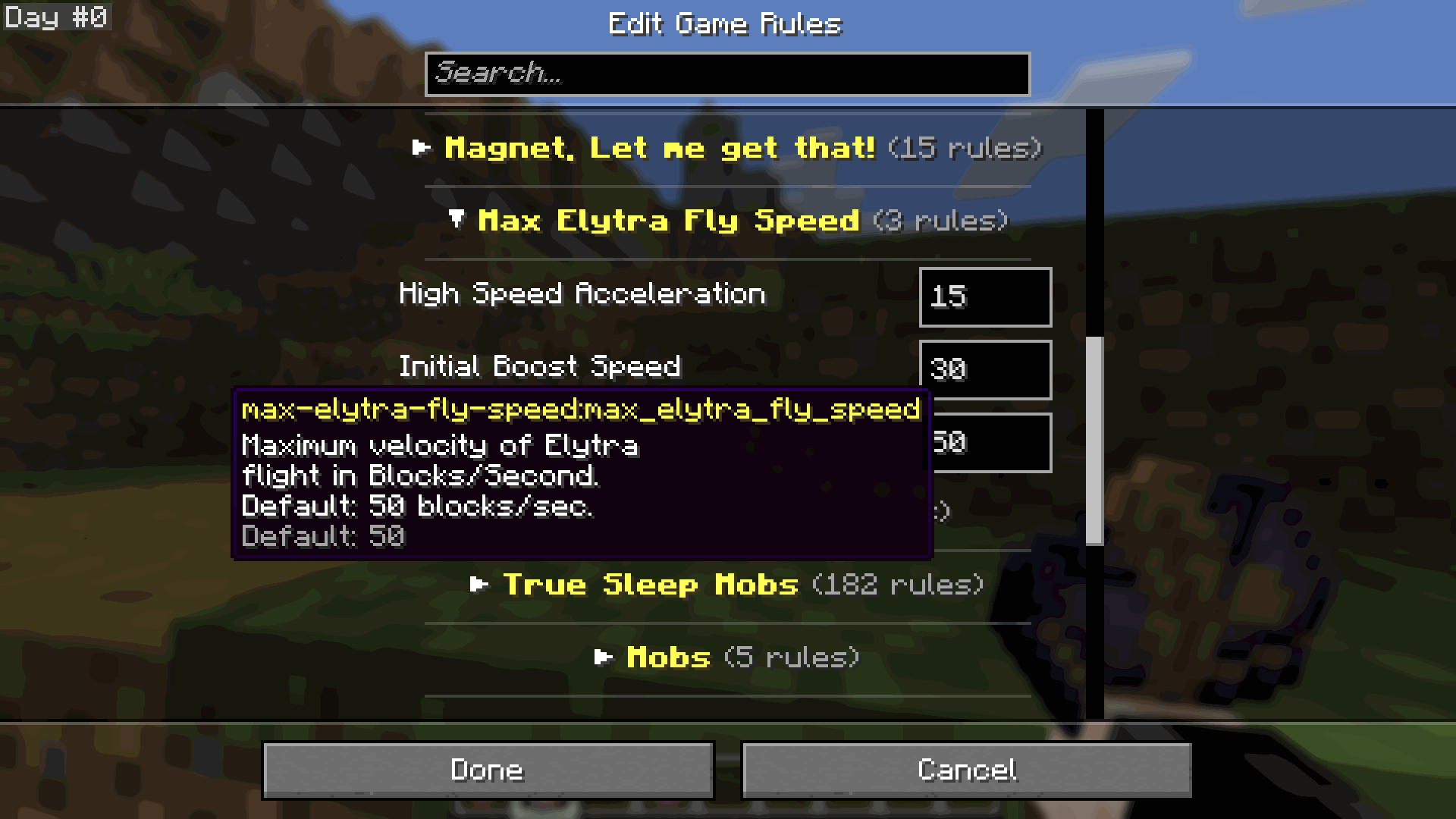
- Clean Drawer Layout: Automatically sorts all vanilla and modded game rules into tidy, collapsible category drawers (Player, Mobs, Spawning, World Updates, and modded namespaces).
- Linear Category Tree Builder: Features a high-performance single-pass parser (
CategoryTreeBuilder) and immutableCategoryGroupdata records that cache titles and rule counts in $O(1)$ time, eliminating nested list scanning overhead.
🖱️ Interactive Headers & Expand/Collapse Carats
- Visual State Indicators: Clearly indicates folder states with responsive toggle carats (
▼for expanded,▶for collapsed) alongside exact rule counters. - Effortless Toggle: Click any category header to instantly expand or collapse that section. Fold away rules you rarely touch to keep your screen distraction-free.
🌐 Global Actions: Expand All & Collapse All
- One-Click Mastery: A dedicated sticky top control bar provides
[ Expand All ]and[ Collapse All ]buttons. - Rapid Navigation: Expand every single category when you want to audit your entire configuration, or collapse everything with a single tap to view a high-level table of contents.
🔍 Smart Vanilla Search Integration & Auto-Expansion
- Seamless Vanilla Compatibility: Type keywords directly into Minecraft's native search bar.
- Dynamic Unfolding: As you type, any category containing matching rules automatically unfolds, while non-matching categories collapse. Clear the search bar to immediately restore your previous layout!
↺ Per-Category Defaults Reset Plate
- Isolated Reset: Each category header features a compact
↺icon plate with dedicated hover tooltips (gui.collapsible-game-rules.reset_category). - Precision Resetting: Reset an entire category's rules back to vanilla or mod defaults in one swift action without accidentally wiping custom tweaks made in other categories.
🧠 Persistent Layout Memory Across Sessions
- Session Continuity: Never repeat your collapsing preferences. Layout states are tracked via translation keys and saved locally to
config/collapsible-game-rules-state.json. - Language Resilient: Because state is saved by translation key rather than localized text, switching language packs will never corrupt or reset your collapsed folders.
- Zero Disk Thrashing: State is committed to disk only when exiting the screen (
isDirtyflag), ensuring zero stutter while clicking through menus.
🧩 Universal Modded GameRule Compatibility & Prettification
- Automatic Discovery: Directly hooks Minecraft's native Game Rules map. Custom rules registered by other mods or datapacks are automatically grouped into clean folders out of the box.
- Namespace Prettification: Intelligent fallback formatting cleans up unlocalized mod strings (e.g. converting
gamerule.category.better-bats.better_batsinto a beautiful, readableBetter Batsheader). - Dasik Library Integration: Deep first-class metadata synchronization for all dynamic rules generated through
DasikLibrary'sDynamicGameRuleManager.
🛡️ 100% Client-Side Architecture & Zero Server Footprint
- Runs entirely on your local client machine.
- Safe for singleplayer worlds, LAN games, and all multiplayer servers (vanilla, Paper, Purpur, Fabric).
📊 Quick Reference & Mechanics Matrix
| Feature Dimension | Vanilla Game Rules Screen | Collapsible Game Rules (v1.0.10+26.2) |
|---|---|---|
| Visual Structure | Giant, flat scrolling list | Collapsible hierarchical category drawers |
| Navigation Speed | Endless manual scrolling | One-click folding & unfolding |
| Global Controls | None | [ Expand All ] & [ Collapse All ] Header |
| Rule Resetting | Global world reset only | Dedicated per-category ↺ Reset Plate |
| Search Interaction | Filters flat list; hard to track | Auto-expands matching category drawers |
| Layout Persistence | Resets on every screen close | Persistent JSON memory (collapsible-game-rules-state.json) |
| Modded Rule Support | Flat, unorganized mod dumping | Auto-grouped with Namespace Prettification |
| Server Footprint | N/A | 100% Client-Side (Zero server install required) |
| Hot-Path Rendering | Repeated nested scanning | $O(N)$ Linear Tree Builder & 0B/frame caching |
🚀 In-Game Controls & Quick Start
Collapsible Game Rules is ready to use immediately upon installation. Operate the interface with intuitive mouse and keyboard controls:
| Input Action | Target Element | Functionality |
|---|---|---|
| Left-Click | Category Header Bar | Expands or collapses the selected category drawer. |
| Left-Click | [ Expand All ] Button |
Expands all category drawers simultaneously. |
| Left-Click | [ Collapse All ] Button |
Collapses all categories and resets scroll to the top. |
| Left-Click | ↺ Reset Plate |
Resets all game rules within that category to default values. |
Right Arrow (→) |
Highlighted Category | Keyboard shortcut to expand the selected category. |
Left Arrow (←) |
Highlighted Category | Keyboard shortcut to collapse the selected category. |
| Search Input | Vanilla Search Bar | Real-time filtering with automatic expansion of matching categories. |
⚙️ Configuration & Persistence Architecture
[!IMPORTANT] 💡 Config vs. In-Game GameRules: The layout file only defines UI expansion states. In-game rule values are saved directly to your world save (
level.dat/game_rules.dat).
Collapsible Game Rules automatically saves your UI drawer layout to:
config/collapsible-game-rules-state.json
Schema Overview:
{
  "schemaVersion": 1,
  "expandedCategories": [
    "gamerule.category.player",
    "gamerule.category.spawning",
    "gamerule.category.updates"
  ]
}
- Automatic Migration: Older unversioned configurations are safely upgraded to
schemaVersion: 1automatically upon launch. - Fail-Safe Recovery: If corrupted JSON syntax is detected, the mod logs a descriptive warning and gracefully initializes clean defaults without crashing the game.
- Optimized I/O: Disk writes only occur when you close the screen after making changes, ensuring 60+ FPS smoothness in menu screens.
📖 In-Depth How-To & Operational Playbook
1. Accessing the Modern Game Rules Screen
- World Creation: Navigate to Singleplayer ➔ Create New World ➔ Game Rules tab.
- Existing Worlds: From the world selection menu, select your world ➔ click Edit ➔ click Edit Game Rules (or access via pause menu settings where supported).
- The modern collapsible interface loads instantly with all categories neatly organized.
2. Streamlining Heavy Modpack Setup
- In large modpacks with dozens of mods installed, click
[ Collapse All ]at the top. - The entire screen condenses into a tidy list of category headers.
- Open only the category you need (e.g.
Spawningor your specific mod category). - Tweak your desired rule values without getting lost in hundreds of unrelated options.
3. Finding Settings with Smart Search
- Click the vanilla search bar at the top of the screen.
- Type any keyword (e.g.
tick,drop, orfire). - Only categories containing matching rules will remain visible, and they will automatically unfold to display the search results.
- When you delete your search text, your custom expanded/collapsed view is restored.
4. Precision Resetting for a Single Category
- If you experimented with complex mob or spawning rules and want to revert them without touching player tweaks, locate the Mobs category header.
- Hover over the
↺plate on the right side of the header. - Click the plate. All rules in that category revert to their official default values instantly!
5. Multi-Session Persistence
- Once you configure your ideal layout (e.g. leaving
PlayerandUpdatesopen while keepingMisccollapsed), click Done. - Collapsible Game Rules commits your preferences to
collapsible-game-rules-state.json. - Every time you create a new world or edit settings, your preferred layout is ready.
🧩 Recommended Sister Mods
If you enjoy Collapsible Game Rules, these companion mods plug in seamlessly:
- 🧠 Dasik Library: The core universal foundation powering dynamic GameRule registration and auto-translation injection.
- 📦 Stack Size Adjuster: Customize item stack limits up to extreme quantities, with clean GameRules organized directly inside Collapsible Game Rules.
- 🌿 Natural Reproduction: Autonomous 27-species wildlife breeding and genetics configured through native categorized GameRules.
🌟 Explore my profile for more vanilla-friendly enhancements and standalone tools.
💬 Join the Community & Get Support
Looking for help, want to test early beta builds, or vote on upcoming features? Join our official Discord community!

☕ Support
If you enjoy the ecosystem, consider fueling future updates!



[!NOTE] 🇮🇩 Indonesian Users: SocioBuzz and Saweria support local payment methods (Gopay, OVO, Dana, etc.) if you want to support me without using PayPal/Ko-fi!
📜 Credits & Modpack Permissions
| Role / Property | Author / Link |
|---|---|
| Creator / Author | Dasik (Rifaditya) |
| Community | Official Discord |
| Collection | Universal UI Overhaul |
| License | GNU General Public License v3.0 (GPLv3) |
| Source Code | GitHub - Rifaditya/Collapsible-Game-Rule-Screen |
| Issue Tracker | GitHub Issues |
| Documentation / Wiki | GitHub Wiki |
[!IMPORTANT] 📦 Modpack Permissions & Distribution:
You are fully welcome to include this mod in any modpack on any platform! However, the mod file must be downloaded directly through official distribution channels (Modrinth or CurseForge). Re-uploading, mirroring, or redistributing the original mod JAR to third-party mirror sites, scraper portals, or unauthorized launchers is strictly prohibited.
⚖️ License & Fork Guidelines (No Zero-Change Re-uploads):
This project is open-source under the GNU GPLv3. You are fully encouraged to inspect the code, learn from it, and fork the repository to create genuine modifications, substantial feature expansions, or community ports—provided your project remains open-source under GPLv3 with proper attribution.
However, straight 1:1 re-uploads, clone forks with no meaningful functional changes, or re-publishing identical builds under different project names (e.g. to farm downloads or rewards) are strictly forbidden.
Made with ❤️ for the Minecraft community
Part of the Universal UI Overhaul