
Compatibility
Minecraft: Java Edition
Platforms
Supported environments


Links
Tags
Creators
Details
CreativeTabsTweaker - Minecraft Forge 1.12.2
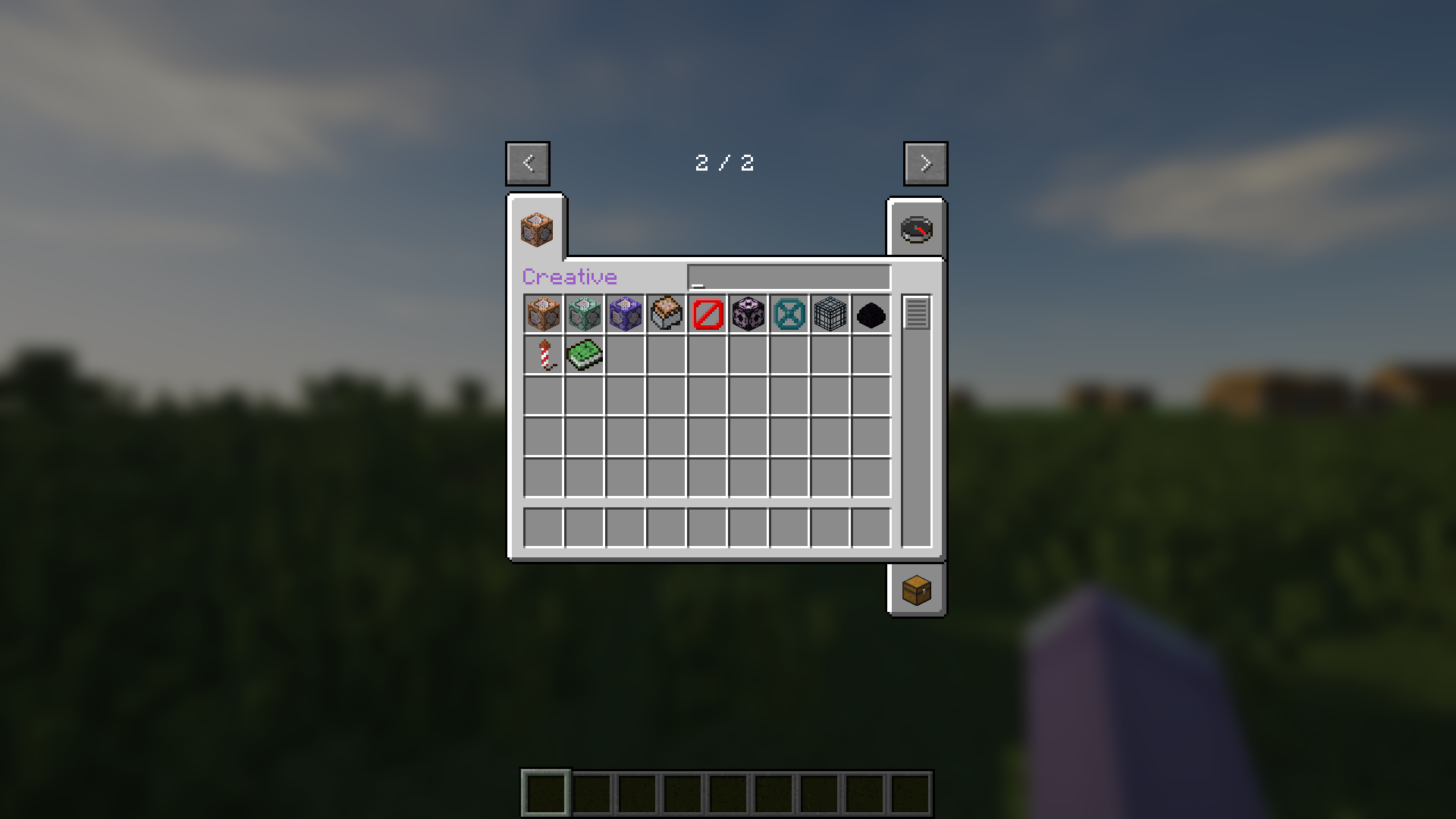
CreativeTabsTweaker (Forge 1.12.2) lets you remove modded creative tabs, add custom ones, and move items between tabs for better organization.
🎉 Features 🎉
- Remove any Creative Tabs from Mod.
- Add custom new Creative Tabs.
- Change Items' Tab.
🚀 Usage 🚀
- Run Minecraft 1 time when installed mod to create config file.
- Edit configured example or just follow below rules.
- Add .lang and .png file of custom tabs to resourcepacks folder.
⚙️ CreativeTabsTweaker.json ⚙️
  "removeTabs": [
    // "tabLabel" What tab you want to remove. You can look for tabs' label in game logs. //
  ],
  "addTabs": {
    "creative": { // What is your custom tab name. //
      "tabBackgroundImage": "tab_creative.png", // Tab's background image from Resource Pack, always start with "tab_" and end with ".png" //
      "tabIconItem": "minecraft:command_block", // Tab's icon item registry name. You can look for the registry name of items in tooltips. //
      "drawTitle": true, // Your tab have title or not. //
      "hasSearchBar": true, // Your tab have search bar or not. //
      "hexLabelColor": "#9A5CC6" // If have title, what is it color in hex. //
      "searchBarWidth": 89, // If have search bar, what is it width. //
    }
  },
  "items": {
    "minecraft:command_block": "creative", // Registry name of item that you want to change tab and tab label of tab to change to. //
    "minecraft:dirt": "" // If want to remove item from any tabs just leave empty//
  }
🖼️ CreativeTabsTweaker.zip 🖼️
CreativeTabsTweaker.zip
├── assets
│   └── ctt
│       ├── lang
│       │   └── .lang
│       └── texture
│           └── gui
│               └── container
│                   └── creative_inventory
│                       └── .png
└── pack.mcmeta
📄 pack.mcmeta 📄
{
  "pack": {
    "description": "ctt mod resources",
    "pack_format": 3
  }
}
🎌 locale_code.lang 🎌
itemGroup.creative=Creative // itemGroup dot then tab label and visual title //
📜 License 📜
- © 2025 by MeowSkyKung is licensed under CC BY-SA 4.0. 🔖
- Credits to MCreator, Blur, Optifine, SEUS
💖 Supporting by 💖
- Star Me on GitHub 🌟
- Donate on Ko-Fi ☕