
Compatibility
Minecraft: Java Edition
Platforms
Supported environments


Tags
Creators
Details
CubeCraft Level & Rank
See a player's CubeCraft level on their in-world nametag and their rank as a coloured bar in the tab list — using information CubeCraft exposes directly to your client.
⚠️ Unofficial. Not made, endorsed, or supported by CubeCraft. The mod primarily reads information the server already sends to your client, with an automatic
/whocommand used to fill in unknown players — see How it works below.
What it does
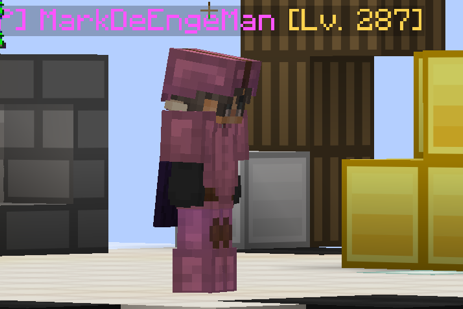
- 🏷️ Levels on nametags —
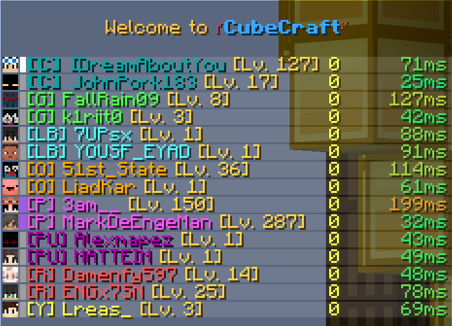
PlayerName [Lv. 127], in-world, above their head. - 🎨 Rank bars in the tab list — a small coloured bar (▌) next to each entry: grey for Stone, white for Iron, aqua for Diamond, purple for Obsidian.
- ⚡ Known almost instantly in the lobby. A local database remembers every player you've met
before, so their level and rank show up the moment you join. For players the mod doesn't know yet,
it can automatically use CubeCraft's
/whocommand once the lobby has settled. - 🎛️ Full in-game settings screen — no config file editing required (though it's there if you want it). Toggle everything, rename ranks, recolour bars, adjust visibility, all live.
- 🧹 Fully configurable visibility — choose the nametag format (
[Lv. 127],[127],Lv. 127, your own); optionally show the rank on nametags too, and the level in the tab list.
Screenshots
How it works
CubeCraft already exposes the information this mod displays through normal client-visible data and commands:
- Hovering a player's name in CubeCraft's own player-list chat message shows a tooltip with their name, level, and rank. That tooltip is a normal Minecraft hover event; this mod reads it.
- The tab list and scoreboard team data the server already pushes to your client also carry rank information, which is why ranks often show up within a second of joining.
- For players whose levels are still unknown, the mod can automatically run CubeCraft's ordinary
/whocommand once after joining a lobby. The response CubeCraft sends back contains the same player information you'd see if you typed/whoyourself. - A local, on-disk cache (
config/lvl_rank-players.json) remembers what's been learned about each player, so returning players are recognised instantly on your next visit — this file never leaves your computer and nothing is ever uploaded anywhere.
Nothing here uses a CubeCraft API, leaderboard scrape, website query, or third-party database. Player information comes directly from CubeCraft while you're connected.
What it will never do
- ❌ Send any custom network packet to the server.
- ❌ Click, move, or act on your behalf.
- ❌ Query CubeCraft's website, an API, or any third-party service.
- ❌ Touch movement, combat, reach, aim, knockback, or cooldowns.
- ❌ Reveal invisible/hidden players or render nametags through walls.
- ❌ Do anything at all on a server that isn't CubeCraft — the mod detects the connection by address and stays completely inactive everywhere else, singleplayer included.
The only automatic server interaction is the /who command described below.
Automatic /who — enabled by default
Automatic /who is enabled by default so unknown player levels can be filled in without waiting
for someone to talk in chat.
After joining a lobby, the mod waits for things to settle and then runs CubeCraft's normal /who
command once if enough players are still unknown. It uses the identical chat-command packet the
vanilla chat box sends when you type the command yourself, and it prints a local line each time so
you always know it happened.
Although /who is an ordinary CubeCraft command any player can type manually, automatically sending
commands may be treated differently under a server's rules. If you'd rather keep the mod completely
passive, Send /who automatically can be disabled at any time in the settings screen.
The automatic behaviour is deliberately conservative: it waits ~5 seconds after joining, waits for the player count to stop changing, only fires when at least 3 players have unknown levels, sends at most once per lobby, and enforces a 2-minute floor between sends no matter how much you lobby-hop. Every one of those values is adjustable in the settings screen.
Configuration
Open it however you like:
- Type
/cubeinfo configin chat - Bind the (unbound by default) keybind under Options → Controls → CubeCraft Level & Rank
- If you have Mod Menu installed, click Configure next to this mod in its list
From there you can enable or disable automatic /who, rename or recolour any rank (a live colour
swatch shows you what you're typing), adjust how far away nametags still show a level, pick who sees
what, and clear the local cache/database if you ever want a clean slate. Everything also lives in
config/lvl_rank.json, hand-editable if you'd rather.
Useful commands
All /cubeinfo commands are client-side — none of these are ever sent to the server.
| Command | Does |
|---|---|
/cubeinfo status |
Connection state, cache size, active settings |
/cubeinfo config |
Open the settings screen |
/cubeinfo config ranks |
Jump straight to rank names & colours |
/cubeinfo cache |
List everyone currently known, with level and rank |
/cubeinfo db |
Size and location of the local, persistent database |
/cubeinfo glyphs |
See which ranks are configured, and flag any CubeCraft adds later |
/cubeinfo debug on |
Verbose logging, for troubleshooting only — off by default |
Requirements
| Minecraft | 1.21.6 - 1.21.11 |
| Fabric Loader | ≥ 0.19.3 |
| Fabric API | required |
| Mod Menu | optional — adds a Configure button |
| Environment | Client-side only. Adding it to a server does nothing; other players don't need it. |
Limitations, honestly stated
- A player's level/rank can only be shown once CubeCraft has provided that information to your
client — either through existing client-visible data or the response to
/who. If CubeCraft does not provide information about a player, the mod cannot invent or independently look it up. - Rank names and colours are this mod's own choices (Stone/Iron/Diamond/Obsidian with colours picked for legibility), not something CubeCraft transmits — CubeCraft only sends an internal glyph code. If CubeCraft adds a new rank, it shows up as a plain grey bar until you (or a future update) name it.
Bugs
Visual bugs. Slow down the settings. The visual bugs are caused by the slash command being sent too fast. Change the settings for them to be slower.

License & source
The project is under the open-source MIT license.
Contact
Discord: IDreamAboutYou2