
Compatibility
Minecraft: Java Edition
Platforms
Supported environments


Tags
Creators
Details
Custom Hitboxes!
This mod is a complete overhaul of minecraft's hitboxes, allowing you to customize them along with added functionalities, such as specific team colors per hitbox, or damage colors.
Features
Hitbox styles
Every style has a live preview in the menu, so you can see your changes as you make them.
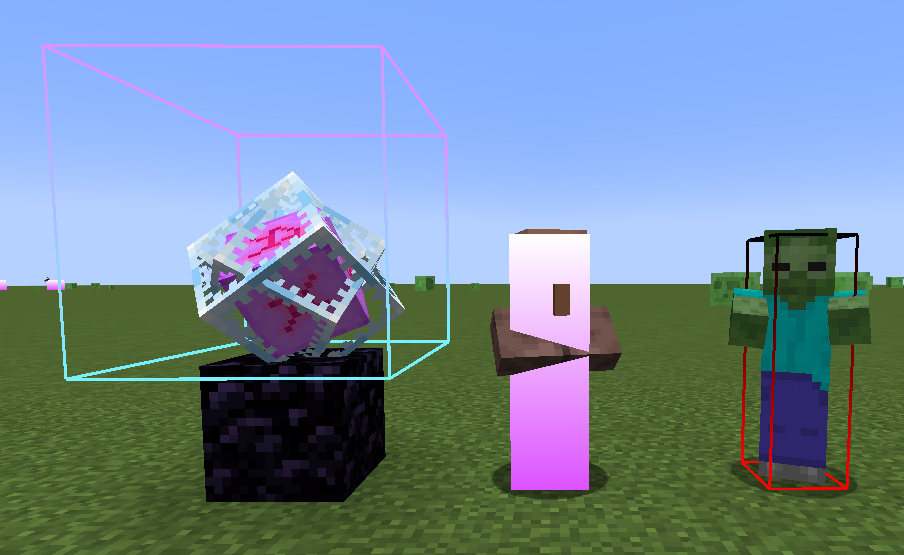
- Lines: width, colour, and an optional gradient into a second colour towards the top.
- Fill: a filled hitbox with its own colour and optional gradient.
- Rainbow colours: any colour can be set to rainbow from the colour picker.
- Look vector: a line showing where the entity is looking, with adjustable length, colour and an optional arrow.
- Eye height: a thin box at the entity's eye level, outlined or filled.
Highlights
Recolour a hitbox while the entity is:
- Hurt: during its damage tick.
- Targeted: while your crosshair is on it.
- In range: while it's within your reach.
Hitbox vanishing (idea from pCrit)
Hide hitboxes when an entity gets within a set distance, to cut the clutter (like end crystal or player hitboxes) at the range you PvP at. Turn on Vanish Fade to have them fade out gradually instead of disappearing at once.
Per-entity styles
Add any entity on the Entities page to give it its own style. Turn on Only Listed Entities to draw hitboxes only for the entities you've added.
Team styles
Teams are shared across all WalksyLib mods. Put players in a team once, then turn on Apply Team Style in Custom Hitboxes to give that team's players their own hitbox style. This is great for teamfights.
General
- A keybind to toggle hitboxes on and off.
- Show hitboxes automatically when the game starts.
- Choose whether to show your own hitbox.
- Only show player hitboxes while they're gliding.
Examples of gradient hitboxes:
Credits
- Mod: Walksy