
Compatibility
Minecraft: Java Edition
Platforms
Supported environments


Links
Tags
Creators
Details
Minecraft Music Player
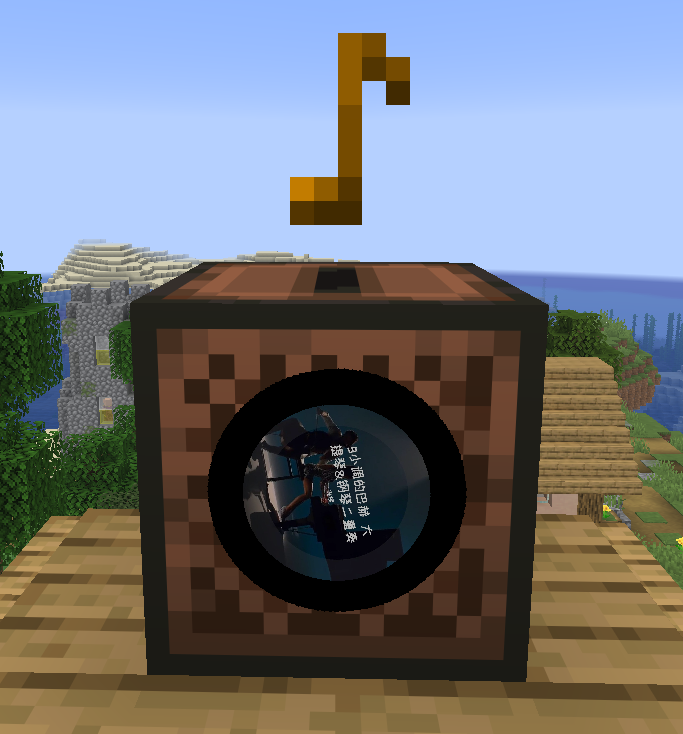
Minecraft Music Player is a Fabric dual-side music mod for NetEase Cloud Music search, song requests, playlist and podcast playback, network background music, real-time lyrics, custom music discs, and jukebox playback.
The server handles commands, queues, configuration, and synchronization. The client handles audio playback. Install the mod on the server and on every client that needs to hear music.





Features
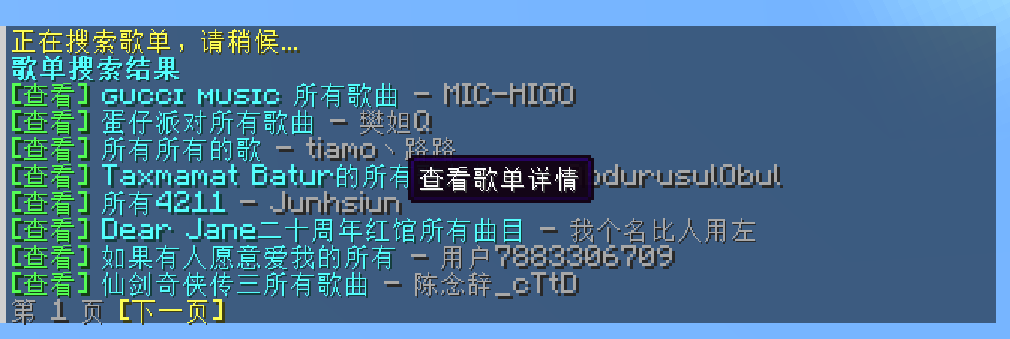
- Search songs, artists, playlists, users, and podcasts
- Request a song: plays immediately when idle, otherwise joins the queue
- Playlist and podcast mode: loads tracks in batches, supports sequential, reverse, and shuffle order
- Request queue has priority; playlist queue fills in automatically
- Vote to skip; requesters and admins can skip instantly
- Seek forward and backward, pause, resume, and progress display
- Real-time lyrics for global playback and jukeboxes, with per-player toggle
- Network background music: replaces vanilla background music, with a separate toggle and volume in sound settings
- Share content: send playlists, artists, users, podcasts, programs, or links to other players
- Music discs: burn songs onto discs and play them in jukeboxes; jukebox volume fades with distance
- Random music discs in loot containers
- Song and podcast titles can be clicked to open in a browser
music.163.comsong, playlist, and podcast link support- Paginated lists with clickable actions
- Simplified Chinese, English, and Japanese included
Requirements
- Minecraft
26.3 - Fabric Loader
0.19.3or newer - Fabric API
0.161.0+26.3or compatible - Java
25 - A reachable NetEase music API, default
https://mycelis.dpdns.org/
Installation
Install the mod and Fabric API on the server and on every client that needs to hear music.
Client settings under Options -> Sound:
- Network Background Music: toggle
- Background Music Volume: 0% - 100%
The network background music playlist is configured on the server. The main menu always uses the default API address.
Player Commands
Playback
| Command | Description |
|---|---|
/music now |
Show the current track, progress, and pause state |
/music seek <seconds> |
Seek forward or backward; positive values seek forward |
/music skip |
Skip the current track; requesters and admins skip instantly, others vote |
/music mute once |
Mute the current track until the next one starts |
Requests
| Command | Description |
|---|---|
/music play song <song ID> |
Request a song |
/music play playlist <playlist ID> |
Play a playlist in order |
/music play playlist <playlist ID> reverse |
Play a playlist from the last track |
/music play program <program ID> |
Play a single podcast program |
/music play radio <radio ID> |
Play an entire podcast in order |
/music play radio <radio ID> reverse |
Play a podcast from the last program |
Queue
| Command | Description |
|---|---|
/music queue [page] |
View the request queue |
/music queue promote <song ID> |
Move a song to the top |
/music queue remove <song ID> |
Remove a song from the queue |
Playlist and Podcast
| Command | Description |
|---|---|
/music playlist |
View playlist playback status |
/music playlist list |
View loaded playlist tracks |
/music playlist stop |
Stop playlist mode |
/music playlist order |
Show the current play order |
/music playlist order sequential |
Play in sequential order |
/music playlist order reverse |
Play in reverse order |
/music playlist order shuffle |
Play in shuffle order |
/music radio |
Podcast center |
/music radio hot [page] |
Hot podcasts |
/music radio categories |
Podcast categories |
Search
| Command | Description |
|---|---|
/music search song <keyword> |
Search songs |
/music search artist <keyword> |
Search artists; author is an alias |
/music search playlist <keyword> |
Search playlists |
/music search user <keyword> |
Search users |
/music search radio <keyword> |
Search podcasts |
All search commands accept page <page> after the keyword.
View Details
| Command | Description |
|---|---|
/music view playlist <playlist ID> [page <page>] |
View playlist details and tracks |
/music view artist <artist ID> [page <page>] |
View artist details and songs; author is an alias |
/music view user <user ID> [page <page>] |
View playlists created by a user |
/music view radio <radio ID> [page <page>] |
View podcast details and programs |
/music view program <program ID> |
View program details |
/music view <URL> |
Parse a music.163.com song, playlist, or podcast link |
Sharing
| Command | Description |
|---|---|
/music share <targets> playlist <playlist ID> [page <page>] |
Share a playlist |
/music share <targets> user <user ID> [page <page>] |
Share a user's playlists |
/music share <targets> artist <artist ID> [page <page>] |
Share an artist's songs; author is an alias |
/music share <targets> radio <radio ID> [page <page>] |
Share a podcast |
/music share <targets> program <program ID> |
Share a program |
/music share <targets> <URL> |
Share linked content |
/music share accepts the same arguments as /music view. Targets can be @a, @p, or player names, and multiple targets are supported. Recipients can click the message to view it.
Other
| Command | Description |
|---|---|
/music random [refresh] |
Generate 10 random hot songs |
/music burn song <song ID> |
Burn a song onto the held disc |
/music join |
Join current playback |
/music leave |
Leave current playback |
/music lyrics [on|off|status] |
Toggle, enable, disable, or check lyrics |
/music help [subcommand] |
Show help |
Admin Commands
| Command | Description |
|---|---|
/music skip |
Skip the current track instantly |
/music pause |
Pause playback |
/music resume |
Resume playback |
/music queue clear |
Clear the request queue |
/music config reload |
Reload configuration and clear source caches |
/music config status |
Show the current configuration |
/music config clearqueue |
Clear the request queue |
/music config set <key> <value> |
Change a configuration value |
/music config reset <key|bgmPlaylist|all> |
Reset configuration |
Configuration
Server configuration: config/minecraft-music-player.json
| Key | Default | Description |
|---|---|---|
neteaseBaseUrl |
https://mycelis.dpdns.org/ |
NetEase API address |
bgmPlaylistId |
18481322122 |
Network background music playlist; empty disables it |
proxy |
empty | Manual proxy; none clears it |
useSystemProxy |
true |
Use the system proxy |
preferIpv4 |
true |
Prefer IPv4 |
connectTimeoutSeconds / readTimeoutSeconds |
10 / 20 |
Connect and read timeouts |
allowCustomServer |
true |
Allow changing the API address |
allowSongRequest |
true |
Allow song requests |
allowPlaylistRequest |
true |
Allow playlist and podcast requests |
autoAdvance |
true |
Advance to the next track automatically |
announceQueueChanges |
true |
Broadcast queue changes |
showLoadingHints |
true |
Show loading hints |
showLyrics |
true |
Enable lyrics by default |
searchLimit |
8 |
Items per page |
maxQueueSize |
40 |
Request queue limit |
maxSongsPerPlayer |
5 |
Requests per player limit |
playlistQueueLimit |
20 |
Playlist preload limit |
queueCacheSize |
3 |
Source cache size |
voteSkipPercent |
0.6 |
Vote skip ratio |
enableLootMusicDiscs |
true |
Enable random loot discs |
lootMusicDiscChance / lootMusicDiscCount |
0.3 / 1 |
Chance and count per container |
Use /music config set bgmPlaylist off to disable bgmPlaylistId, or reset to restore the default. baseUrl accepts default; proxy accepts none.
Client configuration: config/minecraft-music-player-client.json
| Key | Default | Description |
|---|---|---|
enableNetworkBgm |
true |
Enable network background music |
bgmVolume |
0.7 |
Background music volume |
中文
Minecraft Music Player 是一个 Fabric 双端音乐模组,提供网易云音乐搜索、点播、歌单与播客播放、网络背景音乐、实时歌词、音乐唱片和唱片机播放。
服务端负责命令、队列、配置与同步;客户端负责音频播放。服务端和需要听歌的客户端都需要安装本模组。
功能概览
- 搜索歌曲、作者、歌单、用户、播客
- 单曲点播:空闲时立即播放,播放中自动加入队列
- 歌单与播客播放模式:后台分批加载,支持正序、倒序、随机
- 单点队列优先播放,歌单队列自动补充
- 投票跳过;点歌人和管理员可直接跳过
- 快进、快退、暂停、继续和进度显示
- 实时歌词:全局播放和唱片机均支持,开关按玩家保存
- 网络背景音乐:接管原版背景音乐,可在声音设置中独立开关和调节音量
- 分享查看内容:将歌单、作者、用户、播客、节目或链接分享给其他玩家
- 音乐唱片:把歌曲刻录到唱片,放入唱片机播放;唱片机音量随距离衰减
- 战利品箱随机音乐唱片
- 歌曲和播客标题可点击打开浏览器
- 支持
music.163.com的单曲、歌单、播客链接 - 列表分页与点击操作
- 内置简体中文、英文、日文
依赖要求
- Minecraft
26.3 - Fabric Loader
0.19.3或更高 - Fabric API
0.161.0+26.3或兼容版本 - Java
25 - 可访问的网易云音乐 API,默认
https://mycelis.dpdns.org/
安装
服务端和需要听歌的客户端均需安装本模组及 Fabric API。
客户端在 选项 -> 声音 中可以设置:
- 网络背景音乐:开关
- 背景音乐音量:0% - 100%
网络背景音乐的歌单由服务端配置;主菜单始终使用默认 API 地址。
玩家命令
播放控制
| 命令 | 说明 |
|---|---|
/music now |
查看当前播放、进度和暂停状态 |
/music seek <秒数> |
快进或快退,正数快进,负数快退 |
/music skip |
跳过当前歌曲,点歌人或管理员直跳,其他玩家投票 |
/music mute once |
暂时静音当前歌曲,下一首自动恢复 |
点播
| 命令 | 说明 |
|---|---|
/music play song <歌曲ID> |
点播单曲 |
/music play playlist <歌单ID> |
按顺序播放歌单 |
/music play playlist <歌单ID> reverse |
从最后一首开始播放歌单 |
/music play program <节目ID> |
播放单个播客节目 |
/music play radio <播客ID> |
按顺序播放整个播客 |
/music play radio <播客ID> reverse |
从最后一个节目开始播放播客 |
队列
| 命令 | 说明 |
|---|---|
/music queue [页码] |
查看单点队列 |
/music queue promote <歌曲ID> |
置顶歌曲,下一首播放 |
/music queue remove <歌曲ID> |
从队列移除歌曲 |
歌单与播客
| 命令 | 说明 |
|---|---|
/music playlist |
查看歌单播放状态 |
/music playlist list |
查看已加载的歌单曲目 |
/music playlist stop |
停止歌单播放模式 |
/music playlist order |
查看当前播放顺序 |
/music playlist order sequential |
正序播放 |
/music playlist order reverse |
倒序播放 |
/music playlist order shuffle |
随机播放 |
/music radio |
播客中心 |
/music radio hot [页码] |
热门播客 |
/music radio categories |
播客分类 |
搜索
| 命令 | 说明 |
|---|---|
/music search song <关键词> |
搜索歌曲 |
/music search artist <关键词> |
搜索作者,author 等价 |
/music search playlist <关键词> |
搜索歌单 |
/music search user <关键词> |
搜索用户 |
/music search radio <关键词> |
搜索播客 |
所有搜索命令均支持在关键词后追加 page <页码>。
查看详情
| 命令 | 说明 |
|---|---|
/music view playlist <歌单ID> [page <页码>] |
查看歌单详情与曲目 |
/music view artist <作者ID> [page <页码>] |
查看作者详情与歌曲,author 等价 |
/music view user <用户ID> [page <页码>] |
查看用户创建的歌单 |
/music view radio <播客ID> [page <页码>] |
查看播客详情与节目 |
/music view program <节目ID> |
查看节目详情 |
/music view <链接> |
解析 music.163.com 的单曲、歌单或播客链接 |
分享
| 命令 | 说明 |
|---|---|
/music share <目标玩家> playlist <歌单ID> [page <页码>] |
分享歌单 |
/music share <目标玩家> user <用户ID> [page <页码>] |
分享用户歌单 |
/music share <目标玩家> artist <作者ID> [page <页码>] |
分享作者歌曲,author 等价 |
/music share <目标玩家> radio <播客ID> [page <页码>] |
分享播客 |
/music share <目标玩家> program <节目ID> |
分享节目 |
/music share <目标玩家> <链接> |
分享链接内容 |
/music share 的参数与 /music view 一致,目标玩家可使用 @a、@p 或玩家名,支持多个目标。对方点击消息即可查看。
其他
| 命令 | 说明 |
|---|---|
/music random [refresh] |
生成 10 首随机热门音乐 |
/music burn song <歌曲ID> |
将歌曲刻录到主手唱片 |
/music join |
加入当前播放 |
/music leave |
退出当前播放 |
/music lyrics [on|off|status] |
切换、开启、关闭或查看歌词 |
/music help [子命令] |
查看帮助 |
管理员命令
| 命令 | 说明 |
|---|---|
/music skip |
直接跳过当前歌曲 |
/music pause |
暂停播放 |
/music resume |
继续播放 |
/music queue clear |
清空单点队列 |
/music config reload |
重载配置并清空音源缓存 |
/music config status |
查看当前配置 |
/music config clearqueue |
清空单点队列 |
/music config set <键> <值> |
修改配置 |
/music config reset <键|bgmPlaylist|all> |
重置配置 |
配置
服务端配置:config/minecraft-music-player.json
| 键 | 默认值 | 说明 |
|---|---|---|
neteaseBaseUrl |
https://mycelis.dpdns.org/ |
网易云 API 地址 |
bgmPlaylistId |
18481322122 |
网络背景音乐歌单,空字符串关闭 |
proxy |
空 | 手动代理,none 清除 |
useSystemProxy |
true |
使用系统代理 |
preferIpv4 |
true |
优先使用 IPv4 |
connectTimeoutSeconds / readTimeoutSeconds |
10 / 20 |
连接与读取超时 |
allowCustomServer |
true |
允许修改 API 地址 |
allowSongRequest |
true |
允许玩家点歌 |
allowPlaylistRequest |
true |
允许点播歌单和播客 |
autoAdvance |
true |
播放结束后自动切歌 |
announceQueueChanges |
true |
广播队列变更 |
showLoadingHints |
true |
显示加载提示 |
showLyrics |
true |
默认开启歌词 |
searchLimit |
8 |
每页显示数量 |
maxQueueSize |
40 |
单点队列上限 |
maxSongsPerPlayer |
5 |
每位玩家同时点播上限 |
playlistQueueLimit |
20 |
歌单预载上限 |
queueCacheSize |
3 |
音源缓存数量 |
voteSkipPercent |
0.6 |
投票跳过所需比例 |
enableLootMusicDiscs |
true |
启用战利品箱随机唱片 |
lootMusicDiscChance / lootMusicDiscCount |
0.3 / 1 |
生成概率与每箱数量 |
bgmPlaylistId 可用 /music config set bgmPlaylist off 关闭,reset 恢复默认;baseUrl 可设为 default;proxy 可设为 none。
客户端配置:config/minecraft-music-player-client.json
| 键 | 默认值 | 说明 |
|---|---|---|
enableNetworkBgm |
true |
启用网络背景音乐 |
bgmVolume |
0.7 |
背景音乐音量 |