Compatibility
Minecraft: Java Edition
Platforms
Supported environments


Links
Tags
Creators
Details
Licensed ARR
Published 4 months ago
Updated 4 months ago
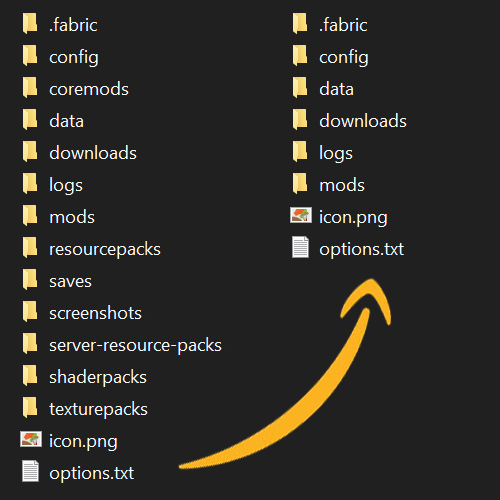
When the game closes, it searches for and deletes any empty folders.

It does not delete empty files or anything outside of the current minecraft instances folder.

If you want to prevent some folders from being deleted for any reason:
  - Create a file in it with any name, content or size.
  - Add it to the optional exclusions text file.
  - Delete, disable or stop using this mod.

To use the optional exclusions text file:
  - Create a file called "cleanup_exclusions.txt" in your Minecraft folder.
  - Put the path to the main folder, for example "saves\" for all saves.
  - Repeat this for every folder you wish to exclude if there's more.
  - Save the file and close the game. It reads this on game close.