
Compatibility
Minecraft: Java Edition
Platforms
Supported environments


Links
Tags
Creators
Details
Delivery Rocket Mod
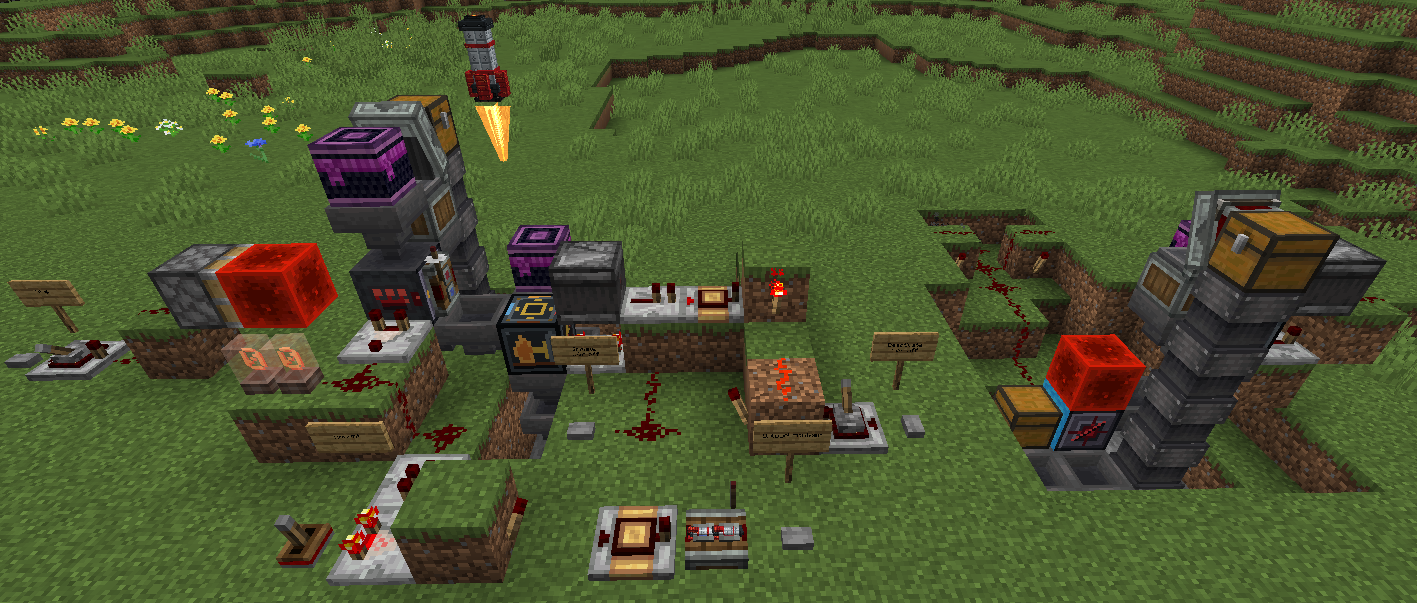
Delivery Rocket Mod adds placeable delivery rockets for moving item stacks between coordinates in the same world dimension. Load a rocket with cargo and fuel, choose a target position, and launch it. The rocket takes off, flies above terrain, turns upright as it approaches its destination, and places itself back down when it lands.
The mod also includes a Landing Pad block for practical automation. A pad can receive rockets, unload landed cargo, refill fuel, load outgoing cargo, and dispatch a ready rocket using redstone.
Features
- Placeable rocket block and item
- Rocket inventory with one cargo slot and one fuel slot
- Coordinate targeting from the rocket screen
- "Use My Pos" button for quickly targeting the player's current position
- Fuel consumption during flight
- Supports normal furnace fuels, redstone dust, and redstone blocks as rocket fuel
- Smooth terrain-aware flight path
- Upright landing approach
- Landed rockets remember their previous launch position as their saved return target
- Redstone launch support for rockets with a saved target
- Landing Pad block for automated rocket loading, unloading, and dispatch
- Custom rocket model, rocket texture, landing pad texture, mod icon, and in-flight thruster flame
Basic Rocket Use
- Place a rocket.
- Open the rocket.
- Put the item stack you want to deliver in the cargo slot.
- Put fuel in the fuel slot.
- Enter the target X/Y/Z coordinates, or press "Use My Pos".
- Press Launch.
- At the destination, collect the cargo from the landed rocket or send it back to its saved return target.
Landing Pad Use
Place a Landing Pad where you want rockets to land. Rockets targeting the pad or landing near it will try to appear directly on top of the pad.
The Landing Pad has three internal slots:
- Send: outgoing cargo waiting to be loaded into a rocket
- Fuel: fuel waiting to be loaded into a rocket
- Arrivals: cargo unloaded from a landed rocket
When a rocket is on top of the pad, the pad automatically moves fuel into the rocket's fuel slot. If the rocket has just landed, the pad unloads the rocket's cargo into Arrivals first. After arrivals are clear, the pad can load Send cargo into the rocket.
Landing Pad Automation
The pad uses dedicated sides so automation stays predictable:
- Front face: insert outgoing cargo into Send
- Right face: insert fuel into Fuel
- Left face: extract fuel from Fuel; the pad also pushes fuel into an adjacent chest on this side
- Bottom face: extract arrived cargo from Arrivals; the pad also pushes arrivals into a container below
- Back face: redstone dispatch input
- Top face: rocket docking only
Power the back face with redstone to dispatch the rocket on top of the pad to its saved target. A rocket must have fuel and a saved target before it can launch.
Comparators can read the Landing Pad inventory fullness.
Notes
- Rockets travel within the same dimension.
- A rocket must have valid fuel before launch.
- If a rocket runs out of fuel mid-flight, it lands where it is.
- Each rocket currently carries one cargo stack and one fuel stack.
- The Landing Pad is intended for simple hopper/chest automation with clear item flow.
Requirements
- Minecraft 1.21.1
- Java 21 or newer
- Fabric Loader 0.18.4 or newer
- Fabric API
Item IDs
- Rocket:
deliveryrocketmod:rocket - Landing Pad:
deliveryrocketmod:landing_pad