Compatibility
Minecraft: Java Edition
Platforms
Supported environments


Tags
Creators
Details
Emote
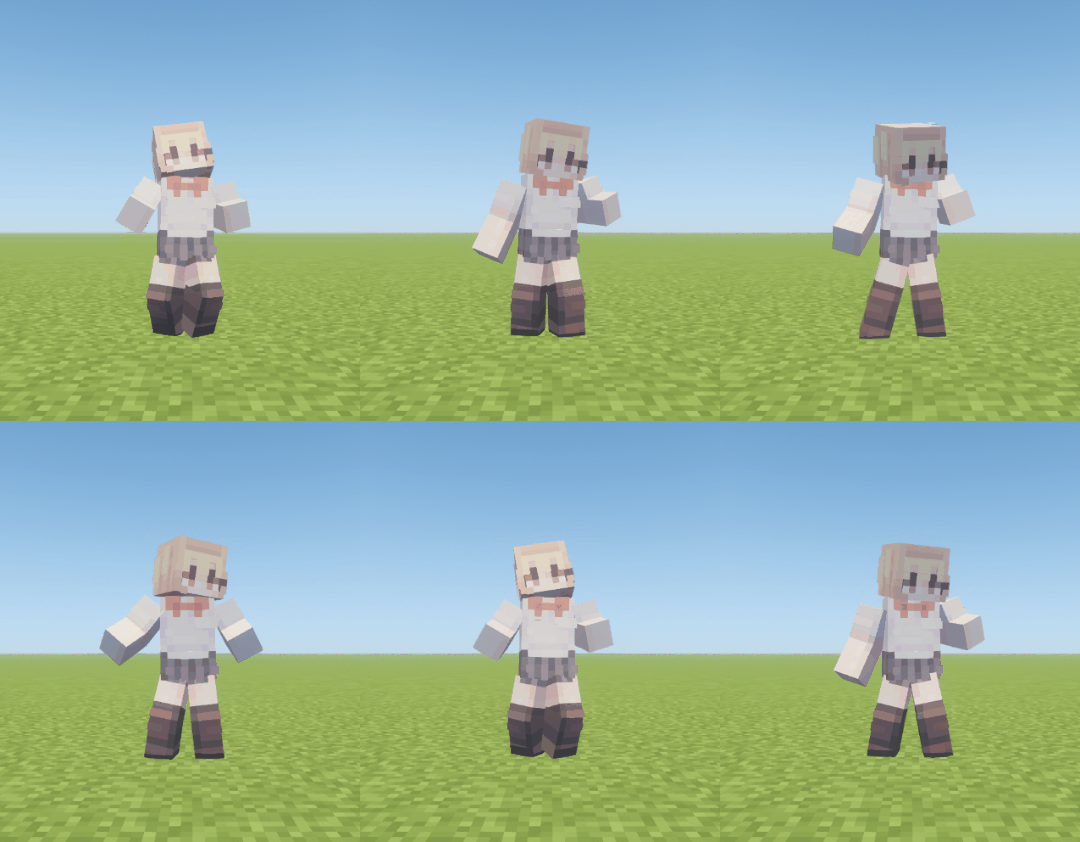
Thanks to Popular Vibe for allowing us to use their animation!
▶ Watch the full emote demo on YouTube


Join the Discord server to share emotes you have made.
Features
Emote is a server-side emote mod that plays animations with Minecraft display entities. All server features work when the mod is installed only on the server. Installing it on the client is optional and adds an emote wheel and automatic third-person view during playback.
The web converter supports BD Engine, GeckoLib, and Animated Java. Configure skin parts, metadata, playback settings, and events without editing Animation JSON.
On the server, LuckPerms permissions can assign emotes and idle emotes per player. Sequences can connect multiple animations, with the player's skin applied to compatible animations. A server API is also available for other mods to register emotes, control playback, and receive events.
Commands
Player
| Command | Description |
|---|---|
/emote |
Opens the Emote Menu dialog. |
/emote play <id> |
Plays an emote by ID. |
V |
Opens the client emote wheel. |
Use the wheel's Edit Wheel button to add, remove, or reorder entries. The order is stored on the client separately for each server.
The emote menu and wheel editor can search by name, ID, description, or #tags included in the description. Multiple #tags match emotes containing all specified tags.
Administration
| Command | Description |
|---|---|
/emote list |
Lists loaded emotes with their IDs, durations, and availability. |
/emote info |
Shows current playback, display-entity capacity, skin-processing queue, and loaded-emote status. |
/emote reload |
Reloads configuration and animations. |
/emote enable/disable <id> |
Enables or disables an emote. |
/emote stop <player>, /emote stop @a |
Stops selected players' emotes; use @a for all players. |
/emote stress-test <time> [load] [packets] |
Measures server performance with concurrent emotes and configurable packet fanout (default 20). 100 or 100i requests 100 instances; 1000d requests up to 1,000 display entities. |
/emote account |
Lists registered bake accounts and the selected skin provider. |
/emote account login |
Connects a Minecraft account using Microsoft device login. |
/emote account remove <account> |
Removes a bake account by name or UUID. |
Administrative commands use the emote.manage permission and are granted to game master operators by default.
Server management
config/emote/
├── config.json
├── emotes.json
├── emote/
└── resource-pack/
The directory and configuration files are created automatically on first startup, with sample emotes included under emote/.
Place JSON exported by the converter under emote/. Subdirectories are loaded as well, and emotes use the id in the JSON rather than the filename. Invalid files are skipped individually, while every file sharing a duplicate ID is rejected.
config.json
{
  "schema_version": 1,
  "menu_page_size": 6,
  "mineskin_api_key": "",
  "mineskin_poll_interval_seconds": 3,
  "mineskin_cache_retention_days": 30,
  "mineskin_cache_max_mib": 256,
  "max_active_display_entities": 512,
  "default_skin": ""
}
Set mineskin_api_key to generate player skin textures when no bake accounts are registered. Completed cached textures remain usable without either credential.
emotes.json
{
  "schema_version": 3,
  "disabled": ["emote:anvil"],
  "permissions": [
    {
      "permission": "emote.default",
      "emotes": ["emote:hello", "emote:backflip"]
    },
    {
      "permission": "emote.vip",
      "emotes": ["emote:vip\\..*"],
      "idle": {"delay": "300s", "emote": ["sit:idle.sit", 70, "music:idle.piano", 30]},
      "cooldown": "x0.8"
    },
    {
      "permission": "emote.admin",
      "emotes": ["*"]
    }
  ]
}
disabled turns off emotes, while permissions determines the emotes and idle emotes available to each player. Valid emote IDs in emotes are matched literally; other entries are Java regular expressions matched against the complete emote ID. * is a special value that grants every enabled emote. Regular-expression backslashes must also be escaped for JSON. Every player receives emote.default. emote.bypass is an administrator and development override that ignores standalone, disabled IDs, permissions, and cooldowns.
Web converter
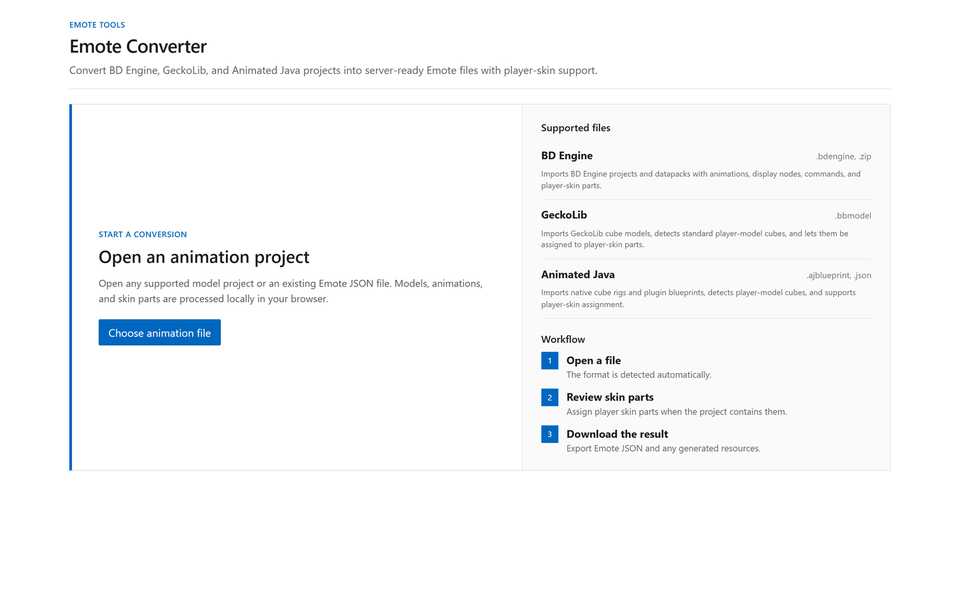
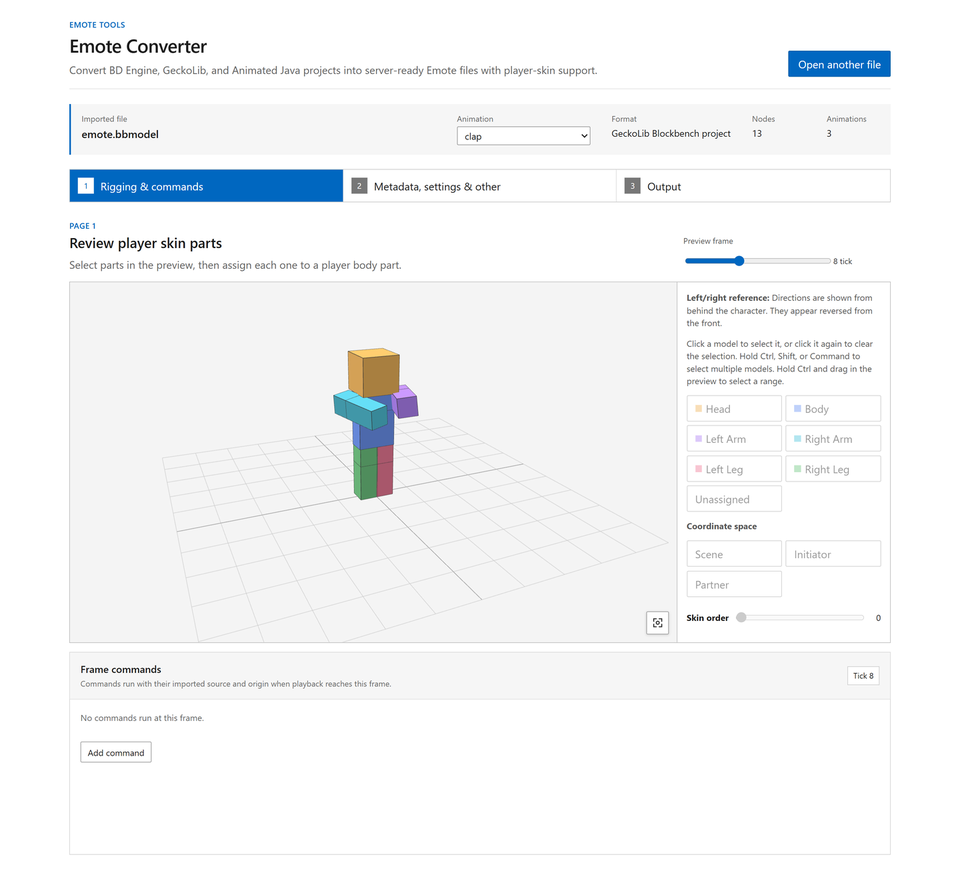
Emote Converter converts and configures projects without requiring direct edits to Animation JSON. All processing happens locally in the browser.
For a step-by-step guide to converting and installing your own emotes, see Adding Custom Emotes.
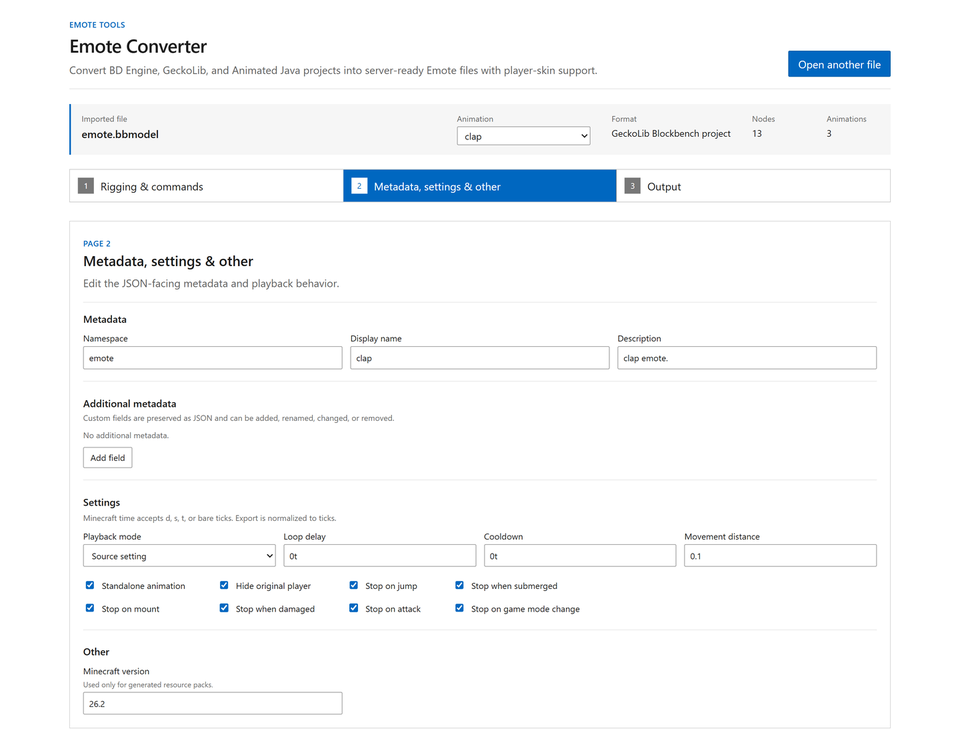
Use the 3D preview to assign skin parts, then configure metadata, playback behavior, stop conditions, and events.
Animation conversion
The web converter recalculates the source animation's easing and interpolation curves for Minecraft ticks. It preserves important points in Bézier, Catmull-Rom, bounce, and elastic motion, then selects the keyframe placement with the lowest position, rotation, and scale error to keep the result as close to the original movement as possible.
Each animation can define a cooldown, player visibility, stop conditions such as movement, jumping, attacking, and taking damage, and events.
Sequence
Connect short animation clips in order and combine waits, weighted random choices, and repeats to create a single emote.
{
  "type": "sequence",
  "schema_version": 4,
  "id": "sit:idle.sit",
  "steps": [
    {"emote": "sit:sit_down"},
    {"wait": "10t"},
    {
      "emote": [
        "sit:idle_sky", 45,
        "sit:idle_butterfly", 45,
        "emote:break", 10
      ],
      "repeat": 3
    },
    {"emote": "sit:stand_up1"}
  ]
}
Mod API
EmoteApi.getInstance() provides playback control, runtime registration, state queries, cancellable play listeners, playback lifecycle listeners, and named lifecycle callbacks. Register callbacks with EmoteApi.registerCallbacks and select them in the Animation or Sequence's root callbacks array. State changes must run on the server thread, and runtime registrations survive reloads.
Troubleshooting
| Problem | Check |
|---|---|
| An emote does not appear | Check the /emote reload result, server log, duplicate IDs, disabled, and whether the animation is sequence-only. |
| A player skin is not applied | Check the converter's skin part assignments and the skin provider configuration. Run the emote again after skin processing finishes. |
| A player skin is applied incorrectly | Reassign each node's skin part and order in the web converter. |
If the problem is not covered here, report it on Discord or GitHub Issues.
License
This project is distributed under the Apache License 2.0.