Compatibility
Minecraft: Java Edition
Platforms
Supported environments


Links
Tags
Creators
Details
FFItemCreationTracker
Items remember who made them and when! Craft a sword, hand it to a friend, and your name stays on it forever.
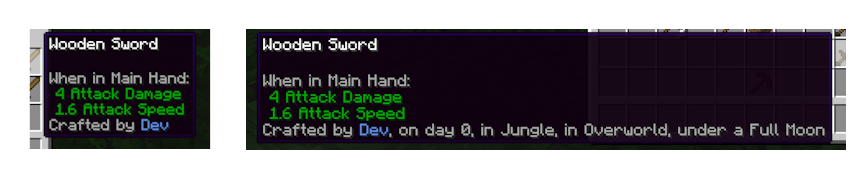 An advanced tooltip (i.e. holding shift) shows more information than the name. All pieces of the description can be toggled off.
How it works
- When you craft, smelt, brew, enchant, use an anvil, fish, or take an item from a crafting output, it gets stamped with your name and the in-game day.
- Hover over the item to see who made it. Hold Shift for more, like the dimension it was made in.
- By default only unstackable items (tools, weapons, armor and the like) are stamped, so blocks and food still stack.
- The first maker wins. Later crafting doesn't overwrite the stamp, but other players who change the item (at an anvil or enchanting table, for example) are listed as "Modified by".
- Potions are stamped too, with the player who loaded the brewing stand. Stonecutter and loom outputs have their own wording.
- Each maker's name gets its own color, and everyone sees the same one.

Want to see the mod in a pack it was designed for? Check it out in my version of Minecraft: Classic+
Configuration
You can adjust:
- Which items get stamped, and whether stackable items and Creative mode count
- Whether other players who modify an item are remembered, and how many names are kept
- Which details show in the normal and Shift tooltips, and whether they sit on one line or a list
- Optional extras: weather, depth and coordinates (coordinates also need the server to allow them)
- Custom name colors
Operators also get /ffitemcreationtracker commands to check or set the stamp on a held item.
Mod compatibility
- Custom crafting screens (like Farmer's Delight's cooking pot) stamp items when you take the result, with no extra setup.
- Automatic crafters (like Create's mechanical crafter) don't stamp items, since no player took them out.
Version differences
FFItemCreationTracker works the same on every supported version and loader.
For datapack makers
FFItemCreationTracker doesn't have a datapack format. The config's item lists accept item tags, so your own datapack tags work there.
For mod developers
Other mods can stamp items, add their own creation sources and details, and change stamps before they're written. Click the Wiki link in the sidebar for the API guide and examples.
What's with the FF prefix?
It stands for Fyxe's Features! It's a clean way to easily find all of my mods when changing configs or creating packs. Mods that are a part of the "FF" system are usually smaller and unintrusive.
Feedback
If you have any ideas for improvements, questions, or concerns, I am open to communicating through email: FyxeINCFeedback@gmail.com