
Compatibility
Minecraft: Java Edition
Platforms
Supported environments


Links
Tags
Creators
Details
Silkbound
Your loot, wrapped in silk instead of scattered in the dirt.
A small mod that turns a spider's cocoon into your safety net. Carry one, and the moment you die your whole inventory is wrapped into a single silk cocoon right where you fell - instead of spraying across the floor to burn, sink, or despawn. And to keep you stocked, Silkbound threads the caves with a brand-new structure: spider nests.
Based on the concept art by Frencore.
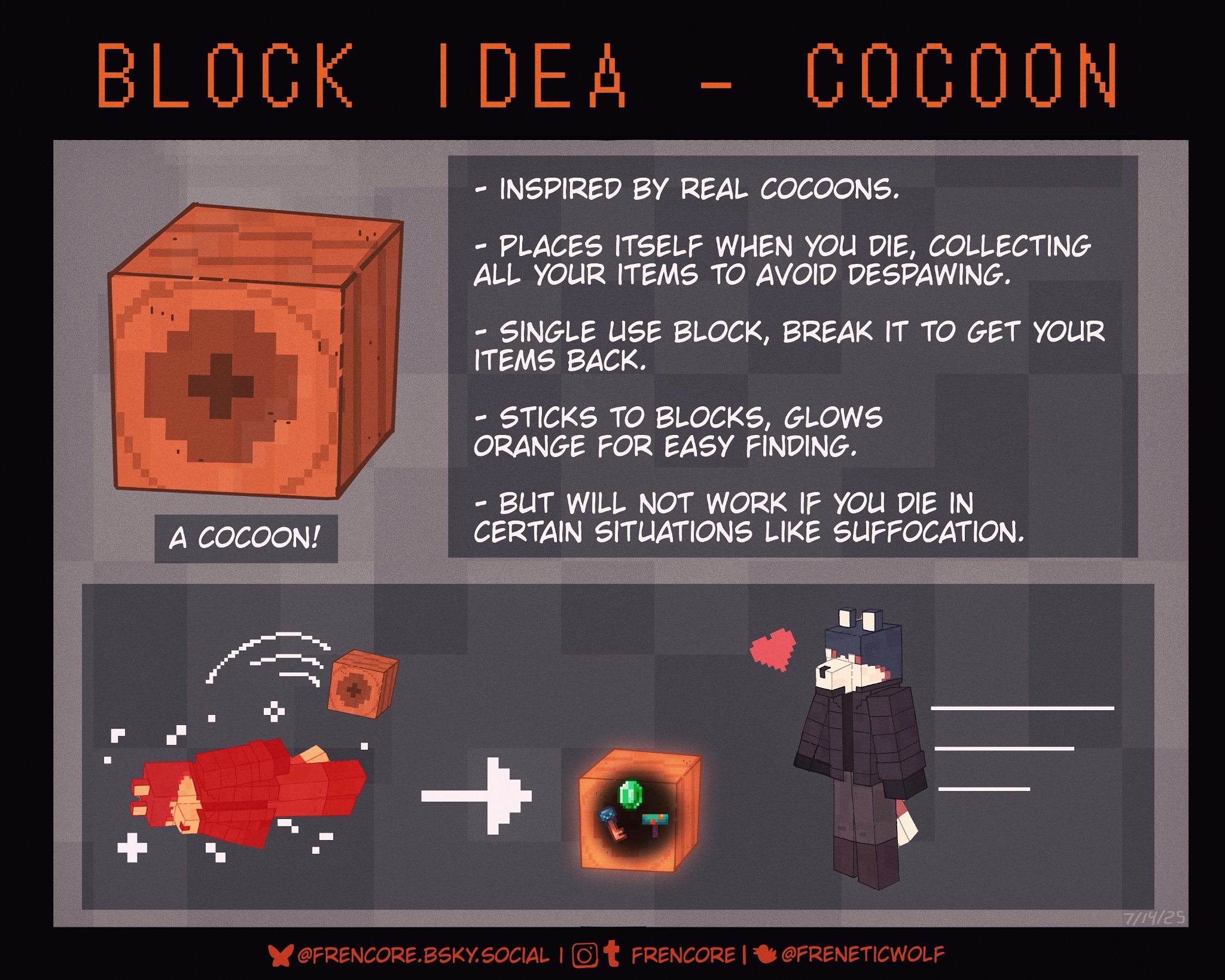
How the cocoon saves your stuff
- Carry it anywhere in your inventory. Hotbar, backpack - doesn't matter. If a cocoon is on you when you die, it triggers.
- Everything is sealed - items, armor, offhand - inside one cocoon block placed at the spot you died.
- One cocoon per death. It's consumed to do the wrapping, so bring spares on long trips.
- The filled cocoon glows, so you can spot your "grave" from across a dark cave.
- Break it to get it all back - the cocoon spills its contents when destroyed.
Think of it as a tombstone made of silk: your loot waits in one tidy, glowing block instead of a scattered pile on the ground.
Spider nests - a new underground structure
Cocoons come from spider nests, carved into the caves of every Overworld biome:
- Irregular silk-and-cobble chambers deep underground, strung with cobwebs and hanging strands, littered with bones and old prey.
- Four flavours, from cramped little dens to sprawling nests - including a rare silverfish-infested variant for the brave.
- Inhabited by cave spiders (spawners inside), so clearing one is a real fight.
- Natural cocoons line the walls, some in tight egg-sac clusters.
- Each nest tunnels itself to the nearest cave, so they're part of the world, not sealed bubbles.
Getting cocoons
- Mine a nest cocoon with Silk Touch to collect the cocoon block itself - that's the one you carry as your safety net.
- Without Silk Touch, an empty cocoon just gives a little string or the odd spider eye.
What it won't save
- Some deaths leave no grave: the void, drowning, suffocating in a wall, and explosions all drop your items the vanilla way.
- The cocoon needs a solid surface to anchor to within a couple of blocks of where you died - fall to your death over a big open drop and there may be nowhere to hang it.
- The cocoon can still be destroyed (and will spill your loot) - it protects against scatter and despawn, not against a creeper dancing on your grave.
Requirements
- Fabric Loader
- Fabric API
- Fabric Language Kotlin
- Required on both client and server
Supported versions: 1.20.6, 1.21.11, 26.1, 26.1.1, 26.1.2, 26.2
FAQ
I died and my stuff scattered - no cocoon? Either you weren't carrying a cocoon, there was no solid surface nearby to anchor it to, or it was one of the excluded deaths (void / drowning / wall / explosion).
How do I open the cocoon? Just break it - your items pop straight back out.
Can I build with them? Yes - empty cocoons place like any block (and glow once filled), so your nests and bases can get properly creepy.
Where's the cocoon in creative? It's in the Functional tab.
Credits
Found a bug? Open an issue - include your Minecraft version
and the latest.log.