
Compatibility
Minecraft: Java Edition
Platforms
Supported environments


Tags
Creators
Details
✨ HitTarget Highlighter Features
Fully Customizable Colors – Use the integrated RGB sliders to choose any highlight color that fits your style or HUD setup.
Adjustable Transparency – Fine-tune the Alpha (opacity) level to make the highlight as subtle or as vibrant as you prefer.
Variable Highlight Duration – Set exactly how long the highlight stays on the screen after a hit, ranging from 0.5 to 5.0 seconds.
Independent Armor Toggle – Choose whether you want the entity's armor to be highlighted as well. This can be toggled ON or OFF separately from the main body highlight.
Real-time Visual Preview – The configuration screen features a live color preview box, so you can see exactly how your choices will look in-game before saving.
Native Interface – A clean, intuitive configuration screen that uses Minecraft's native UI style for a seamless experience.
Persistent Config – Your settings are automatically saved to a JSON file and reloaded every time you launch the game.
📸 Screenshots
Config menu Config screen featuring RGB sliders, Alpha transparency, Duration control, and the Armor highlight toggle.
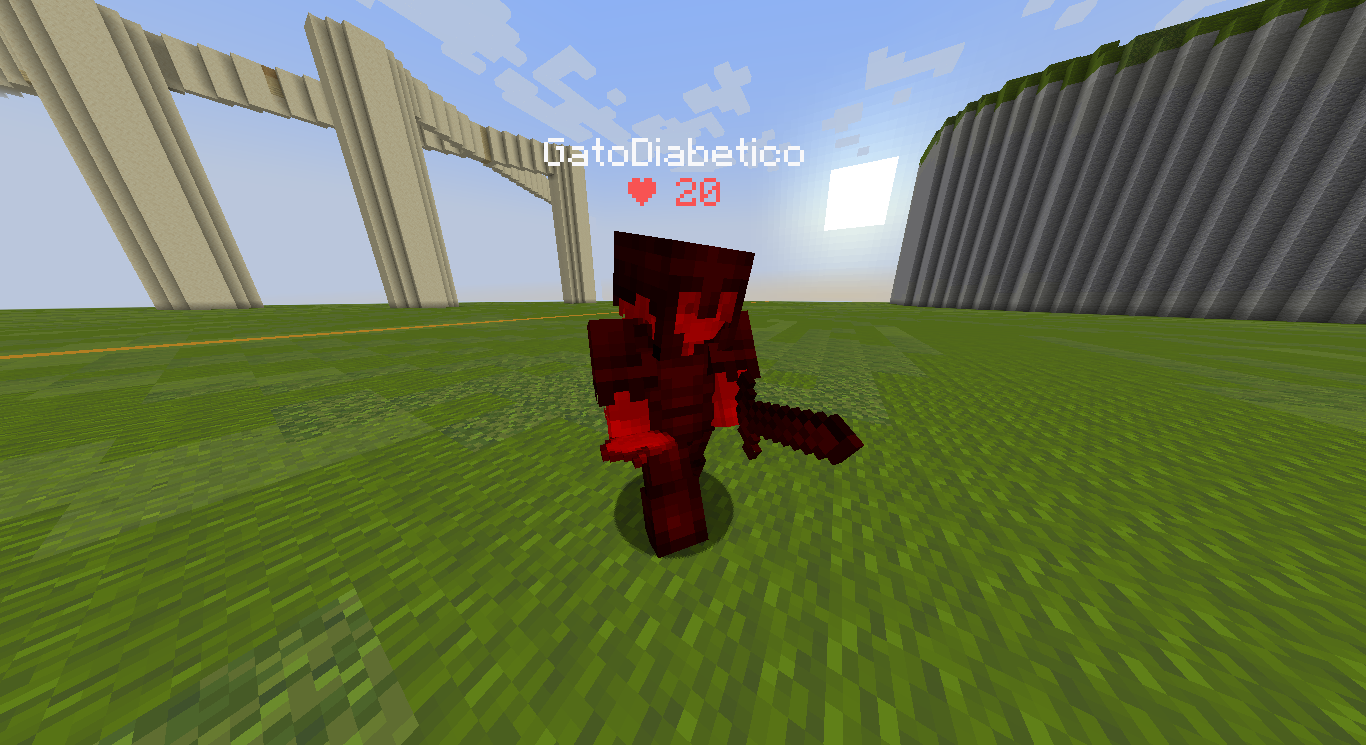
In-game Action shot showing an entity being highlighted with a custom color upon impact.
🔧 Requirements
> Fabric Loader ≥ 0.18.4
> Fabric API
> Java 21
🎮 How to use
Install the mod and launch Minecraft. Open the config screen with H (default key, changeable in your Controls settings). Adjust the Red, Green, and Blue sliders to find your perfect color. Use the Alpha slider to set the transparency and the Duration slider to set the highlight time. Toggle the Armor button to decide if equipment should also be highlighted. Click Done to save your settings. Hit any entity in-game to see your custom highlight instantly!
🐛 Bug reports & suggestions
Send me a DM on Discord:
marcellesa