
Compatibility
Minecraft: Java Edition
Platforms
Supported environments


Tags
Creators
Details
HyskExpFly Mod
A Minecraft Fabric mod that allows players to fly in survival mode using experience points
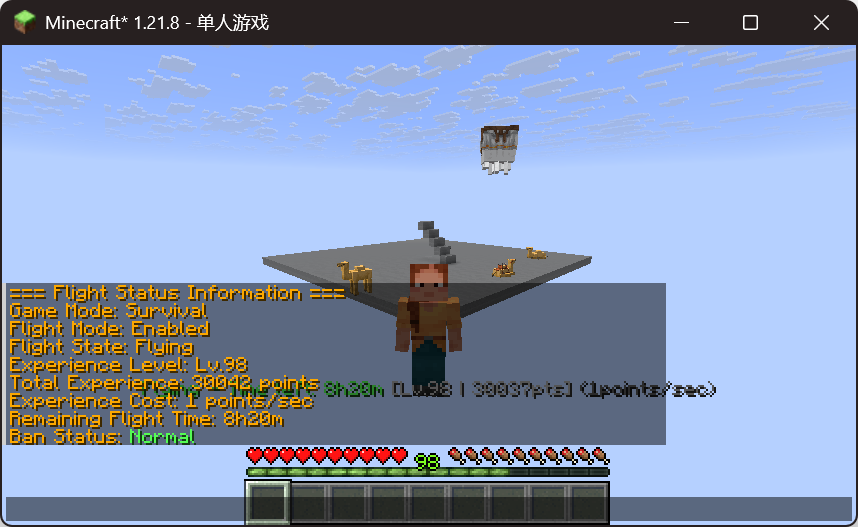
Mod Introduction
HyskExpFly Mod is an innovative Minecraft Fabric mod that allows players to consume experience points to gain flight ability in survival mode. Through simple commands and an intuitive interface, players can easily manage their flight status and enjoy the freedom of aerial exploration.
- All code features are assisted by Deepseek AI
- Qingxin Hengyue Shikong Server free public flight mod
Creator: YkinLing
AI Assistant: Deepseek
QQ Group: 783492881 (Get open source code)
Core Features
Basic Flight Features
- Experience-based Flight: Fly in survival mode using experience points
- Smart Consumption: Automatically deduct configured experience points per second
- State Recovery: Automatically restore flight status when reconnecting
- Mode Support: Supports survival mode, automatically handles other modes
Management Features
- Permission Management: Complete ban system supporting name and UUID bans
- Configuration System: Real-time adjustable experience consumption rate
- Status Query: Administrators can query all flying player status
- Safety Detection: Multiple safety checks to prevent state abnormalities
Multi-language Support
- Bilingual Interface: Full support for Chinese and English
- Real-time Switching: Supports in-game language switching commands
- Complete Translation: All prompt messages have bilingual versions
- Custom Extension: Supports adding new language configurations
User Experience
- Real-time Display: Continuously shows remaining time and experience information during flight
- Smart Tips: Rich status prompts and operation guidance
- Auto Protection: Automatically handles flight status during death, mode switching, and riding
- Easy Operation: Supports double-tap spacebar for quick takeoff/landing
Safety & Stability
- State Repair: Automatically detects and fixes flight state abnormalities
- Riding Protection: Automatically pauses flight when riding vehicles, resumes after dismounting
- Experience Monitoring: Monitors experience deduction intervals to prevent abnormal deductions
- Config Check: Automatically checks configuration integrity and fixes missing items
Installation Requirements
Required Dependencies
- Minecraft: 1.21.8
- Fabric Loader: ≥ 0.16.9
- Fabric API: Latest version
- Java: ≥ 21
Recommended Environment
- Server Environment: Fabric Server
- Client: Fabric Client
- Memory: ≥ 2GB RAM
Command List
Player Commands
| Command | Permission | Description |
|---|---|---|
/fly |
All players | Enable/disable experience flight mode |
/flystatus |
All players | View own flight status information |
Administrator Commands
| Command | Permission | Description |
|---|---|---|
/fly reload |
OP Level 4 | Reload configuration files |
/fly cost <points> |
OP Level 4 | Set experience consumption rate |
/fly enable |
OP Level 4 | Enable survival mode flight |
/fly disable |
OP Level 4 | Disable survival mode flight |
/fly ban <player> |
OP Level 4 | Ban player from using flight |
/fly deban <player> |
OP Level 4 | Unban player |
/fly banlist |
OP Level 4 | View ban list |
/fly query |
OP Level 4 | Query flying players list |
/fly debug [player] |
OP Level 4 | View debug information |
/flystatus <player> |
OP Level 4 | View other player's flight status |
/fly lang [language] |
OP Level 4 | View or switch language |
/fly checkconfig |
OP Level 4 | Check configuration integrity |
/fly updateconfig |
OP Level 4 | Update missing configuration items |
Operation Methods
Basic Operation Flow
- Enable Flight: Use
/flycommand to enable flight mode - Takeoff: Double-tap spacebar to start flying
- Flight Control:
- Spacebar: Ascend
- Shift: Descend
- WASD: Move forward/backward/left/right
- Landing: Double-tap spacebar again to land
- Disable Flight: Use
/flycommand to disable flight mode
Flight Status Description
- Flying: Continuously consumes experience points, shows remaining time
- Landed: Pauses experience consumption, shows remaining experience
- Riding Paused: Automatically pauses when riding vehicles, resumes after dismounting
- Auto Protection: Automatically disables when dying or switching to adventure mode
Configuration System
Configuration File Location
Configuration files are located in the server's config/hyskexpfly/ directory:
config/
└── hyskexpfly/
    ├── hyskexpfly.json    # Main configuration file
    └── lang.json          # Language configuration file
Main Configuration (hyskexpfly.json)
{
  "costPerSecond": 1,
  "enableSurvivalFlight": true,
  "bannedPlayers": []
}
Configuration Options Description
| Option | Type | Default | Description |
|---|---|---|---|
costPerSecond |
Integer | 1 | Experience points consumed per second |
enableSurvivalFlight |
Boolean | true | Whether to allow survival mode flight |
bannedPlayers |
Array | [] | List of banned players |
Banned Player Data Structure
{
  "name": "PlayerName",
  "uuid": "PlayerUUID",
  "banTime": "BanTimestamp"
}
Language Configuration (lang.json)
{
  "currentLanguage": "zh_cn",
  "languages": {
    "zh_cn": {
      "flyEnabled": "§a飞行模式已开启!",
      "flyDisabled": "§c飞行模式已关闭",
      "notEnoughExp": "§c你没有足够的经验点来开启飞行!",
      "...": "More translation items..."
    },
    "en_us": {
      "flyEnabled": "§aFlight mode enabled!",
      "flyDisabled": "§cFlight mode disabled",
      "notEnoughExp": "§cYou don't have enough experience points to fly!",
      "...": "More translations..."
    }
  }
}
Supported Languages
- zh_cn: Simplified Chinese
- en_us: English (US)
Configuration Modification Methods
Method 1: In-game Commands (Recommended)
# Modify experience consumption rate
/fly cost 5

# Enable/disable survival flight
/fly enable
/fly disable

# Switch language
/fly lang en_us

# Reload configuration
/fly reload
Method 2: Direct File Editing
- Stop the server
- Edit
config/hyskexpfly/hyskexpfly.jsonorconfig/hyskexpfly/lang.json - Restart the server
Method 3: Hot Reload Configuration
# Execute in-game
/fly reload
Configuration Integrity Check
The mod provides automatic configuration checking and repair functions:
# Check configuration integrity
/fly checkconfig

# Automatically update missing configurations
/fly updateconfig
Auto-repair Features
- ✅ Automatically detects missing configuration items
- ✅ Fills in default values
- ✅ Validates configuration format
- ✅ Repairs corrupted configuration files
Configuration Best Practices
Balanced Server Settings
{
  "costPerSecond": 2,
  "enableSurvivalFlight": true,
  "bannedPlayers": []
}
Hardcore Server Settings
{
  "costPerSecond": 5,
  "enableSurvivalFlight": true,
  "bannedPlayers": ["Violator1", "Violator2"]
}
Creative Server Settings
{
  "costPerSecond": 1,
  "enableSurvivalFlight": false,
  "bannedPlayers": []
}
Troubleshooting
Common Configuration Issues
-
Configuration Files Missing
- Solution: Use
/fly updateconfigto regenerate
- Solution: Use
-
Configuration Format Error
- Solution: Delete configuration files and use
/fly reloadto regenerate
- Solution: Delete configuration files and use
-
Language Display Abnormal
- Solution: Use
/fly lang zh_cnto reset language
- Solution: Use
-
Permissions Not Working
- Solution: Check OP permission level, requires OP Level 4
Custom Language
To add new language support:
- Add new language code in
lang.json'slanguagesobject - Copy key-value pairs from existing languages and translate content
- Use
/fly lang <new-language-code>to switch
Example:
{
  "currentLanguage": "zh_cn",
  "languages": {
    "zh_cn": { ... },
    "en_us": { ... },
    "ja_jp": {
      "flyEnabled": "§a飛行モードが有効になりました!",
      "flyDisabled": "§c飛行モードが無効になりました",
      "...": "More Japanese translations..."
    }
  }
}
Technical Features
Mixin Injection System
- PlayerInputMixin: Detects player input, implements double-tap spacebar takeoff/landing
- PlayerRidingMixin: Handles riding state, automatically pauses and resumes flight
- Safe Injection: Uses Mixin framework to ensure compatibility with other mods
Experience Calculation System
- Precise Calculation: Uses Minecraft standard experience calculation formulas
- Real-time Updates: Automatically detects experience changes and updates display
- Safe Deduction: Monitors deduction intervals to prevent abnormal situations
State Management System
- Persistent Storage: Automatically restores flight status when players reconnect
- Safety Checks: Multiple safety checks to ensure state consistency
- Auto Repair: Automatically repairs state abnormalities when detected
This configuration system is designed to provide maximum flexibility and ease of use, allowing server administrators to easily adjust mod behavior to suit different gaming environments.~~~~