
Compatibility
Minecraft: Java Edition
Platforms
Supported environments


Tags
Creators
Details
Iron Crate is a versatile and immersive Minecraft mod that introduces a wide array of wooden crates, crafted from every type of wood available in the game. Perfect for players looking to expand their storage options, enhance their base aesthetics, or add a touch of realism to their world, this mod brings a whole new level of organization to your Minecraft adventures.
Features:
Diverse Wood Types: Craft crates using all types of wood, including Oak, Spruce, Birch, Jungle, Acacia, Dark Oak, Mangrove, Cherry, Bamboo, and more. This ensures your crates match any build style or biome theme you prefer.
Unique Visuals: Each crate is designed to reflect the unique texture and color of its respective wood type, providing a visually distinct storage option that complements your builds perfectly.
Various Sizes: Choose from small, medium, and large crates to fit your storage needs. Whether you're hoarding cobblestones or precious diamonds, there's a crate for every item.
Stackable Design: Save space in your storage rooms with stackable crates, similar to barrels. This feature is ideal for creating compact and efficient storage solutions.
Easy Crafting Recipes: Crafting crates is straightforward and requires only planks and sticks, making them accessible early in your gameplay.
Upgradable Crate: You can upgrade crate storage with enhancements made from Iron, Gold, Diamond, Emerald, Netherite, Obsidian, and much more.
Seamless Compatibility: Fully compatible with other popular Minecraft mods, ensuring a smooth and integrated experience within your modded Minecraft world.
Decorative Elements: Beyond their practical use, crates serve as decorative blocks, adding a rustic charm and authenticity to any build, whether it’s a medieval castle or a modern home.
How to Use:
Crafting Crates: Open your crafting table and use planks of your chosen wood type to craft crates. Each crate follows a simple recipe, allowing you to create them quickly and efficiently.
Organizing Items: Right-click to open the crate's inventory and start organizing your items. Utilize the custom labeling feature to keep track of what each crate contains, making inventory management a breeze.
Stacking and Arranging: Optimize your storage space by stacking crates vertically or arranging them side by side. Experiment with different layouts to suit your aesthetic preferences.
How to Craft:
Crate Craft :
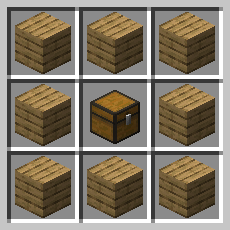
Upgrader Craft:
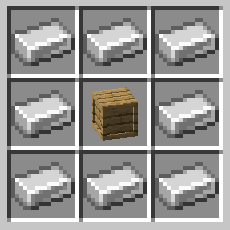
Then, you just have to surround the crate with the material.
You must upgrade in order: Wood, then Iron, then Gold, etc.
Installation:
To install Iron Crate, download it from Modrinth and place the downloaded file into your Minecraft 'mods' folder. Make sure you have Neo Forge installed for compatibility. Dive into a world of organized storage and improved aesthetics with Iron Crate!