Compatibility
Minecraft: Java Edition
Platforms
Supported environments
Tags
Creators
Details
JEBB: More Blocks, More Possibilities
Tired of the same bulky cubes limiting your creativity? Just Enough Building Blocks is a lightweight, vanilla-plus mod dedicated to giving you the precise shapes you have always wanted. We focus on the micro-details that turn a simple house into a masterpiece. Instead of reinventing the wheel, this mod fills the gaps in Minecraft’s block palette with a handful of new shapes that look and feel completely native.
Maybe you are a professional terraformer sculpting entire landscapes, or maybe you are just looking to add a little more depth to your starter base. Either way, Builders’ Expanded hands you the geometric freedom Minecraft has been missing. Thinner walls, sharper roof lines, recessed lighting channels, smooth ramps, delicate pillars — all of it becomes possible the moment you install the mod.
Key Features
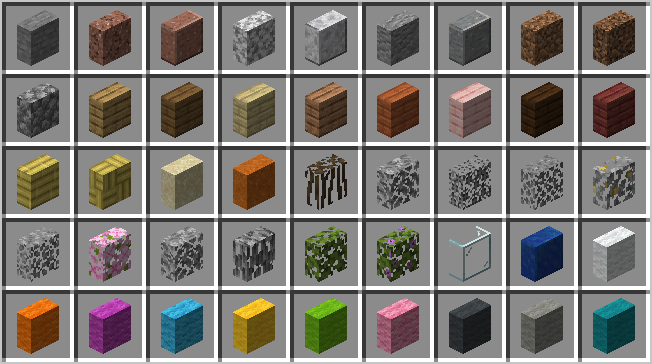
Vertical Slabs

The community’s most requested feature finally arrives. Place slabs on their sides to create slim walls, recessed windows, built-in shelving, decorative beams, and intricate pillars that do not force you to use a full block. With vertical slabs, you can define spaces more clearly without sacrificing floor area. Use them indoors to partition rooms or outdoors to add subtle trim to your facades. The placement logic automatically detects the face you are targeting, so orientation feels natural from the first click.
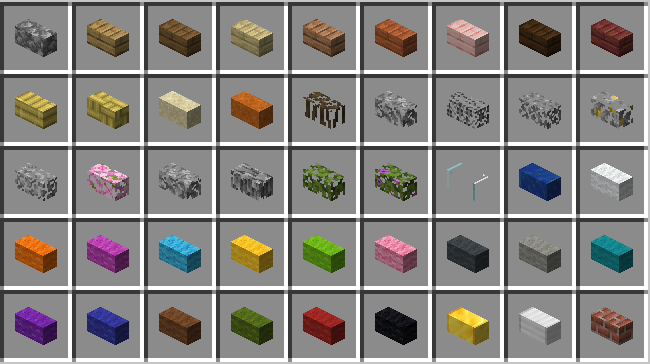
Quarter Blocks (1/4 Slabs)

Take detailing to the next level with quarter-height increments. These small blocks let you build custom stairs that rise more gradually, unique crenellations for castle battlements, smooth transitions between terraced gardens, and delicate furniture profiles. Quarter blocks are especially useful for roof design — create gentle slopes, layered overhangs, and subtle shadow lines that make your builds feel alive. Combine them with slabs and full blocks to produce a near-infinite gradient of shapes without ever leaving the vanilla aesthetic.
More Plank Textures
The rich wood selection your builds have been waiting for finally arrives. Unlock a fresh palette of plank textures, each boasting distinct grain patterns, weathered finishes, and deeper, more natural color tones that sit perfectly within the vanilla aesthetic. With these added styles, you can craft authentic timber-framed walls, elegant parquet floors, and custom furniture accents that make every room feel warm and lived-in. Use them indoors to build detailed ceiling beams, cozy kitchen counters, and intricate wainscoting, or take them outside to design charming boardwalks, decorative shutters, and bold accent facades. Each new texture is available through the Stonecutter from existing wood types and blends seamlessly with stairs, slabs, and fences, so your entire build stays cohesive from every angle.
Compatibility and Performance
Vanilla Friendly
We deliberately avoided any flashy “modded” looking blocks. Every new shape uses the same 16x16 textures you already know and love, so your builds will blend perfectly into both singleplayer worlds and multiplayer servers. The shapes fit naturally alongside stairs, fences, and regular slabs, extending the vanilla toolkit without making it look alien.
Highly Optimized
Builders’ Expanded is designed to be lightweight. You can place thousands of quarter blocks and vertical slabs in a single scene without taking a noticeable hit to your frame rate. The mod adds no ticking block entities for the decorative shapes, and the rendering pipeline is kept as close to vanilla as possible. Whether you are assembling a sprawling city skyline or a detailed interior, performance stays smooth.
Tag and Recipe Support
These blocks function as their base materials for recipes and behavior tags, which means they integrate cleanly with other mods. A vertical oak slab can be used as oak planks in crafting recipes that check the appropriate item tags. This compatibility ensures that your favorite modded workstations, builders’ wands, and block-placement gadgets will treat the new shapes exactly as you would expect.
Getting Started
All of the new shapes are craftable in survival mode. For maximum efficiency, use the Stonecutter — simply drop in your cobblestone, stone bricks, or planks and pick the shape you need from the menu. You can also craft them by hand on a Crafting Table if you prefer. The recipe ratios are kept fair so that building beautifully never feels like a grind.
To install the mod, just drop it into your mods folder on Fabric. Once you are in game, grab some basic materials, open the Stonecutter, and start shaping your world block by block.
A quick note: we recommend using a recipe-viewing tool such as EMI, JEI, or REI to quickly browse all the available shapes and their crafting paths. This makes discovering every variant much faster.