
Compatibility
Minecraft: Java Edition
Platforms
Supported environments


Tags
Creators
Details
MapStitch
This mod adds a world map and a minimap using vanilla maps and makes vanilla maps cheaper and easier to manage by using the new Atlas item.
Unlike other world map/minimap mods which ignore vanilla maps and make them obsolete, MapStitch makes them much more enjoyable to use and turns them into a core part of the world map and minimap.
Requires:
- Fzzy Config
- Fabric API (Fabric only)
World map
MapStitch uses atlases from your inventory to create a world map which you can open at any time by pressing M or right-clicking while holding an atlas.
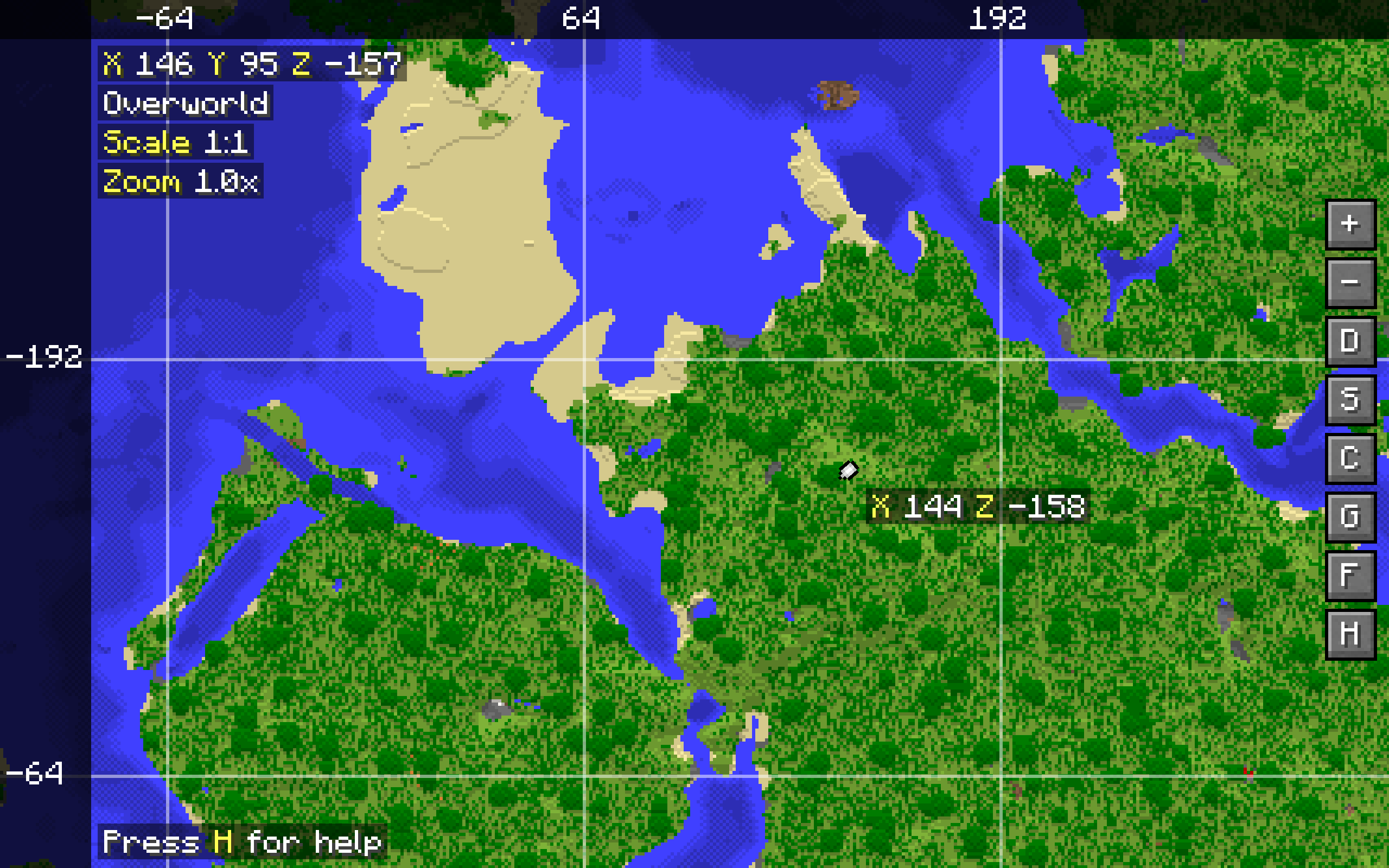
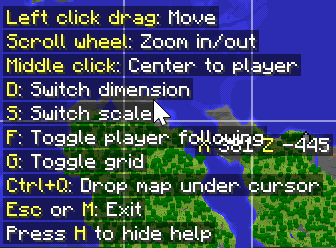
The world map can only show one dimension and scale at once. These can be switched in the world map itself. There are basic controls like panning and zooming using the mouse, and toggleable player following and map grid overlay. A keybind reference can be brought up at any time by pressing H. Most of the keybinds can be rebound in the vanilla Controls menu.
The world map shows custom player markers for all online players. They're smoothly animated, and each player marker is uniquely colored, identically to locator bar player markers. Hovering over a player marker shows the player's name. Markers stored on the maps themselves are displayed too, such as banners and exploration markers.
Atlas
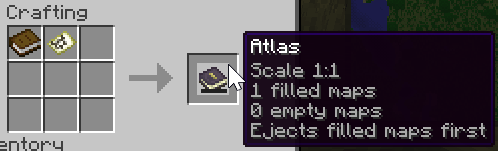
Create an atlas by combining a filled map and a book. The atlas can then be used like a bundle to store empty maps and filled maps matching the scale of the filled map used to create the atlas (up to 16384 items in total, configurable).
Maps from the atlas will be used to create the world map, and the atlas will automatically turn empty maps inside it into filled maps as you enter unmapped areas.
- Atlases can be copied and merged in the cartography table.
- Atlases can be enchanted with Globetrotter, which makes them consume paper instead of empty maps to create new maps. This is a treasure enchantment and can only be found in stronghold library chests.
- Adding an explorer map or buried treasure map to an atlas will make the target marker visible in the world map and minimap.
- Scrolling while hovering over an atlas will switch between ejecting filled or empty maps first.
- Right-clicking with an atlas in hand when targeting a banner will create a banner marker on the currently active map, just like regular maps do.
Atlas Pins
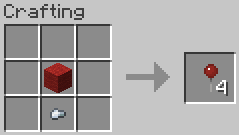
Atlas pins can be used in the world map to place location pins. They are crafted with wool and an iron nugget, and can be dyed the same way leather armor is dyed, supporting millions of color combinations. Atlas pins carried in your inventory, bundles, and shulker boxes will be available for use in the world map. Placed pins can be shared with other players on multiplayer servers.
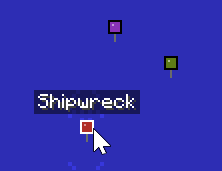
Pin placement:
- In the world map screen, press P to turn on pin placement mode.
- Click anywhere on the world map to open the pin placement menu.
- In the menu, set the pin name and select the pin color from the palette.
- Press the "Confirm" button to place the pin on the clicked location, consuming the atlas pin of the matching color.
- Click on an existing pin while holding Ctrl to remove the pin under the cursor, placing it back into your inventory.
- Press P again to turn off pin placement mode.
Pin sharing:
- Left-click a pin outside of pin placement mode to share it with an online player.
- Sharing a pin consumes an atlas pin of a similar color.
- The receiving player gets a chat message with a link to accept the pin.
- If the request isn't accepted within 60 seconds (configurable), the atlas pin is refunded.
The atlas pin item can be disabled in the config. When disabled, pins can be placed and shared without atlas pins, choosing from the 16 base dye colors and the colors of existing pins.
Minimap
Having an atlas in the hotbar will display a minimap showing the map where you're currently located.
If multiple atlases are present, the minimap will prioritize the atlas in your hands, otherwise the first atlas will be used.
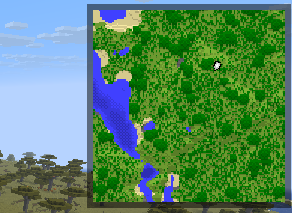
The minimap shows the same markers that the world map does. Player marker names are displayed while the player list is open (holding Tab).
Some basic information like real time, game time, coordinates, biome and weather can be displayed under the minimap, with each being toggleable. These are all disabled by default.
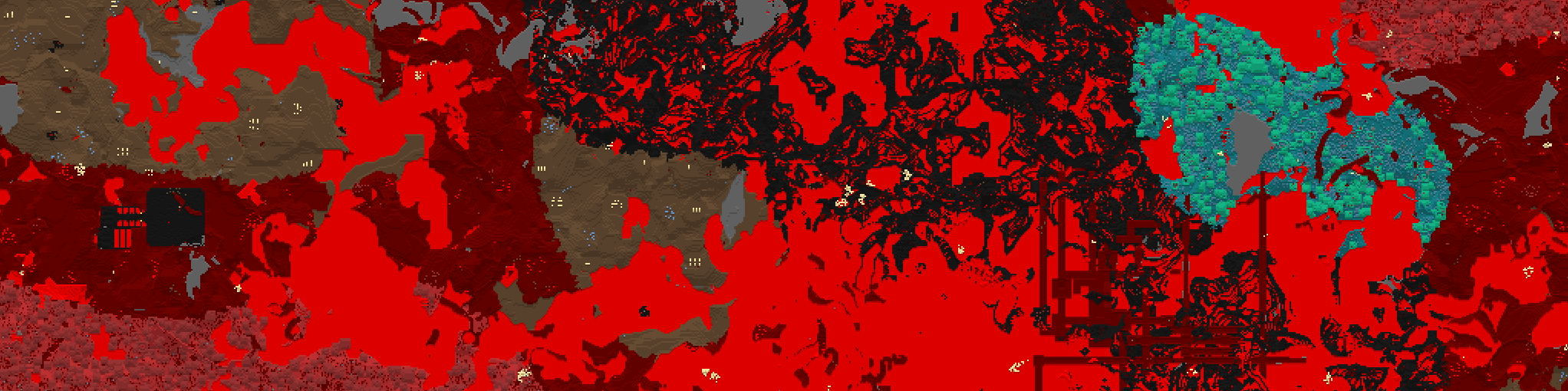
Working Nether maps
MapStitch enables maps in the Nether - no other mods required. The way Nether maps are displayed can be configured, and additional ceiling dimensions can be added to enable maps in them.
Cheaper maps
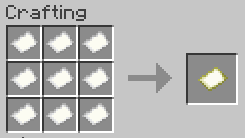
Making maps is now cheaper, requiring only 9 paper instead of 8 paper and a compass, but they won't show your position unless you have a compass in your inventory.
Mod integration
- Trinkets (Updated), Ohmega, Curios API, or Trinkets: Allows equipping one atlas as an accessory, from where it will function as usual and be prioritized for the minimap
- Remapped: Fabric mod that significantly improves map colors, MapStitch works with it out of the box without any configuration needed, highly recommended
Configuration
Many aspects of the mod are configurable. It's highly recommended to use the in-game configuration screen to configure the mod. On Fabric, you can access it by installing Mod Menu. On NeoForge, you can access it in the mod loader's built-in mod menu.
Client-side settings can also be configured from the Sodium video settings screen if Sodium is installed.
Some notable settings include:
- Customizing the appearance of the world map, minimap, and Nether maps
- Granular control over the requirement of items to use certain features (such as the compass being required for the player marker and coordinates, clock being required for time and weather etc.)
- Toggling the cheaper map recipe and whether it should replace the vanilla recipe
- Toggling the Globetrotter enchantment and adjusting the chance for it to appear in stronghold library chests
- Toggling whether to keep atlases on death
- Toggling each accessory slot when an accessory mod is installed