
Compatibility
Minecraft: Java Edition
Platforms
Supported environments


Tags
Creators
Details
Metrognome
Plays MIDI files on the in-game instruments from the
Instruments plugin.
Pick a .mid, adjust it until it sounds right, then save it to a library you
can play from later.
Minecraft 1.21.11, Fabric. Client-side. Nothing to install on the server.
Play a song
Hold an instrument and right-click to open it. Leave that screen open. Metrognome plays by clicking its keys, so closing it stops the song.
Press M for the menu, Browse to pick a MIDI, then Play.
| Key | |
|---|---|
| M | Menu |
| B | Play / stop |
| H | Pause / resume |
| U | Audition. Plays locally, sends nothing to the server |
Making it sound better
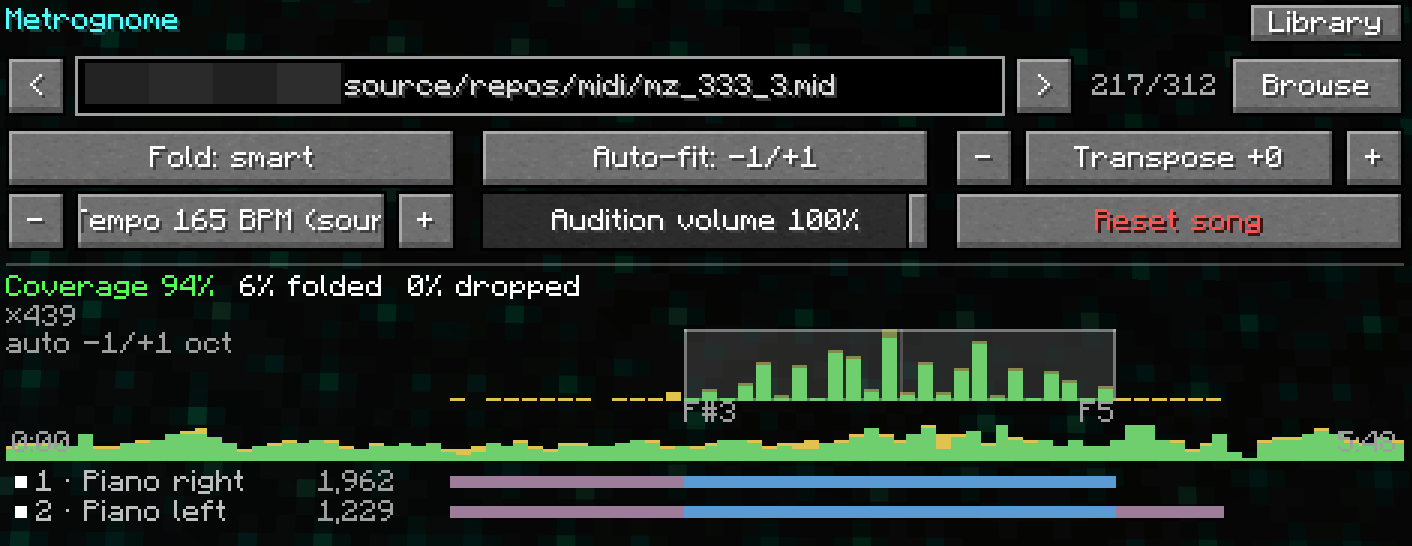
The instrument has 24 keys, two octaves. Most music is wider than that, so anything outside the range moves to the nearest octave that fits. The Coverage line under the controls says how much of the song fits as written:
- Green: close to the original.
- Yellow: recognisable, some notes moved.
- Red: a lot of it is being squashed.
For a red song, try these in order.
Mute tracks. Every track in the file is listed under the stats with its note count and range. Left-click mutes one, right-click solos it. Dropping a bass or drum track usually helps more than anything else, and soloing the melody often beats forcing every part into two octaves.
Transpose. Shifts the whole song. The register map above the track list shows where the notes sit against the playable range, so nudge it until most of them land inside.
Fold. Decides what happens to notes that still do not fit. smart keeps a
melody connected and suits most music. simple shifts by whole octaves. none
drops them.
The song reconverts as you change things, so press U to hear the result. The timeline strip shows where the trouble is. Click it to start from that point instead of the beginning.
Press Save when it sounds right. The song and its settings go to the library.
Library
Library lists your saved songs. Play, audition, edit or remove any of them, and drag rows to set a running order. A saved song keeps the settings it had at save time, so later edits elsewhere leave it alone.
Server load
Each note is one click sent to the server, so a busy song sends a lot of them. Not every server will want that, so may have prevention mechanisms in place. This may also result in notes being held back and played over the top of one another here and there if the server TPS dips. I don't expect an actual performance impact against the server, and have not measured any such impacts throughout the development process.