
버전: 26.1 ~최신버전 기반: Fabric 0.19.3(패브릭 지원)
오로지 한국인들이 불편해하는 기능들을 위한 통합 패치 모드를 만들었습니다. 초보자가 모드를 넣어 사용하기도 좋게 구성해뒀으니 많은 이용 바랍니다.
기능: **1. 심플한 한글패치 [한글채팅] 개선,영어 검색 기능 한글 작성 도중 움직임이 제한되고 불편한 채팅박스 표시 문제를 해결합니다. 초성 검색도 지원하며, 모든 언어여도 영어 검색도 추가로 지원합니다.

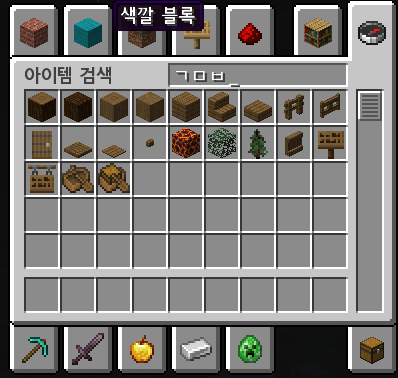
2. 리소스팩 없이 원하는 어디서든 폰트 변경 [설치되어 있는 폰트 지원], 리소스팩 필요없이 폰트를 PC에 설치하면 어디서든 폰트 변경을 지원합니다. 검색기능 및 크기 설정도 지원합니다. 우선순위가 리소스팩보다 높으며, 폰트 설정창에서 우선순위를 설정할 수 있어요.
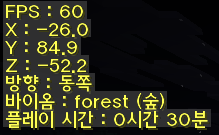
** 3. 복잡한 F3 개선 [프레임,바이옴,좌표,방향,게임 접속시간],**
F3의 정보들을 플레이에 필요한 정보들로만 간추려 보여줍니다
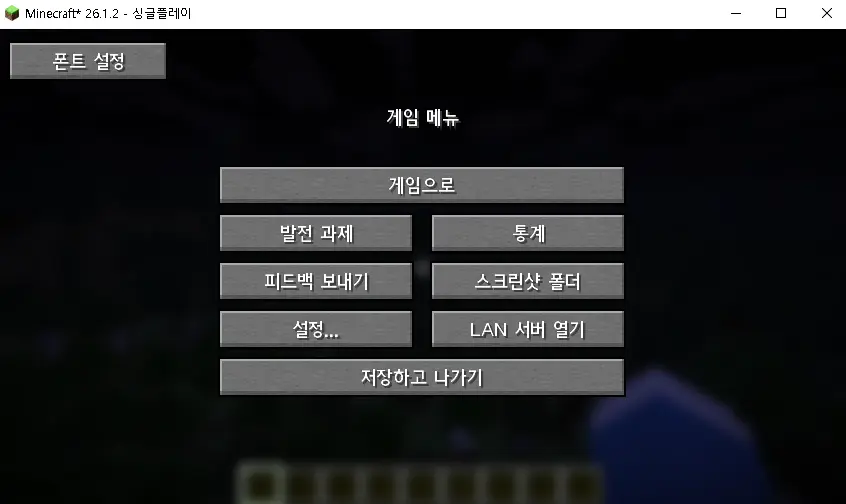
4. 스크린샷 폴더 바로 열기 버튼 추가,
ESC 에서 바로 스크린샷 바로 열기 버튼을 추가합니다.
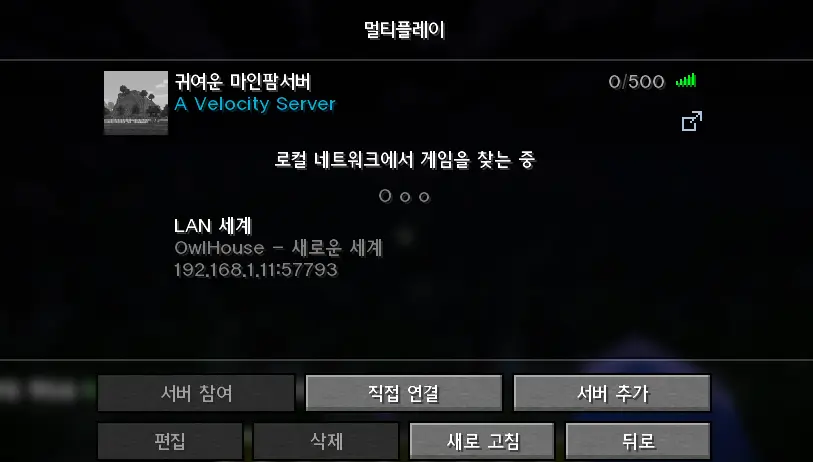
5. 게임 플레이 도중 멀티서버 확인하기
ESC를 누를 시 싱글플레이 또는 멀티플레이 도중 다른 서버를 바로 접속할 수 있는 버튼이 생겼습니다.
6. 자동키바인드 전환 모드를 처음 설치하고 게임을 플레이하면 채팅이 자동으로 T 키에서 엔터로 변경됩니다. 이후 저장한 키,언어 데이터는 남아있습니다.
7. 자동 언어 변경 모드를 처음 설치하고 게임을 플레이하면 자동으로 언어가 한국어로 선택됩니다. 이후 저장한 키,언어 데이터는 남아있습니다.
해당 프로젝트는 AI의 도움을 받아 제작되었습니다.**
Version: 26.1 ~ Latest Based on: Fabric
An all-in-one patch mod built specifically for the pain points Korean players run into. Set up to be easy for beginners to install and use, so give it a try.
Features:
Simplified Korean Input Fix + English Search Fixes movement getting locked and chat box display issues while typing in Korean. Supports Korean initial-consonant (초성) search, plus English search across any language. Change Fonts Anywhere Without a Resource Pack [Supports Installed Fonts] No resource pack needed — install a font on your PC and use it anywhere in-game. Includes font search and size settings. Takes priority over resource packs, and priority can be adjusted in the font settings menu. Simplified F3 Screen [FPS, Biome, Coordinates, Facing, Session Time] Trims the F3 debug overlay down to just the info you actually need while playing. Quick Screenshot Folder Button Adds a button in the ESC menu to open your screenshots folder instantly. Switch Servers Mid-Game Adds a button in the ESC menu (singleplayer or multiplayer) to jump straight to another server. Auto Keybind Switch On first install, the chat keybind automatically switches from T to Enter. Your saved key and language settings persist after that. Auto Language Switch On first install, the game language automatically switches to Korean. Your saved key and language settings persist after that.