
Compatibility
Minecraft: Java Edition
Platforms
Supported environments


Links
Tags
Creators
Details
Prefab World
把一张地图放进文件夹,之后新建的每一个世界都会按它自动生成。
Drop a map into a folder — every world you create from then on is generated from it.
为地图作者、整合包作者和服务器主设计。不需要命令方块,不需要数据包。
Built for mapmakers, modpack authors and server owners. No command blocks, no datapacks.
中文文档
它能解决什么问题
做地图和整合包的人都有一个麻烦:每开一个测试世界、每让玩家开一个新局,都要从零开始搭同一个出生区、同一座起始岛、同一个新手大厅。
Prefab World 把这件事变成一次操作:把你做好的地图放好,之后所有新世界都从它开始。
怎么用
- 安装模组(客户端和服务端都需要)
- 把你准备好的模板地图(一个普通的存档文件夹)放进实例目录下的
prefab_saves文件夹 - 正常点"新建世界"
新世界就会直接带着你的模板地形和建筑生成。想换开局布局,换掉文件夹里的模板就行。
.minecraft/
└── prefab_saves/
    ├── .active            # 记录当前启用的模板
    └── 你的模板地图/
        ├── level.dat
        ├── region/
        └── ...
放着一个模板时会自动启用;放多个时,用管理界面或 /prefab use <名字> 选一个。
适合谁
| 身份 | 用来做什么 |
|---|---|
| 地图作者 | 每次开新游戏,起始区域保持一致,方便测试和发布 |
| 整合包作者 | 让每个新世界都带自定义出生点、新手岛或教程区 |
| 服务器主 | 开服前直接备好大厅、起始地块、活动场地 |
功能
- 模板即插即用:放一个存档文件夹就能生效,不用写配置
- 图形化管理:在游戏里直接把存档加入预制列表,一键启用或删除
- 服务器命令:专用服务器用
/prefab完成同样的操作 - 可选复制内容:玩家背包、统计进度、世界图标、
level.dat都能单独开关 - 世界规则覆盖:可强制新世界的游戏模式和是否允许命令
- 玩家无感:管理入口默认隐藏,普通玩家看不到任何额外界面
- 不依赖其他模组:单独安装即可运行
兼容性
| 版本 | 加载器 | 状态 |
|---|---|---|
| 26.3 | NeoForge 26.3.0.92+ | ✅ 支持(当前版本) |
| 1.20.1 | Forge | 旧版本,不再更新 |
| 1.18.2 | Forge | 旧版本,不再更新 |
目前只支持 NeoForge。Fabric 暂无计划——如果你需要,在 Issue 里说,需求够多会加。
安装
- 安装 Minecraft 26.3 和 NeoForge 26.3.0.92 或更高版本
- 把
.jar放进mods文件夹 - 启动游戏(需要 Java 25)
管理界面
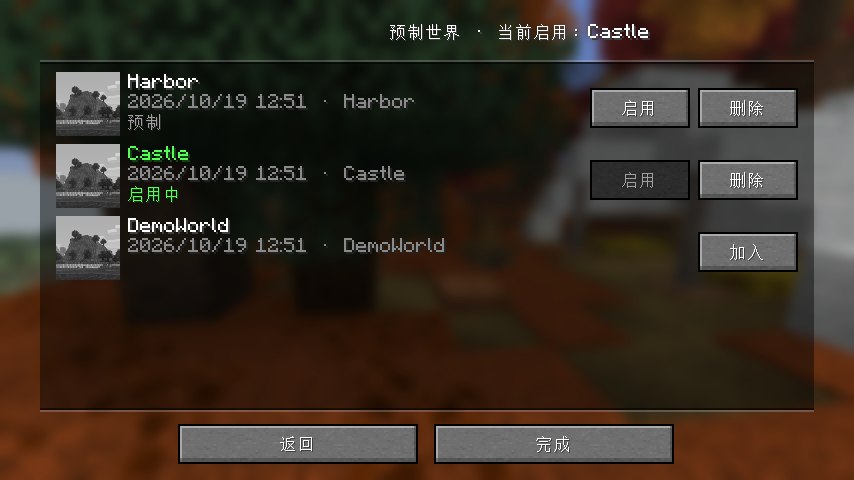
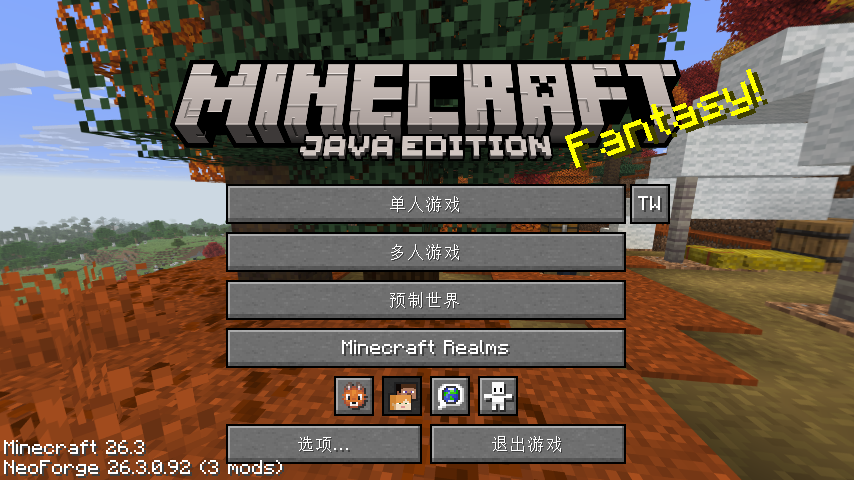
在配置里把 showManageButton 设为 true,主界面「多人游戏」下方就会出现「预制世界」按钮。打开后是一个存档列表:
- 每条显示地图图标、名称、上次游玩时间和存档 ID
- 普通存档行右侧有「加入」按钮 → 复制为预制
- 预制行右侧有「启用 / 删除」按钮
- 当前启用的预制名称显示为绿色并标记「启用中」
命令
管理员(权限等级 2)可用:
| 命令 | 说明 |
|---|---|
/prefab list |
列出所有预制,标记当前启用的 |
/prefab use <名字> |
启用指定预制 |
/prefab add <存档名> |
把 saves/ 里的存档复制为预制 |
/prefab remove <名字> |
删除预制 |
参数支持 Tab 补全,带空格的中文名也能用。
配置
配置文件位于 config/prefabworldmod-local.toml,也可在游戏内「模组 → Prefab World → 配置」中修改。
| 配置项 | 默认 | 说明 |
|---|---|---|
folderName |
prefab_saves |
预制文件夹名称 |
showManageButton |
false |
是否在主界面显示管理入口 |
overwriteLevelDat |
false |
是否复制模板的 level.dat(世界名、时间等) |
copyPlayerData |
false |
是否复制 players/(背包、坐标、末影箱) |
copyPlayerProgress |
false |
是否复制统计与进度 |
copyIcon |
true |
是否复制世界图标 |
defaultGameMode |
KEEP |
强制游戏模式:KEEP / SURVIVAL / CREATIVE / ADVENTURE / SPECTATOR |
allowCommands |
KEEP |
是否允许命令:KEEP / ENABLED / DISABLED |
默认值的设计意图:模板是地图,玩家进去应该是干净的开局,所以玩家数据默认不复制;图标默认复制,新世界会显示同一张预览图;游戏模式和命令默认跟随新建世界时的选择。
常见问题
Q:新世界还是普通地形?
A:检查模板文件夹是否正好在实例目录下的 prefab_saves 里,且里面是一整个存档文件夹,不是压缩包。可以用 /prefab list 或管理界面确认是否已启用。
Q:多人服务器能用吗?
A:能。服务端和客户端都要装同一个版本。
Q:会覆盖我原来世界的存档吗?
A:不会。它只影响之后新建的世界,已有世界不受影响。
Q:为什么主界面没有「预制世界」按钮?
A:为了让普通玩家看不到,这个入口默认关闭。在配置里打开 showManageButton 即可。
Q:玩家进来会带着模板作者的背包吗?
A:不会,玩家数据默认不复制。需要的话把 copyPlayerData 设为 true。
反馈
在 Issues 提问,中文英文都可以。附上游戏版本和崩溃日志(如果有)会更快定位。
许可证
All Rights Reserved — 见 LICENSE。二次分发或整合进你自己的包里请先开 Issue 联系。
English documentation
What problem it solves
Mapmakers and modpack authors keep running into the same chore: every test world, every player's fresh start, has to be filled with the same spawn area, the same starting island, the same tutorial lobby — built again from scratch.
Prefab World turns that into a single step: prepare the map once, and every new world starts from it.
How it works
- Install the mod (client and server side).
- Put your template map — a normal world save folder — into the
prefab_savesfolder inside your instance directory. - Create a new world as usual.
The new world is generated with your template's terrain and structures. Want a different starting layout? Swap the template folder.
.minecraft/
└── prefab_saves/
    ├── .active            # remembers which template is active
    └── your-template-map/
        ├── level.dat
        ├── region/
        └── ...
With a single template in the folder it is activated automatically; with several, pick one in the manager screen or with /prefab use <name>.
Who it's for
| Role | What you use it for |
|---|---|
| Mapmakers | A consistent starting area for every new playthrough — easier to test and ship |
| Modpack authors | Custom spawn, starter island or tutorial area in every new world |
| Server owners | A ready-made lobby, starter plot or event arena before you open the server |
Features
- Plug and play — one save folder, no config to write
- In-game manager — add saves to the prefab list, activate or delete them with a click
- Server commands —
/prefabdoes the same on dedicated servers - Selective copying — player data, progress, world icon and
level.datare each toggleable - World rule overrides — force the game mode and whether commands are allowed
- Invisible to players — the manager entry is hidden by default
- No dependencies — runs on its own
Compatibility
| Version | Loader | Status |
|---|---|---|
| 26.3 | NeoForge 26.3.0.92+ | ✅ Supported (current) |
| 1.20.1 | Forge | Legacy, no longer updated |
| 1.18.2 | Forge | Legacy, no longer updated |
NeoForge only for now. Fabric is not planned; ask in Issues if you need it — enough requests and we'll add it.
Installation
- Install Minecraft 26.3 and NeoForge 26.3.0.92 or newer
- Drop the
.jarinto yourmodsfolder - Launch the game (requires Java 25)
Manager screen
Set showManageButton to true in the config and a Prefabs button appears on the title screen, right below Multiplayer. It opens a list of your saves:
- Each row shows the world icon, name, last played time and save id
- Regular saves have an Add button — copies the save into the prefab folder
- Prefabs have Use / Delete buttons
- The active prefab is shown in green with an "ACTIVE" marker
Commands
For admins (permission level 2):
| Command | Description |
|---|---|
/prefab list |
List all prefabs and mark the active one |
/prefab use <name> |
Activate a prefab |
/prefab add <save> |
Copy a save from saves/ into the prefab folder |
/prefab remove <name> |
Delete a prefab |
Arguments are tab-completed and support names with spaces, including Chinese characters.
Configuration
The config lives in config/prefabworldmod-local.toml, or use Mods → Prefab World → Config in game.
| Option | Default | Description |
|---|---|---|
folderName |
prefab_saves |
Folder that holds the prefab saves |
showManageButton |
false |
Show the manager button on the title screen |
overwriteLevelDat |
false |
Copy the template's level.dat (world name, time, …) |
copyPlayerData |
false |
Copy players/ (inventories, positions, ender chests) |
copyPlayerProgress |
false |
Copy statistics and advancements |
copyIcon |
true |
Copy the world icon |
defaultGameMode |
KEEP |
Force a game mode: KEEP / SURVIVAL / CREATIVE / ADVENTURE / SPECTATOR |
allowCommands |
KEEP |
Allow commands: KEEP / ENABLED / DISABLED |
Why these defaults: a prefab is a map, so players should start clean — player data and progress are not copied. The icon is copied so every new world shows the same preview image. Game mode and commands follow whatever was picked when creating the world.
FAQ
Q: My new world still has normal terrain.
A: Check that the template folder sits directly inside prefab_saves in your instance directory, and that it is an extracted save folder, not a zip. Use /prefab list or the manager screen to confirm it is active.
Q: Does it work on multiplayer servers?
A: Yes. The server and every client need the same version installed.
Q: Will it overwrite my existing worlds?
A: No. It only affects worlds created after installation; existing worlds are untouched.
Q: Why is there no Prefabs button on the title screen?
A: So that regular players never see it — the entry is off by default. Turn on showManageButton in the config.
Q: Do players inherit the map author's inventory?
A: No, player data is not copied by default. Set copyPlayerData to true if you want it.
Feedback
Open an Issue. English or Chinese, both are fine. Include your game version and a crash log if you have one.
License
All Rights Reserved — see LICENSE. If you want to redistribute it or bundle it into your own pack, please open an Issue first.