
Compatibility
Minecraft: Java Edition
Platforms
Supported environments


Tags
Creators
Details
Rewind — Reverse Time Itself
Undo the chaos.
Rewind is a powerful server-side Minecraft time manipulation mod that records the world every tick and lets you reverse it in real time. Explosions, block destruction, flying arrows, mob movement, dropped items, player states, End Crystals, and even the day/night cycle can all be pulled backward exactly as they happened.
Built around a global frame-based rewind system, Rewind restores the world with smooth and accurate reverse playback while giving you full control over what gets affected.
✨ Features
• True Tick-Based Rewind — records the world every tick for accurate reverse playback
• Block Rewind — restores destroyed, placed, or modified blocks in reverse order
• Mob Rewind — rewinds mob movement, position, state, and existence
• Projectile Rewind — reverses arrows, tridents, snowballs, and all projectile motion
• Item Rewind — restores dropped items and reverses item movement
• Player Rewind — rewinds player position, inventory state, and actions
• End Crystal Rewind — restores destroyed End Crystals and their states
• Time Rewind — reverses the sun and moon while rewinding
• Live Rewind Countdown — optional action-bar rewind timer while time reversal is active
• Selective Categories — enable or disable exactly what gets rewound
• Instant Presets — quickly switch between different rewind setups
• Custom Rewind Duration — configure rewind history from seconds up to long sessions
• Global Frame System — synchronized rewind across entities, blocks, and world events
• Rewind Controller — a crafted control item used for managing time manipulation
🧠 How It Works
Every server tick, Rewind stores a complete frame of the world state.
That includes:
• Block changes
• Entity snapshots
• Projectile positions
• Item states
• Player data
• End Crystals
• Time progression
When rewinding begins, frames are restored backwards one-by-one in a carefully optimized order:
Players → End Crystals → Projectiles → Items → Mobs → Blocks → Time
This keeps visual playback smooth and prevents desync between entities and world changes.
🎮 Commands
/rewind
• Toggle rewinding ON/OFF
/rewind status
• Displays current rewind information
/rewind limit <seconds>
• Sets the maximum rewind history
/rewind give
• Gives the Rewind Controller item
/rewind details <true|false>
• Enables or disables rewind countdown/action bar details
⚙ Category Controls
Enable or disable individual rewind systems:
/rewind category blocks <true|false>
/rewind category mobs <true|false>
/rewind category projectiles <true|false>
/rewind category items <true|false>
/rewind category players <true|false>
/rewind category endcrystals <true|false>
/rewind category time <true|false>
📦 Presets
Quickly apply ready-made rewind configurations:
• all
• no_players
• blocks_only
• mobs_only
• projectiles_only
• items_only
• endcrystals_only
• time_only
• none
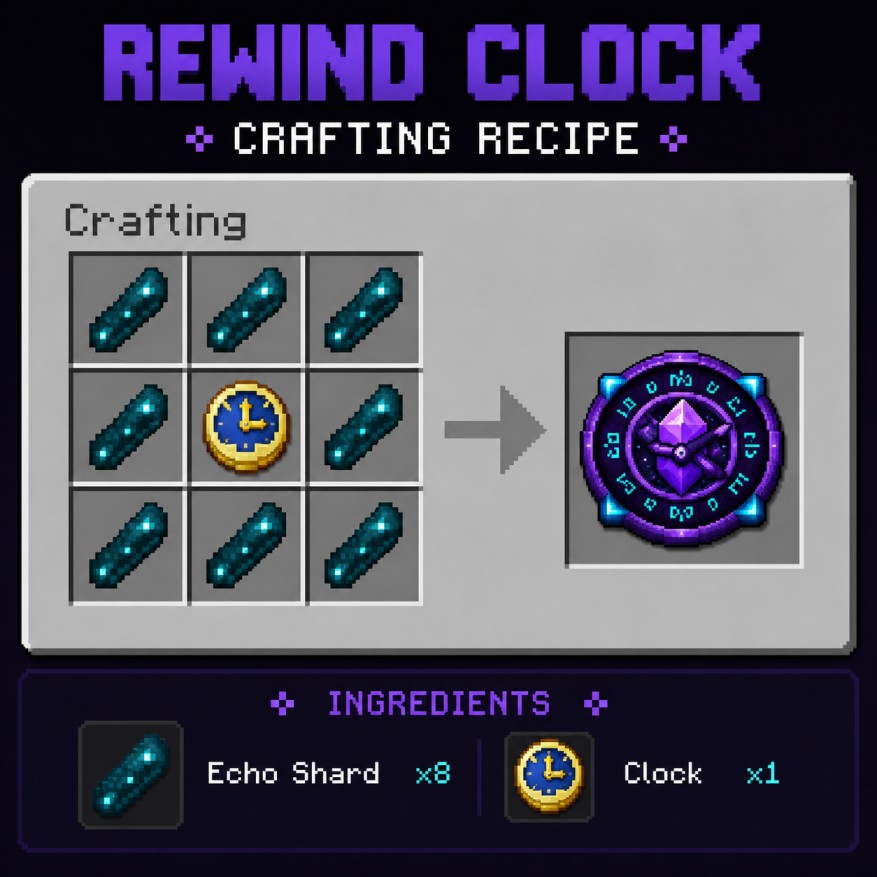
🕹 Rewind Clock
Craft the mysterious Rewind Clock to gain access to temporal manipulation.
Recipe:
• 8 Echo Shards surrounding 1 Clock
⚠️ Important Notes
• Rewind is fully server-side
• Best experienced in singleplayer or dedicated servers with the mod installed
• Large rewind histories may increase memory usage depending on world activity
• Rewind restores entities that no longer exist and removes entities created in the “future”
🛠 Compatibility
• Minecraft 1.21.10, 26.1.2
• Fabric
• Server-side
• No extra dependencies
Installation
-
Download the latest .jar
-
Place it inside your mods folder
-
Launch Minecraft
-
Use /rewind give to obtain the Rewind Controller
Perfect for:
• Cinematic gameplay
• PvP rollback moments
• Boss fight recovery
• Adventure maps
• Time-based mechanics
• Experimental survival gameplay
• Anyone who ever said “wait… can I undo that?”