
Compatibility
Minecraft: Java Edition
Platforms
Supported environments


Tags
Creators
Details
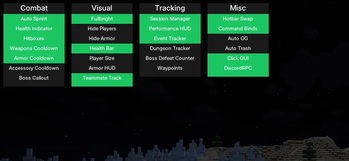
Click GUI
Runal's main menu, opened with Right Shift or Left Alt. Modules are organized into four categories, Combat, Visual, Tracking, and Misc. Left-click a module to toggle it on/off, right-click to expand its settings.
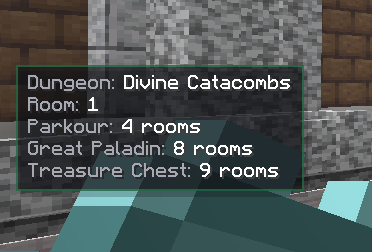
Dungeon Tracker
Live dungeon HUD showing the current dungeon (Divine Catacombs), your room number, and exactly how many rooms remain until the next Parkour room, the boss (dynamically named per dungeon, Great Paladin here), and the Treasure Chest room.
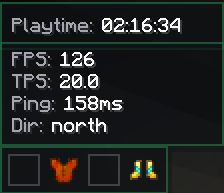
Session, Performance & Armor HUDs
Three independently draggable HUD panels: Session Manager tracking playtime for the current session, Performance HUD showing FPS/TPS/Ping/facing direction, and the Armor HUD displaying currently equipped gear at a glance.
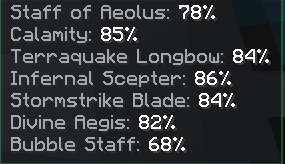
Weapon Cooldown Panel
Unified cooldown tracking for all your weapons on cooldown at once. Can be switched between Percent (shown here) and Seconds remaining via the Cooldown Display setting in the ClickGUI.

Team Tracker - Player Selector
Select online players as teammates to glow-highlight them in world. Automatically stays in sync with your party too, teammates get added and removed on their own as people join, leave, get kicked, or the party disbands.
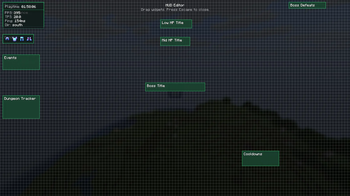
HUD Editor - Drag & Drop Positioning
Every HUD element snaps to a grid and can be dragged to reposition — Session Manager, Performance HUD, Armor HUD, Health Warnings, Boss Title, Boss Defeats, Dungeon Tracker, Events, and the Cooldown panel are all independently placeable.
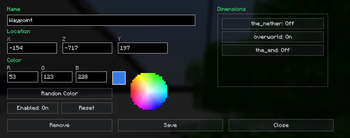
Waypoints
Create custom waypoints with colored beams visible from a distance, and on-screen name + distance labels when you're looking their direction. Manage them per-dimension (Overworld/Nether/End) from the Waypoint Manager, with quick teleport support.