
Compatibility
Minecraft: Java Edition
Platforms
Supported environments


Tags
Creators
Details
Overview
Server Eye is a Mod designed for Forge and NeoForge, giving Server Owners the ability to Blacklist Mods via there modId to prevent (most) Players with these Mods from joining the Server if they have a blacklisted Mod installed.
How does this work?
Once a Player connects to your Server, the Client will send the Player's Mod list to the Server, which will the be compared to the Blacklist set in server_eye-common.toml. If a modId matches, the Player will be kicked from the Server, with them being asked to remove the Mod.
Best use-case
I personally recommend doing this, as it is an ideal outcome.
The best use case by far is if your Server is Modded and has a Modpack! You can just add Server Eye to the Modpack, so Players do not have to install it manually.
Then, simply put Server Eye on the Server's end, configure it to match your needs, Blacklist some Mods via there modId and you should be good to go.
Heads up!
I made this Mod for my Server, and only published it in the hoppes that people may find it useful. Server Eye is not perfect, but I will try to maintain the Project as best as I can.
Configuration
You can find Server Eye's Config under Files > Config > server_eye-common.toml
Blacklisting Mods
blacklistedMods
blacklistedMods is a list of modIds that you do not want your Players to use on your Server.
# This is how you add modIds
blacklistedMods = ["freecam", "xray"]
Where can I find a modId?
On Forge and NeoForge, you have an inbuild Mod Menu, just click on "Mods", and it will show a list of all Mods you currently have installed. You can click on any Mod listed within the Menu.
Right below the Mod'ss Version, you should be able to find something that says "ModID". A Mod's ID is always lowercase, so it should not be hard to find. You can see an example below.
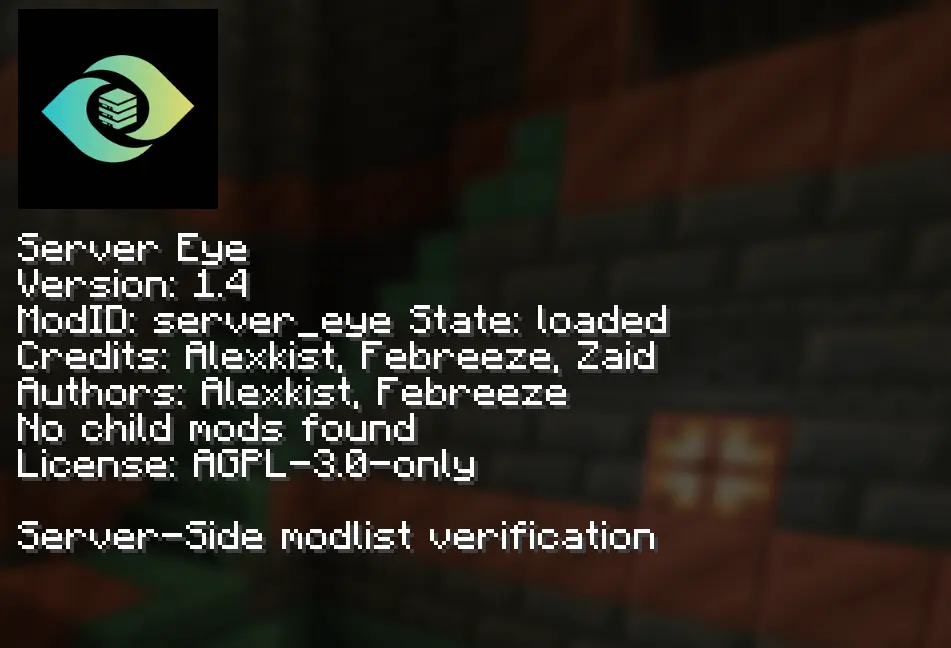
This Screenshot was taken on NeoForge 1.21.1
Whitelisting Players
whitelistedPlayers
whitelistedPlayers is a list of Players which will skip the Mod checks that Server Eye does. This currently only Supports Usernames.
# This is how you add Players
whitelistedPlayers = ["Player1", "Player2"]
timeoutSeconds
timeoutSeconds
timeoutSeconds is the Duration where Server Eye waits for the Client to send its Modlist. If the Modlist is not send in the specified duration, the Player will be kicked for timing out.
This feature can be disabled by setting timeoutSeconds to 0
"logOnly" Mode
logOnly
logOnly will disable Players being kicked from the Server. If a Player joins with a Blacklisted Mod, it will be logged in the Console.
Commands
Server Eye has a few simple Commands, which can be accessed via /server_eye.
Server Eye Versions above 1.5 are also LuckPerms compatible!
viewMods
/server_eye viewMods
The /server_eye viewMods Command allows you to see all the Mods a Player currently has installed, once the Player has sent there Modlist.
reload
/server_eye reload
This Command only exists for the Forge version. If you are running a NeoForge Server, NeoForge will automatically apply changes once saved.
The /server_eye reload Command will reload Server Eye's Config File, so you do not have to restart the Server when changing the Config.
LuckPerms Integration
LuckPerms Integration
LuckPerms Integration is availible for all Server Eye versions above 1.5.
Giving Permissions (Web-Panel)
Giving Permissions for a Player or Role within LuckPerms is quite simple, go to a Player or Role you would like edit Command Permissions for, go to the Bottom of the Page, select Permission and type "server_eye" in the Textfield.
Server Eye's Permission Nodes start with its modId (server_eye), check below for all Permission Node names and to what Commands they give access
Permission Nodes
server_eye.mods- Gives access to theviewModssub-commandserver_eye.reload- Gives access to thereloadsub-command (Forge Only)
DO NOT USE command.server_eye.viewmods OR command.server_eye.reload! These are the Commands itself, and will not update the Permission Nodes. Use server_eye.mods and server_eye.reload
Q&A
Fabric Support?
I have no plans to port this Project to Fabric. ClientID is an allot better alternative then what I created here. So if you want something simular for Fabric, use ClientID!
Is this Server-Side only?
No. there is no known methood to do so for Forge and NeoForge. You can get more detail below.
Can you make this a Plugin?
Yes, I could. I can make the Server-side of Server Eye a Plugin. But, it would still need its Client-side to work correctly. Players would still need to Download the Mod, even if it is a Plugin.
Even if there are methoods to do so without the Mod, they are not as reliable as a Plugin Mod pair, I do not have plans for any kind of Plugin Support.
Is Server Eye reliable?
Yes, it should be in most cases, but ofcourse, nothing is perfect. So, you cannot just add this and expect that if you Blacklist Freecam that your Players cannot use it anymore, there are ways to bypass Mods like Server Eye.
Links

