
Compatibility
Minecraft: Java Edition
Platforms
Supported environments


Tags
Creators
Details
Working moving head spotlights for Minecraft!
StageFX adds real moving head spotlights to Minecraft! Create cinematic shows, concerts, or theater sets. Not just decorative: These are fully controllable moving head spotlights
✨ What's included
Moving Head
A placeable light fixture that projects a colored beam. Mount it on floors, ceilings, or walls. Aim it anywhere. Change its color, brightness, zoom, and more.
Truss
A metal lattice block for building overhead rigs and mounting structures. Looks exactly like real stage trussing.
Lighting Wrench
A tool for quickly reconfiguring fixtures in-game. Right-click: Change the mount direction Shift + Right-click: Change the body rotation Left-click: Open the ingame control UI with a click
🎛️ What You Can Control
Every spotlight has a full set of adjustable properties:
- Pan & Tilt: Aim the beam anywhere in 3D space (360° horizontal, 180° vertical)
- Color: Any RGB color you want, from deep reds to cool blues
- Brightness: Full dimming from off to full intensity
- Beam Length & Width: From a tight narrow spot to a wide flood (1–64 blocks long)
- Core: Toggle the bright inner cone for a more realistic beam look
- Body Rotation: Rotate the fixture housing in 90° increments
- Smooth Movement: Set transition times for manual moves (0–200 ticks)
- Player Tracking: Make selected spotlights follow any player or entity automatically
- Targeting: Point the beams to one specific point
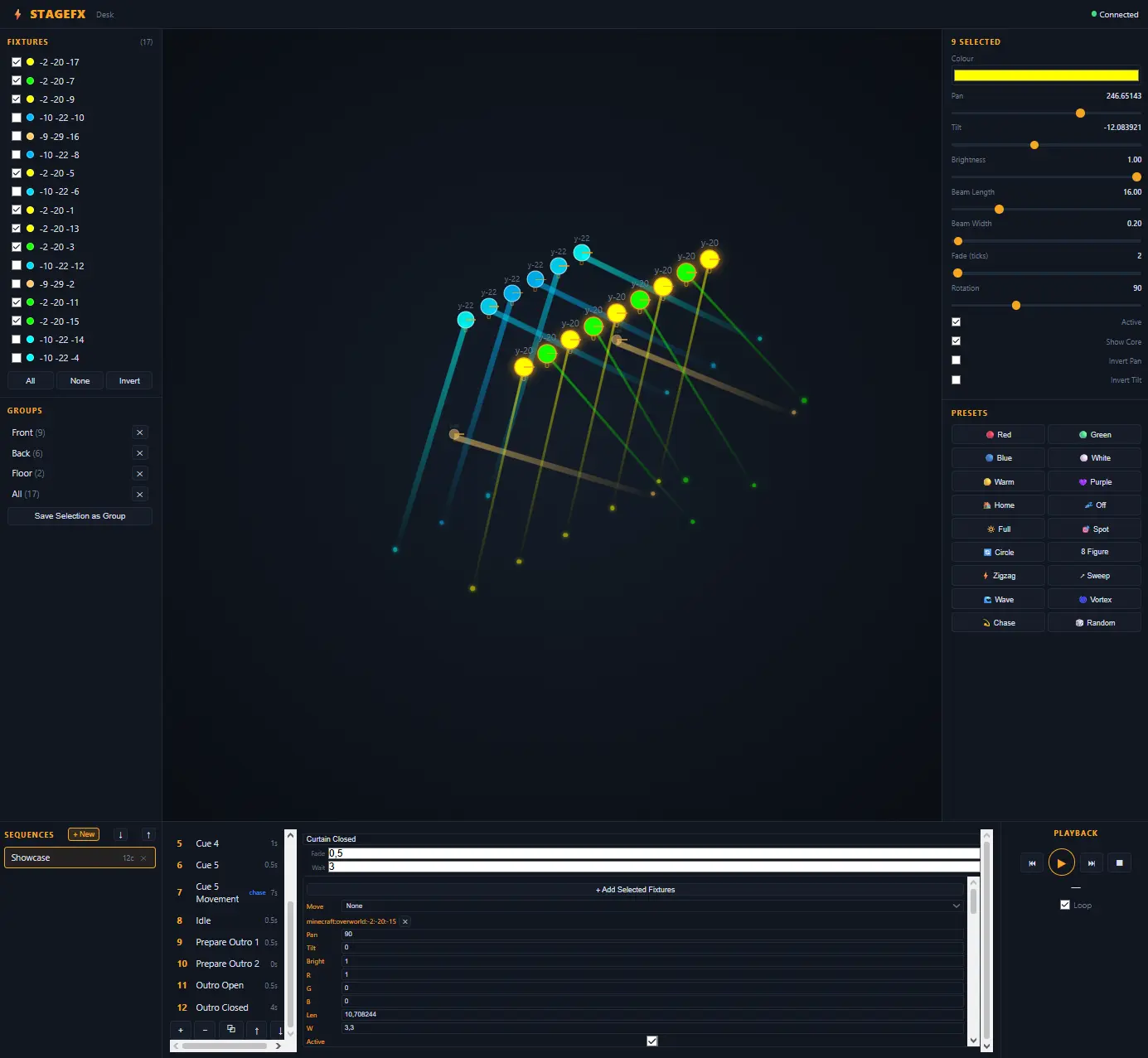
🖥️ Built-In Web Dashboard
Server: Open your browser and go to http://{YOUR_SERVER_IP}:8173 (you probably need to forward the port 8173). Enter the auth token from config/stagefx/dashboard-token.txt
Singleplayer: Open your browser and go to http://127.0.0.1:8173. Enter the auth token from config/stagefx/dashboard-token.txt in your Minecraft Instance (On Windows: C:\Users\{username}\AppData\Roaming\ModrinthApp\profiles\{profile} for Modrinth or C:\Users\{username}\AppData\Roaming\.minecraft for default Minecraft Launcher)
- Real-Time Updates: Changes sync instantly in-game and in the browser
- Live Isometric Stage Map: See all your fixtures and their beams in a real-time 3D overview
- Multi-Fixture Control: Select multiple fixtures and adjust them all at once
- 18 Presets: Quick-apply colors and movement patterns (Red, Blue, Circle, Chase, Wave, Vortex, and more)
- Sequence & Cue Editor: Build lighting shows with timed cues, fades, and movement animations
- Groups: Save and recall fixture selections by name (synced between all players and dashboards)
🎮 How to Use
- Get the items from the "StageFX Spotlights" creative tab (spotlight, truss, wrench)
- Place spotlights on your build, they auto-attach to the face you click
- Aim with commands (
/mh rotate 45 -30) or right-click to toggle the beam on/off - Use the wrench to change the mount direction or open the in-game control panel
- Open the lighting desk in your browser for the full experience
- Build a show with sequences, cues, and presets
⌨️ Commands
Control everything from the chat with the /movinghead command (or /mh for short):
/mh selectSelect the fixture you look at (or use optionsall,nearby <radius>or<x> <y> <z>/mh createPlace a spotlight where you're looking/mh rotate <pan> <tilt>Aim the beam/mh color <r> <g> <b>Set the color (0–255 per channel)/mh brightness <0.0-1.0>Set the intensity/mh beam <length> <width>Shape the beam/mh target <x> <y> <z>Auto-aim at any point/mh track <player>Follow a player around/mh untrackStop all tracking/mh group create <name>Save a group of fixtures- And many more...
🔧 How It Works
StageFX uses a custom rendering pipeline to draw the spotlight's arm, head, and light beam as real 3D geometry, not just a colored particle or a glow effect. The beam is a cone of light that actually places light blocks in the world, so it genuinely illuminates the area around it.
Movement is smooth: when you set a new pan or tilt angle, the fixture transitions smoothly from its current position to the target. Player tracking updates every tick, so the beam follows its target in real-time.
The lighting desk is a self-contained web app that runs directly inside the Minecraft server; no installation, no external dependencies. Just open your browser and start designing.
🔧 Requirements
- Minecraft 1.21.11
- Fabric Loader 0.19+
- Fabric API 0.141.5+1.21.11
- (Optional) Iris + shaders for best visuals
🚧 Planned Features
- DMX control system
- Integration with redstone or external systems
- More Presets
🎬 Perfect For
- Builders creating stages, theaters or TV studios
- Content creators making cinematics
- Servers hosting events or shows
- All Lighting Enthusiasts who like Minecraft
- Anyone who wants interactive lighting in Minecraft